
Ana içeriğe geç

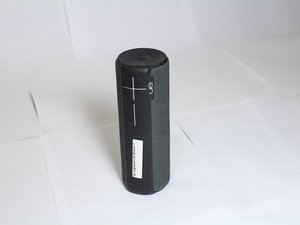
The Logitech UE Boom 2 is a waterproof, portable Bluetooth speaker known for its 360 degree sound. The Boom 2 comes in a multitude of vibrant colors and patterns.

Factory Reset won't work...

This is quoted from another post:

Factory rest [for UE Boom 2]

Note that doing this many times in a row may harm your speaker, so refrain from doing this more than once or twice.

What does this mean exactly? I have tried resetting my UE Boom 2 and now the Bluetooth Sync light won't stop flashing when I try to turn it on. And it won't display on any devices either. Is this speaker toast? Thanks.

Bu soruyu yanıtla Ben de bu sorunu yaşıyorum

Bu iyi bir soru mu?

Puan 5

1 Yorum:

I have exactly the same problem: I believe it is an incompatibility with the latest iOS update. My devices running the latest iOS software won’t connect. However my old iPad running an older version connects fine. I guess we’ll have to wait until Logitech provides us with an update :(

tarafından

Yorum Ekle

3 Cevap

Filtre ölçütü:

Im not really familiar with this device but I would recommend going to the manufacturers website or calling them, here is a link to their faqs.. and phone number.

https://support.ultimateears.com/en/boom...

Bu yanıt yardımcı oldu mu?

Puan 0

1 Yorum:

Have u found a solution, I'm having the same problem with mine and I really can't find out how to fix it

tarafından

Yorum Ekle

I think it is the latest iOS. Old iPad connect. iPhone 7 running 11.3.1 doesn’t connect. Arghhhg

Bu yanıt yardımcı oldu mu?

Puan 0
Yorum Ekle

Step-by-step instructions

  1. Turn on the speaker: If the speaker is off, press the power button to turn it on.
  2. Press and hold the buttons: Press and hold both the power button (the circle button on top) and the "volume down" button at the same time.
  3. Wait for the sound: Continue holding the buttons for at least 5 seconds until you hear a second sound indicating the reset is complete.
  4. Release the buttons: The speaker will turn off automatically.
  5. Restart and pair: Turn the speaker back on. It will now be in pairing mode, ready to connect to a device as if it were new.

You can also watch this video to learn how

Bu yanıt yardımcı oldu mu?

Puan 0
Yorum Ekle

Yanıtını ekle

emerich kaspar sonsuza kadar minnettar olacak.
İstatistikleri Görüntüle:

Son 24 Saat: 1

Son 7 gün: 6

Son 30 gün: 22

Her zaman: 24,748

