Ana içeriğe geç
Onarım Topluluğuna Katılın - Hesap Oluşturun

Valve tarafından 25 Şubat 2022'de piyasaya sürülen, LCD ekranlı, el tipi oyun konsolu Steam Deck için onarım, söküm ve sorun giderme bilgileri. 1010 model numarasıyla tanımlanır.

My Up Dpad isn't working

My steam deck up directional button is not given any input or not working at all. My other buttons on my steam deck does including the left, down, and right d pad inputs. I took it apart to see what was wrong with it I can't seem to brainstorm what's going on as everything looks normal inside. So what I need a new membrane Dpad or the entire left bumper board with the d-pad cable?

Bu soruyu yanıtla Ben de bu sorunu yaşıyorum

Bu iyi bir soru mu?

Puan 2
Yorum Ekle

3 Cevap

Filtre ölçütü:
En Yararlı Yanıt

I had the similar issue so here is the solution log

Issue:

Steam Deck D-Pad "Up" button stopped working. Instead, the Steam and Quick Access ("...") buttons acted as if the "Up" direction was being constantly pressed. Problem persisted even in BIOS, so not OS-related.

Symptoms:

  • "Up" on D-Pad unresponsive
  • Steam and Quick Access buttons behaving like D-Pad Up
  • Input was stuck in a loop, spamming "Up"
  • Occurred even before boot (in BIOS), so not software-related

Fix (worked for me):

  1. Powered off the Deck completely
  2. Opened the back cover
  3. Located the D-Pad ribbon cable (marked “D-PAD” on the daughterboard)
  4. Disconnected the D-Pad ribbon cable from the connector
  5. Booted the Deck with the cable disconnected to confirm buttons behaved normally again
  6. Powered off, reconnected the D-Pad ribbon properly
  7. Booted back up — everything worked normally again

Theory:

It might not have been a physical connection issue. The BIOS input controller may have glitched and started misinterpreting D-Pad input — causing "phantom presses" and remapping behavior. Disconnecting/reconnecting the ribbon cable likely forced a soft reset of the controller's state. So the root cause may be firmware-related, not hardware failure.

Conclusion:

Bad input state or firmware glitch caused phantom input. Simply reseating the D-Pad cable forced the controller to reset. No need for cleaning — just unplug–replug.

Hope this helps someone avoid replacing half their Deck.

Bu yanıt yardımcı oldu mu?

Puan 3

4 Yorum:

Thanks a lot! Worked for me

tarafından

Yup, re-attaching the D-Pad cable did the trick. No need to turn the SD inbetween the processes, it registered that action naturally.

tarafından

Thank you so much! That solved my problem perfectly.

tarafından

Had a similar issue, but it was down and left that weren’t working. It would also randomly turn on the screen reader. Regardless of the differences, this fixed it. Thank you so much!

tarafından

Yorum Ekle

Yes I'm having the exact same problem my up Dpad dosent work at all but the rest does have you found a solution to this situation I even bought a new Dpad cable still dosent work only the left right and down works.

Bu yanıt yardımcı oldu mu?

Puan 1
Yorum Ekle

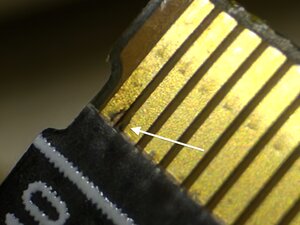
I had this on my D-pad cable:

Resim

I couldn't find this with the naked eye, after inspecting everything I tried using a magnifying glass, and voila - I found it.

What worked for me was cleaning the space between contacts with a needle.

Bu yanıt yardımcı oldu mu?

Puan 0
Yorum Ekle

Yanıtını ekle

Damien Boozer sonsuza kadar minnettar olacak.
İstatistikleri Görüntüle:

Son 24 Saat: 3

Son 7 gün: 29

Son 30 gün: 165

Her zaman: 3,234