Ana içeriğe geç

Software support for the Windows operating system.

screen fails to display windows icon correctly

5CD6119GB0

THE WINDOWS ICON IN THE EXPLORER FAILS TO DISPLAY CORRECTLY WHEN SELECTING TO A BIGGER VIEW THE ICONS DO NOT DISPLAY CORRECTLY AND NEED TO KNOW WHY AS I AM UNABLE TO FIND OUT OFF A RELATIVE AS THEIR WORK LOAD IS STUPID AND UNABLE TO ASSIST AND YES I DID SHARE THE IMAGE BUT THEY ARE NOT ABLE TO ASSIST ME SO AM TURNING TO THE SITE FOR ANSWERS
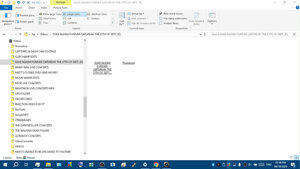
Block Image
Bu soruyu yanıtla Ben de bu sorunu yaşıyorum

Bu iyi bir soru mu?

Puan 0
Yorum Ekle

1 Cevap

Filtre ölçütü:
En Yararlı Yanıt

Hi @matt99712

Scroll down and see the last two answers in this link and see if it resolves the problem

Bu yanıt yardımcı oldu mu?

Puan 1

28 Yorum:

how does this assist me as they are discussing other issues not relating to mine so this is false info

tarafından

@matt99712

You're asking about thumbnail images not appearing above the file name in the right side page in Explorer is this correct?

If it is then the answer says one way to try and fix it so they do appear.

tarafından

@jayeff yes but others have topics not relating to my issue

tarafından

@jayeff what am saying is that when the thumbnails are made of a bigger size they do not display the contents they do not disappear totally so they cannot be accessed

the contents cannot be seen within the thumbnails

tarafından

@matt99712

Try clearing the thumbnail cache and check.

Here's a video that shows what to do.

tarafından

23 tane daha yorum göster

Yorum Ekle

Yanıtını ekle

Matt sonsuza kadar minnettar olacak.
İstatistikleri Görüntüle:

Son 24 Saat: 0

Son 7 gün: 41

Son 30 gün: 102

Her zaman: 102
