Popüler Forum Soruları
Bir soru sorHiç soru yok. İlk soru soran siz olun!
Arka plan
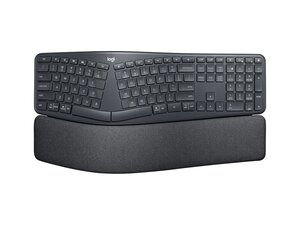
ERGO K860 for Business, kavisli tuş takımı ve yastıklı bilek desteğiyle gerginliği azaltmak için tasarlanmış, tam boyutlu, ayrık ergonomik bir klavyedir. Güçlendirilmiş plastik kasa, ABS tuş başlıkları ve dayanıklı kumaş ile köpükten üretilmiş yastıklı bilek desteğiyle dayanıklılığı öne çıkarır. Temel özellikler arasında daha iyi duruş için eğimli, ayrık düzen, çoklu cihaz kablosuz bağlantısı ve kurumsal düzeyde kablosuz güvenlik (Logi Bolt) bulunur. Tasarım, yoğun ofis kullanımı ve uzun vadeli güvenilirlik için amaçlanmıştır.
Kimlik
Logitech ERGO K860 for Business, model numarasından (M/N CU0021) tanımlanabilir. Model etiketi klavyenin alt tarafındadır. Bu etiket; model (M/N), parça (P/N) ve seri (S/N) numaralarını listeler.
Teknik Özellikler
- Form Faktörü: Entegre yastıklı bilek desteğine sahip tam boyutlu ayrık ergonomik klavye
- Düzen: Standart tam boyut (nümerik tuş takımı) — 104 tuşlu QWERTY düzeni
- Anahtar Tipi: Logitech makaslı/membran "Perfect Stroke" tuşları (üretici halka açık belirtilmemiştir)
- Bağlanırlık: Bluetooth Düşük Enerji ve Logi Bolt USB alıcı (kurumsal kablosuz)
- Alıcı Model(ler)i: Destek sayfasında listelenmemiştir; kurumsal kitler genellikle Logi Bolt alıcılar kullanır (model numaraları değişebilir)
- Güç: 2 × AAA pil (kullanıcı tarafından değiştirilebilir)
- Pil Kullanım Süresi: 24 aya kadar (tipik kullanım — gerçek süre kullanıma ve kablosuz moda göre değişir)
- Malzemeler: Güçlendirilmiş ABS tuş başlıkları, yüksek dayanımlı plastik kasa, dayanıklılık için tasarlanmış yastıklı kumaş/köpük bilek desteği
- Yedek Parça Mevcudiyeti: Resmî destek sayfasında bu ürün için listelenen yedek parça bulunmamaktadır
- Sertifikalar: Alt etikette listelenen mevzuat işaretleri ve sertifikalar (FCC/CE); Logi Bolt güvenliği ile kurumsal uyumluluk
Sorun Giderme
Onarımla ilgili yaygın arızalar; yanıt vermeyen veya yapışan tuşlar (genellikle kir veya makas mekanizması aşınması nedeniyle), bağlanırlık/eşleşme hataları ve bilek desteğinin dokunsal bozulmasıdır. Tuşları, kir veya kırık makas klipsleri kontrol etmek için tuş başlıklarını çıkararak ve baskı devre üzerinde matris sürekliliğini test ederek teşhis edin; bağlanırlık için pilleri değiştirin ve yeniden eşleştirin veya Logi Bolt alıcı ile test edin; tuşlar veya bilek desteği sensörleri yanıt vermiyorsa alt taraftaki ribbon kabloları ve bağlantıları kontrol edin.
Ek sorun giderme yardımı için: Ürün desteği, sorun giderme kılavuzları ve iletişim seçenekleri için https://support.logi.com adresini ziyaret edin.
Ek Bilgi
Garanti Bilgisi
Garanti bölgeye göre değişiklik gösterir; hükümler ve talep prosedürleri için resmî destek sitesinde bağlantısı verilen Logitech garanti sayfasını inceleyin.

