8BitDo USB Adapter for Switch User Guide
8BitDo
USB Adapter for Switch

System Settings
Themes
Notifications
Sleep Mode
Controllers and Sensors
TV Settings
System
Update Controllers
Change Grip/Order
Controller Vibration
Pro Controller Wired Communication
If this option is enabled, the Nintendo Switch Pro Controller will communicate with the console via wired communication when connected to it using the USB charging cable. The NFC touchpoint on the Pro Controller will be disabled while the controller is using wired communication.
Back OK
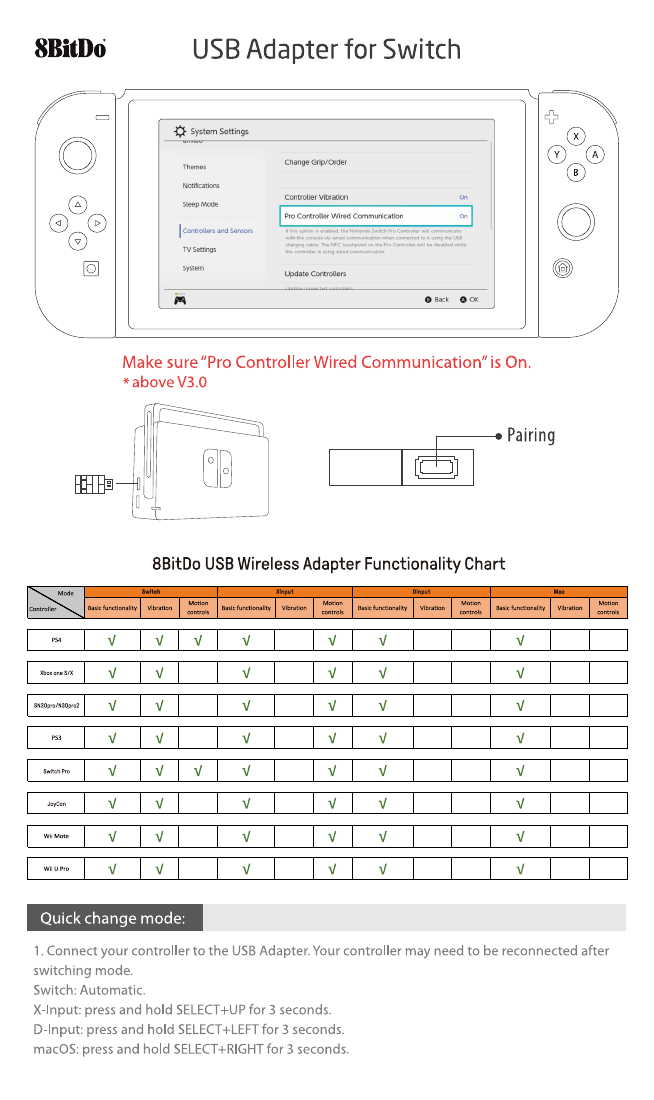
Make sure "Pro Controller Wired Communication" is On.
- above V3.0

O

☐ Pairing
8BitDo USB Wireless Adapter Functionality Chart
| Controller\Mode | Switch | Xinput | Dinput | Mac | ||||||||
| Basic functionality | Vibration | Motion controls | Basic functionality | Vibration | Motion controls | Basic functionality | Vibration | Motion controls | Basic functionality | Vibration | Motion controls | |
| PS4 | ✓ | ✓ | ✓ | ✓ | ✓ | ✓ | ✓ | |||||
| Xbox one S/X | ✓ | ✓ | ✓ | ✓ | ✓ | ✓ | ||||||
| SN30pro/N30pro2 | ✓ | ✓ | ✓ | ✓ | ✓ | ✓ | ||||||
| PS3 | ✓ | ✓ | ✓ | ✓ | ✓ | ✓ | ||||||
| Switch Pro | ✓ | ✓ | ✓ | ✓ | ✓ | ✓ | ✓ | |||||
| JoyCon | ✓ | ✓ | ✓ | ✓ | ✓ | ✓ | ||||||
| Wii Mote | ✓ | ✓ | ✓ | ✓ | ✓ | ✓ | ||||||
| Wii U Pro | ✓ | ✓ | ✓ | ✓ | ✓ | ✓ | ||||||
Quick change mode:
- Connect your controller to the USB Adapter. Your controller may need to be reconnected after switching mode.
Switch: Automatic.
X-Input: press and hold SELECT+UP for 3 seconds.
D-Input: press and hold SELECT+LEFT for 3 seconds.
macOS: press and hold SELECT+RIGHT for 3 seconds.
For PS4 controller
-
Insert USB Adapter into console and then press the pairing button (the LED will rapidly blink)
-
Press and hold the PS and Share buttons until the lightbar begins to strobe quickly in double.
-
Wait until your USB Adapter's LED is solid blue and the controller's lightbar stay on.
-
For next connection only need to press PS button and wait until receiver's LED is solid blue.
$ ^{*} $ Key command for switching between two levels: L+R+SELECT

SELECT Screenshot START Y DPAD X HOME
For Xbox One S/X Bluetooth controller
-
Insert USB Adapter into console and then press the pairing button (the LED will rapidly blink).
-
Press HOME button to turn on your Xbox One S/X Bluetooth controller and then press the button.
-
Wait until both LEDs on the USB Adapter and controller stay solid.
-
USB adapter will auto-reconnect to the controller when you turn back on the controller with the HOME button only.
$ ^{*} $ Vibration is supported on Switch and X-input mode.

HOME SELECT START Y DPAD
For Wii U Pro controller
-
Insert USB Adapter into console and then press the pairing button (the LED will rapidly blink).
-
Press your Wii U Pro controller's sync button.
-
Wait until your USB Adapter's LED is solid blue and the controller's #1 LED stay on.
-
For next connection only need to press A button.

HOME SELECT START WiiU DPAD BA
For PS3 controller
-
Download and Run 8Bitdo USB Adapter Tools on your PC available for Mac and PC.
-
On your USB Adapter, hold down the pairing button and connect it to your MAC/PC via USB.
-
Connect your PS3 controller to MAC/PC via USB.
-
Once your USB Adapter and PS3 controller are both connected via USB, click the "Pair" button in the software.
-
Once pairing is complete, you can
