Ana içeriğe geç
Onarım Topluluğuna Katılın - Hesap Oluşturun

ASUS UX50V-RX05 Keyboard Replacement

Neye ihtiyacın var

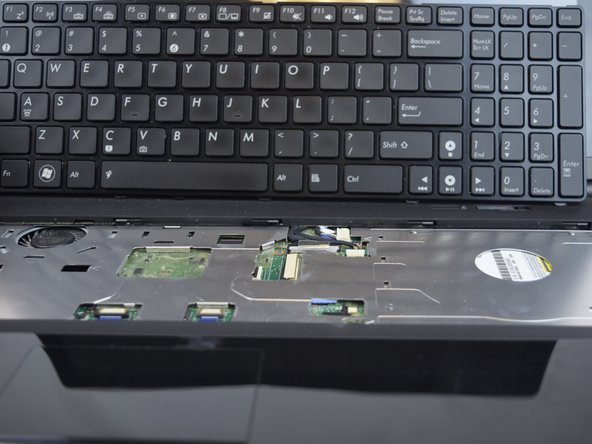
    1. ASUS UX50V-RX05 Keyboard Replacement, Keyboard: adım 1, 3 resimden 1. ASUS UX50V-RX05 Keyboard Replacement, Keyboard: adım 1, 3 resimden 2. ASUS UX50V-RX05 Keyboard Replacement, Keyboard: adım 1, 3 resimden 3.
      • Make sure the device is powered off and the battery is removed before beginning.

      • Use the Plastic Opening tool to pry the five slots up at the top of the keyboard.

      FixBot'a Sor

      Yorum Ekle

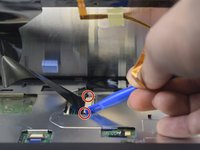
    2. ASUS UX50V-RX05 Keyboard Replacement: adım 2, 2 resimden 1. ASUS UX50V-RX05 Keyboard Replacement: adım 2, 2 resimden 2.
      • Lift the keyboard enough to expose the two ribbon connectors (LCD flex cable and flex band).

      • Use the Plastic Opening tool to push open the two black clips on each side of the connecting cords.

      • Remove the cable after pushing out the two black clips.

      FixBot'a Sor

      Yorum Ekle

    3. ASUS UX50V-RX05 Keyboard Replacement: adım 3, 2 resimden 1. ASUS UX50V-RX05 Keyboard Replacement: adım 3, 2 resimden 2.
      • Push out each end of the black clip with a plastic opening tool or nylon spudger to remove the ribbon cable.

      • Remove the cable after pushing out both black clips.

      • Remove the keyboard.

      FixBot'a Sor

      Yorum Ekle

Sonuç

To reassemble your device, follow these instructions in reverse order.

İptal et: Bu kılavuzu tamamlamadım.

James

Üyelik tarihi: 02/14/17

663 İtibar

6 adet Kılavuz yazıldı

Ekip

USF Tampa, Team 20-2, Remmell Spring 2017 USF Tampa, Team 20-2, Remmell Spring 2017 üyesi

USFT-REMMELL-S17S20G2

4 Üyeler

36 adet Kılavuz yazıldı

0Kılavuz Yorumları

Yorum Ekle

İstatistikleri Görüntüle:

Son 24 Saat: 1

Son 7 gün: 7

Son 30 gün: 34

Her zaman: 690