Ana içeriğe geç
Onarım Topluluğuna Katılın - Hesap Oluşturun

ASUS X44H-BBR4 Battery Replacement

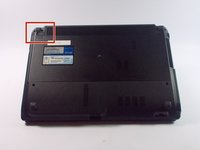
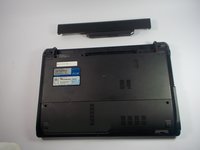
  1. ASUS X44H-BBR4 Battery Replacement, Battery: adım 1, 2 resimden 1. ASUS X44H-BBR4 Battery Replacement, Battery: adım 1, 2 resimden 2.
    • Flip the device over.

    FixBot'a Sor
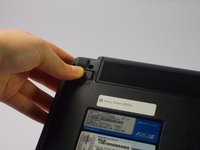
  2. ASUS X44H-BBR4 Battery Replacement: adım 2, 3 resimden 1. ASUS X44H-BBR4 Battery Replacement: adım 2, 3 resimden 2. ASUS X44H-BBR4 Battery Replacement: adım 2, 3 resimden 3.
    • Slide the right lock button to the unlock position.

    • After it is unlocked, a red line will be visible.

    FixBot'a Sor
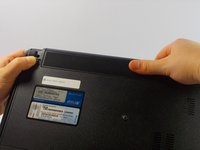
  3. ASUS X44H-BBR4 Battery Replacement: adım 3, 2 resimden 1. ASUS X44H-BBR4 Battery Replacement: adım 3, 2 resimden 2.
    • Slide the left lock button into the unlock position and hold.

    FixBot'a Sor
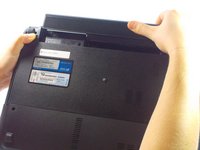
  4. ASUS X44H-BBR4 Battery Replacement: adım 4, 3 resimden 1. ASUS X44H-BBR4 Battery Replacement: adım 4, 3 resimden 2. ASUS X44H-BBR4 Battery Replacement: adım 4, 3 resimden 3.
    • While holding the left lock button in the unlock position, push the battery from the center away from you.

    FixBot'a Sor
Sonuç

To reassemble your device, follow these instructions in reverse order.

2 farklı kişi bu kılavuzu tamamladı.

Kelly Merlo

Üyelik tarihi: 10/14/15

500 İtibar

2 adet Kılavuz yazıldı

Ekip

UMass Dartmouth, Team 4-3, Catania Fall 2015 UMass Dartmouth, Team 4-3, Catania Fall 2015 üyesi

UMASSD-CATANIA-F15S4G3

4 Üyeler

8 adet Kılavuz yazıldı

0Kılavuz Yorumları

Yorum Ekle

İstatistikleri Görüntüle:

Son 24 Saat: 0

Son 7 gün: 3

Son 30 gün: 47

Her zaman: 1,201