Ana içeriğe geç

Acer Extensa 4420 Back Panel Replacement

Neye ihtiyacın var

  1. Acer Extensa 4420 Back Panel Replacement, Battery: adım 1, 2 resimden 1. Acer Extensa 4420 Back Panel Replacement, Battery: adım 1, 2 resimden 2.
    • First, make sure that the battery lock is turned off.

    • The battery lock makes it so the battery doesn't accidentally fall out of your computer while it is running.

  2. Acer Extensa 4420 Back Panel Replacement: adım 2, 3 resimden 1. Acer Extensa 4420 Back Panel Replacement: adım 2, 3 resimden 2. Acer Extensa 4420 Back Panel Replacement: adım 2, 3 resimden 3.
    • Then, slide the other battery lock while pulling the battery out.

  3. Acer Extensa 4420 Back Panel Replacement, Back Panel: adım 3, 1 resimden 1.
    Bu adımda kullanılan alet:
    Phillips #00 Screwdriver
    $5.49
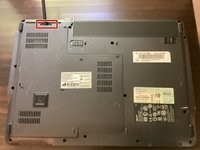
    • Unscrew all five screws on the back panel with a Phillips #00 screwdriver

    • The screws will stay in the back panel, so when you remove it, you don't have to worry about organizing the screws.

  4. Acer Extensa 4420 Back Panel Replacement: adım 4, 3 resimden 1. Acer Extensa 4420 Back Panel Replacement: adım 4, 3 resimden 2. Acer Extensa 4420 Back Panel Replacement: adım 4, 3 resimden 3.
    Bu adımda kullanılan alet:
    Spudger
    $3.99
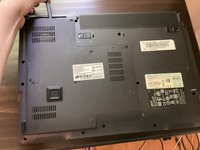
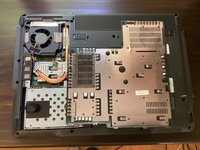
    • Take a spudger and start to pry open the back panel. Finish prying it open with your hands.

    • Be extra careful and try not to break any clips in this process.

Sonuç

To reassemble your device, follow these instructions in reverse order.

TheMasterG

Üyelik tarihi: 07/19/24

1.369 İtibar

12 adet Kılavuz yazıldı

0Kılavuz Yorumları

Yorum Ekle

İstatistikleri Görüntüle:

Son 24 Saat: 0

Son 7 gün: 2

Son 30 gün: 11

Her zaman: 119