Bu çeviri bir makine tarafından oluşturulmuştur ve henüz bir kişi tarafından incelenmemiştir. Bu dili konuşuyor musunuz? İnceleme için.

Acer Extensa 4420 Sabit Disk Değişimi

TheMasterG ve başka bir katkıda bulunan
En son 12 Ağu 2026 tarihinde güncellendi
Görüntüleme: 328
İstatistikleri görüntüle:
- Son 24 Saat:
- 2
- Son 7 Gün:
- 9
- Son 30 Gün:
- 61
- Her zaman:
- 328
Yorumlar: 0
Hiç kimse bu kılavuza yorum bırakmadı. Birinci olacak mısın?
Go to guide commentsTamamlandı: 0 1
Hiç kimse bu kılavuzu "tamamlandı" olarak işaretlemedi. İlk mi olacaksın?
1 kişi bu kılavuzu "tamamlandı" olarak işaretledi. Bu sensin - harika iş!
Sık Kullanılanlar: 0 1
Hiç kimse bu kılavuzu favorilere eklemedi (ve abone olmadı). İlk mi olacaksın?
1 kişi bu kılavuzu favorilerine ekledi (ve abone oldu) — ve bu sizsiniz!
Topluluk-Katkılı Kılavuz
Topluluğumuzdan muhteşem birisi bu kılavuzu hazırladı. Bu kılavuz iFixit elemanları tarafından oluşturulmamıştır.
Yanlış Araçlar
Resimlerde ve/veya metinde doğru araçları kullanarak bu kılavuzun daha iyi hale gelmesine yardımcı olun.
Neye ihtiyacın var
Aletler
-
Spudger4.9


-
-
-
Bu adımda kullanılan alet:Phillips #00 Screwdriver$5.49
-
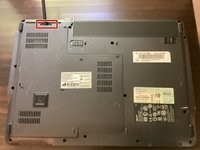
Arka paneldeki beş vidayı da bir Phillips #00 yıldız tornavida yardımıyla sökün.
-
-
Bu adımda kullanılan alet:Spudger$3.99
-
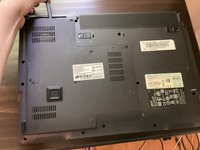
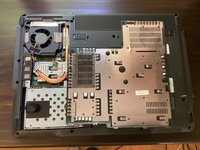
Bir plastik kanırtma aparatı alın ve arka paneli açmak için ayırmaya başlayın. Açma işlemini elinizle tamamlayın.
-
-
-
-


 FixBot'a Sor




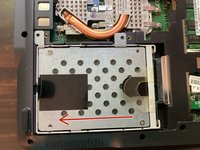
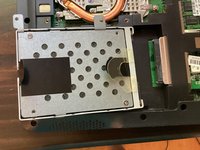
Cihazınızı yeniden toplamak için bu talimatları ters sırayla uygulayın.