Ana içeriğe geç
Onarım Topluluğuna Katılın - Hesap Oluşturun

Alienware 17 R3 RAM Replacement

Neye ihtiyacın var

    1. Alienware 17 R3 RAM Replacement, RAM: adım 1, 1 resimden 1.
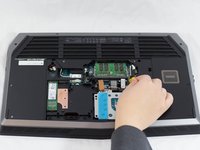
      • Unscrew and remove the two 4mm Phillips #1 screws from the cover.

      FixBot'a Sor

      Yorum Ekle

    2. Alienware 17 R3 RAM Replacement: adım 2, 1 resimden 1.
      • Pull up to slide the cover off.

      FixBot'a Sor

      Yorum Ekle

    3. Alienware 17 R3 RAM Replacement: adım 3, 2 resimden 1. Alienware 17 R3 RAM Replacement: adım 3, 2 resimden 2.
      • Unplug the black wire with the yellow tag to disconnect the battery from the RAM stick.

      FixBot'a Sor

      Yorum Ekle

    4. Alienware 17 R3 RAM Replacement: adım 4, 1 resimden 1.
      • Release the tabs on each side of the chip by simultaneously pushing each tab away from the RAM.

      • After the RAM chip has popped up, pull it straight out of its socket.

      • Repeat this process if a second RAM chip is installed.

      FixBot'a Sor

      Yorum Ekle

Sonuç

To reassemble your device, follow these instructions in reverse order.

İptal et: Bu kılavuzu tamamlamadım.

6 farklı kişi bu kılavuzu tamamladı.

Jonathon Tschurwald

Üyelik tarihi: 02/01/17

878 İtibar

4 adet Kılavuz yazıldı

Ekip

UW Tacoma, Team 1-1, Rose Winter 2017 UW Tacoma, Team 1-1, Rose Winter 2017 üyesi

UWT-ROSE-W17S1G1

3 Üyeler

35 adet Kılavuz yazıldı

0Kılavuz Yorumları

Yorum Ekle

İstatistikleri Görüntüle:

Son 24 Saat: 1

Son 7 gün: 20

Son 30 gün: 57

Her zaman: 3,497