Ana içeriğe geç
Onarım Topluluğuna Katılın - Hesap Oluşturun

Alienware AW610M Motherboard Replacement

Neye ihtiyacın var

    1. Alienware AW610M Motherboard Replacement, Battery: adım 1, 3 resimden 1. Alienware AW610M Motherboard Replacement, Battery: adım 1, 3 resimden 2. Alienware AW610M Motherboard Replacement, Battery: adım 1, 3 resimden 3.
      • Power off the mouse and disconnect any wired connections.

      FixBot'a Sor

      Yorum Ekle

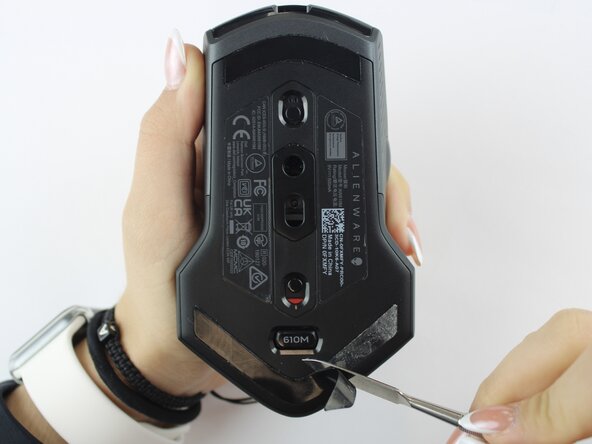
    2. Alienware AW610M Motherboard Replacement: adım 2, 2 resimden 1. Alienware AW610M Motherboard Replacement: adım 2, 2 resimden 2.
      • Use a spudger to gently lift and remove the old mouse feet.

      • If the feet are sticky, try lifting slowly from one corner to avoid tearing them.

      • Be careful not to scratch the mouse surface or damage the plastic housing.

      FixBot'a Sor

      Yorum Ekle

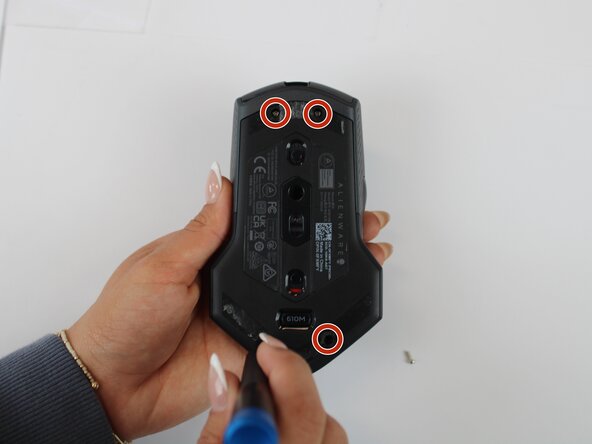
    3. Alienware AW610M Motherboard Replacement: adım 3, 2 resimden 1. Alienware AW610M Motherboard Replacement: adım 3, 2 resimden 2.
      • Remove the four 6.5 mm screws using a Y1 Tri-Point screwdriver.

      FixBot'a Sor

      Yorum Ekle

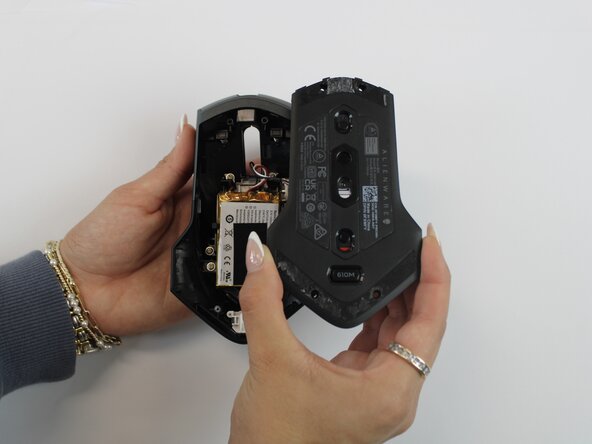
    4. Alienware AW610M Motherboard Replacement: adım 4, 2 resimden 1. Alienware AW610M Motherboard Replacement: adım 4, 2 resimden 2.
      • Using an opening tool, gently pry apart the two halves of the mouse case. Start at the seam and work your way around until the housing is separated.

      • Don't pull the halves completely apart, as internal wires still connect them.

      FixBot'a Sor

      Yorum Ekle

    5. Alienware AW610M Motherboard Replacement: adım 5, 3 resimden 1. Alienware AW610M Motherboard Replacement: adım 5, 3 resimden 2. Alienware AW610M Motherboard Replacement: adım 5, 3 resimden 3.
      • Remove the battery pack inside the mouse.

      • If you are having trouble, use a small flat tool to help ease it out.

      • The battery is lightly glued to the mouse, so ease it out gently to avoid breaking the battery or wiring

      FixBot'a Sor

      Yorum Ekle

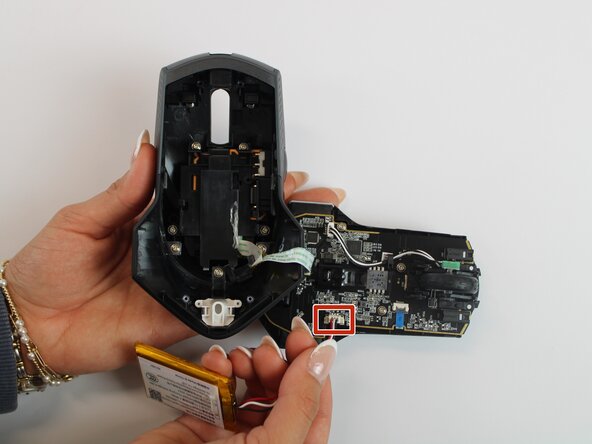
    6. Alienware AW610M Motherboard Replacement: adım 6, 2 resimden 1. Alienware AW610M Motherboard Replacement: adım 6, 2 resimden 2.
      • Remove the old battery from its spot. Lift the wire connector away from the mainboard to disconnect it.

      • Make sure all wires are inside the mouse before sealing it shut for easy reassembly.

      FixBot'a Sor

      Yorum Ekle

    1. Alienware AW610M Motherboard Replacement, Motherboard: adım 7, 2 resimden 1. Alienware AW610M Motherboard Replacement, Motherboard: adım 7, 2 resimden 2.
      • Remove the single 5.4 mm screw using a Phillips #1 screwdriver.

      • Detach the cable connector, and remove the scroll wheel.

      • Gently detach the last connector using your fingers.

      • Be careful when unplugging all connectors to prevent tearing them.

      FixBot'a Sor

      Yorum Ekle

    2. Alienware AW610M Motherboard Replacement: adım 8, 2 resimden 1. Alienware AW610M Motherboard Replacement: adım 8, 2 resimden 2.
      • Detach the blue ribbon that connects the motherboard to the shell casing.

      • Using a Phillips #1 screw driver, remove two 5.4 mm screws to detach the motherboard from the base shell casing.

      FixBot'a Sor

      Yorum Ekle

    3. Alienware AW610M Motherboard Replacement: adım 9, 3 resimden 1. Alienware AW610M Motherboard Replacement: adım 9, 3 resimden 2. Alienware AW610M Motherboard Replacement: adım 9, 3 resimden 3.
      • Gently detach the motherboard using your fingers.

      FixBot'a Sor

      Yorum Ekle

Sonuç

To reassemble your device, follow these instructions in reverse order.

İptal et: Bu kılavuzu tamamlamadım.

Sherlyn Herman

Üyelik tarihi: 09/24/25

97 İtibar

1 Kılavuz yazıldı

Ekip

Texas Tech, Team 46-4, Johansen Fall 2025 Texas Tech, Team 46-4, Johansen Fall 2025 üyesi

TTU-JOHANSEN-F25S46G4

4 Üyeler

5 adet Kılavuz yazıldı

0Kılavuz Yorumları

Yorum Ekle

İstatistikleri Görüntüle:

Son 24 Saat: 1

Son 7 gün: 16

Son 30 gün: 54

Her zaman: 340