Ana içeriğe geç
Onarım Topluluğuna Katılın - Hesap Oluşturun

Altec Lansing BoomJacket 2 Speaker Replacement

Neye ihtiyacın var

  1. Altec Lansing BoomJacket 2 Speaker Replacement, Altec Lansing BoomJacket 2 Disassembly: adım 1, 2 resimden 1. Altec Lansing BoomJacket 2 Speaker Replacement, Altec Lansing BoomJacket 2 Disassembly: adım 1, 2 resimden 2.
    • Starting from any side, use your fingers to grab the black rubber sleeve and gently pull away from the speaker on both sides.

    FixBot'a Sor
  2. Altec Lansing BoomJacket 2 Speaker Replacement: adım 2, 2 resimden 1. Altec Lansing BoomJacket 2 Speaker Replacement: adım 2, 2 resimden 2.
    • Using your fingers, grab the blue sleeve from one side and pull away from the unit.

    FixBot'a Sor
  3. Altec Lansing BoomJacket 2 Speaker Replacement: adım 3, 1 resimden 1.
    • At each of the marked pry spots, use the metal spudger to lift the speaker grill away from the case.

    • Avoid using excessive force to prevent bending the grill.

    FixBot'a Sor
  4. Altec Lansing BoomJacket 2 Speaker Replacement: adım 4, 2 resimden 1. Altec Lansing BoomJacket 2 Speaker Replacement: adım 4, 2 resimden 2.
    Bu adımda kullanılan alet:
    Tweezers
    $4.99
    • Use the tweezers to remove the six rubber stoppers. There are four in the middle and two on the sides.

    FixBot'a Sor
  5. Altec Lansing BoomJacket 2 Speaker Replacement: adım 5, 1 resimden 1.
    • Use the PH1 Phillips screwdriver to remove the six 12mm screws that lie underneath each rubber stopper.

    FixBot'a Sor
  6. Altec Lansing BoomJacket 2 Speaker Replacement: adım 6, 1 resimden 1.
    • Gently pull apart the front panel from the base of the speaker.

    FixBot'a Sor
  7. Altec Lansing BoomJacket 2 Speaker Replacement, Speaker: adım 7, 2 resimden 1. Altec Lansing BoomJacket 2 Speaker Replacement, Speaker: adım 7, 2 resimden 2.
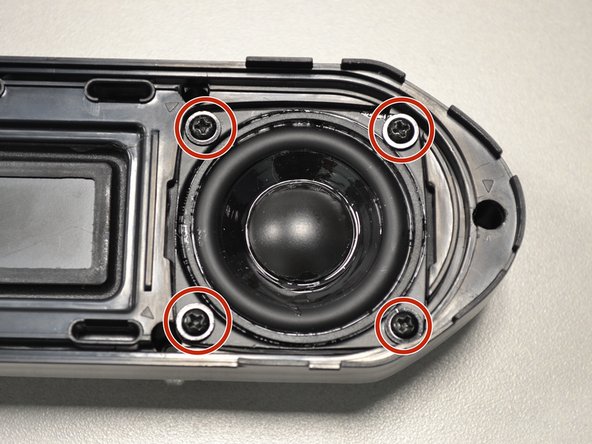
    • Unscrew the four screws holding the speaker in place.

    FixBot'a Sor
  8. Altec Lansing BoomJacket 2 Speaker Replacement: adım 8, 2 resimden 1. Altec Lansing BoomJacket 2 Speaker Replacement: adım 8, 2 resimden 2.
    • Unscrew the two screws on the smaller speaker.

    • Pull the small speaker through the larger speaker hole.

    FixBot'a Sor
Sonuç

To reassemble your device, follow these instructions in reverse order.

Bir başkası bu kılavuzu tamamladı.

Zach Braaten

Üyelik tarihi: 07/12/18

537 İtibar

4 adet Kılavuz yazıldı

Ekip

UW Tacoma, Team S1-G4, Cardinal Summer 2018 UW Tacoma, Team S1-G4, Cardinal Summer 2018 üyesi

UWT-CARDINAL-SU18S1G4

4 Üyeler

4 adet Kılavuz yazıldı

0Kılavuz Yorumları

Yorum Ekle

İstatistikleri Görüntüle:

Son 24 Saat: 2

Son 7 gün: 9

Son 30 gün: 36

Her zaman: 767