Ana içeriğe geç
Onarım Topluluğuna Katılın - Hesap Oluşturun

Altec Lansing BoomJacket Bluetooth Board Replacement

Neye ihtiyacın var

  1. Altec Lansing BoomJacket Bluetooth Board Replacement, Case Removal: adım 1, 1 resimden 1.
    • Using your hands, remove the pegs (4+4) from the front and back of the speaker.

    FixBot'a Sor

    Yorum Ekle

  2. Altec Lansing BoomJacket Bluetooth Board Replacement: adım 2, 1 resimden 1.
    • Remove the outer black rubber housing of the speaker.

    FixBot'a Sor

    Yorum Ekle

  3. Altec Lansing BoomJacket Bluetooth Board Replacement: adım 3, 1 resimden 1.
    • Remove the inner blue rubber housing from the speaker.

    FixBot'a Sor

    Yorum Ekle

  4. Altec Lansing BoomJacket Bluetooth Board Replacement: adım 4, 1 resimden 1.
    • Pull out the two black wire meshes using a metal spudger.

    • Be careful not to damage the metal casing.

    FixBot'a Sor

    Yorum Ekle

  5. Altec Lansing BoomJacket Bluetooth Board Replacement: adım 5, 2 resimden 1. Altec Lansing BoomJacket Bluetooth Board Replacement: adım 5, 2 resimden 2.
    Bu adımda kullanılan alet:
    Tweezers
    $4.99
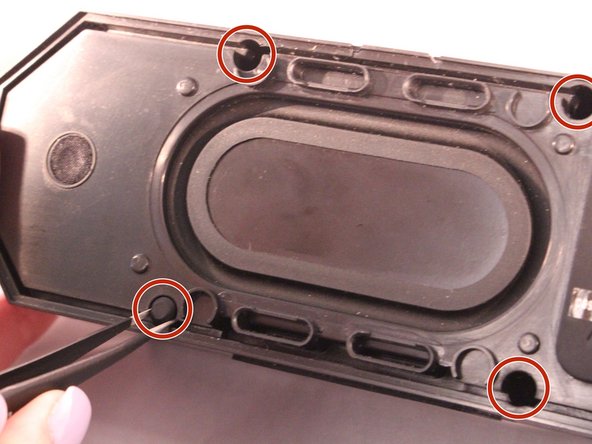
    • Using tweezers remove the rubber stoppers (4 at the back + 2 at the front).

    FixBot'a Sor

    Yorum Ekle

  6. Altec Lansing BoomJacket Bluetooth Board Replacement: adım 6, 1 resimden 1.
    • Using the size PH1 screwdriver remove the screws exposed from the rubber stoppers (4 + 2).

    FixBot'a Sor

    Yorum Ekle

  7. Altec Lansing BoomJacket Bluetooth Board Replacement: adım 7, 1 resimden 1.
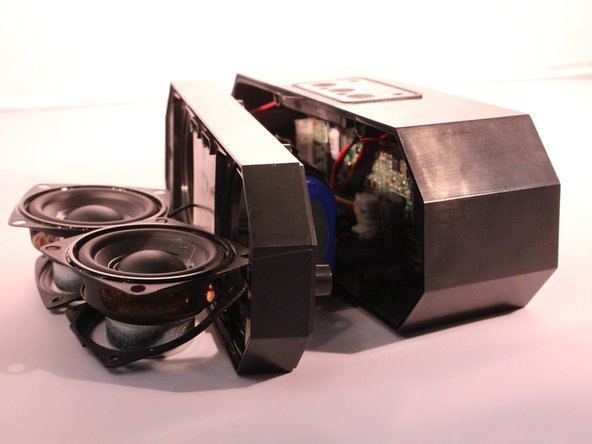
    • Pull the case apart and you will be able to see all the components inside the speaker.

    FixBot'a Sor

    Yorum Ekle

  8. Altec Lansing BoomJacket Bluetooth Board Replacement, Bluetooth Board: adım 8, 1 resimden 1.
    • Now that the case is open look for the small green (NFC) chip on the inside of the case next to the motherboard.

    FixBot'a Sor

    Yorum Ekle

  9. Altec Lansing BoomJacket Bluetooth Board Replacement: adım 9, 1 resimden 1.
    • Disconnect the Bluetooth (NFC) chip from the motherboard.

    FixBot'a Sor

    Yorum Ekle

Sonuç

To reassemble your device, follow these instructions in reverse order.

İptal et: Bu kılavuzu tamamlamadım.

2 farklı kişi bu kılavuzu tamamladı.

1Rehber Yorum

Is this a common issue with the Lifejacket 3? I was able to use my new BT speaker twice, since it was bought last week. The speaker hasn't been dropped, in or around water, outside, left on, damaged, or tampered with.

Kat - Yanıt Paylaş

Yorum Ekle

İstatistikleri Görüntüle:

Son 24 Saat: 1

Son 7 gün: 10

Son 30 gün: 36

Her zaman: 5,136