Giriş
If the buttons on the speaker are unresponsive, disassembling the device and checking all connections is advised. If everything seems to be connected, the button panel may need to be replaced. You may search for third-party dealers online, or salvage a button panel from another device.
Neye ihtiyacın var
-
-
Use a spudger to remove each side speaker cover by inserting it in the crevice and using moderate force to pry them off.
 FixBot'a Sor
-
-
-
Insert a spudger into the space between the grille and speaker frame to pry the mesh grille covering the front speakers.
-
-
-
Use a Phillips #1 screwdriver to remove the eight 12.7 mm screws securing the front cover.
-
-
-
-
Using a Phillips #1 screwdriver, remove the eight 8.75 mm screws around the corners of each speaker.
-
-
-
Flip the speaker so you have access to the bottom of the device.
-
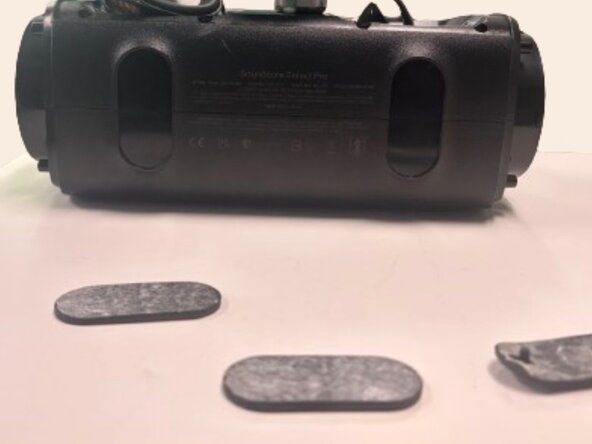
Use a spudger to remove both rubber pads that protect the bottom of the device.
-
-
-
Using a spudger remove the rubber pad on the top handle to expose 3 screws underneath.
-
Using a Phillips #1 screwdriver, remove the three 6.75 mm screws.
-
-
-
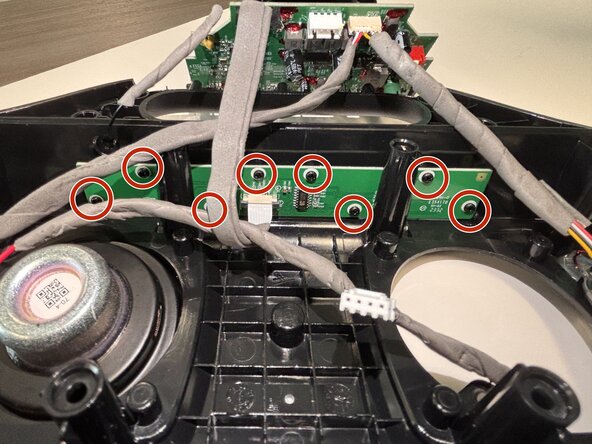
Use a Phillips #1 screwdriver to remove the eight 6.5 mm screws securing the button board.
-
-
-
Use the tip of the spudger to push the black plastic locking tab away from the socket.
-
Pull the ribbon cable straight out of the socket.
-
Remove the old button board.
-






To reassemble your device, follow these instructions in reverse order.

Ekip

Austin Community College, Team 49-1, Cox Spring 2026 Austin Community College, Team 49-1, Cox Spring 2026 üyesi
AUSTINCC-COX-S26S49G1
3 Üyeler
3 adet Kılavuz yazıldı
