Ana içeriğe geç
Onarım Topluluğuna Katılın - Hesap Oluşturun

Apple PowerBook 520 Memory (RAM) Replacement

Neye ihtiyacın var

  1. Apple PowerBook 520 Memory (RAM) Replacement, Case: adım 1, 2 resimden 1. Apple PowerBook 520 Memory (RAM) Replacement, Case: adım 1, 2 resimden 2.
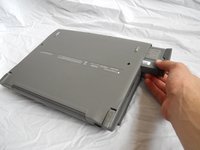
    • Turn computer over.

    • Remove battery expansion cover and battery.

    FixBot'a Sor

    Yorum Ekle

  2. Apple PowerBook 520 Memory (RAM) Replacement: adım 2, 1 resimden 1.
    • With monitor hinge at the bottom, remove the two top center screws.

    FixBot'a Sor

    Yorum Ekle

  3. Apple PowerBook 520 Memory (RAM) Replacement: adım 3, 1 resimden 1.
    • Remove top left and top right screws.

    FixBot'a Sor

    Yorum Ekle

  4. Apple PowerBook 520 Memory (RAM) Replacement: adım 4, 1 resimden 1.
    • Remove middle left and middle right screws.

    FixBot'a Sor

    Yorum Ekle

  5. Apple PowerBook 520 Memory (RAM) Replacement: adım 5, 1 resimden 1.
    • Open computer kickstands.

    • Remove screws underneath each kickstand.

    FixBot'a Sor

    Yorum Ekle

  6. Apple PowerBook 520 Memory (RAM) Replacement: adım 6, 1 resimden 1.
    • Lift keyboard from bottom and take out of shell.

    FixBot'a Sor

    Yorum Ekle

  7. Apple PowerBook 520 Memory (RAM) Replacement: adım 7, 3 resimden 1. Apple PowerBook 520 Memory (RAM) Replacement: adım 7, 3 resimden 2. Apple PowerBook 520 Memory (RAM) Replacement: adım 7, 3 resimden 3.
    • Lift the white ribbon clamps securing the keyboard ribbon cables to the motherboard. You can do this using a plastic opening tool.

    • Removing both ribbon cables from the motherboard will leave the clamps like so.

    • From here you can access the logic board, hard drive, and floppy drive.

    FixBot'a Sor

    Yorum Ekle

  8. Apple PowerBook 520 Memory (RAM) Replacement, Memory (RAM): adım 8, 1 resimden 1.
    • Open the panel on back of the device. Remove 2 T8 torque screws.

    FixBot'a Sor

    Yorum Ekle

  9. Apple PowerBook 520 Memory (RAM) Replacement: adım 9, 1 resimden 1.
    • Remove the plastic panel underneath the LCD Screen.

    FixBot'a Sor

    Yorum Ekle

  10. Apple PowerBook 520 Memory (RAM) Replacement: adım 10, 1 resimden 1.
    • Remove the 2 T8 Torx Screws securing the logic board protection plate from the midsection of the logic board protection plate. Remove the T8 Torx Screw from the back of the plate, underneath the hinge.

    FixBot'a Sor

    Yorum Ekle

  11. Apple PowerBook 520 Memory (RAM) Replacement: adım 11, 1 resimden 1.
    • Remove the logic board protection plate.

    FixBot'a Sor

    Yorum Ekle

  12. Apple PowerBook 520 Memory (RAM) Replacement: adım 12, 1 resimden 1.
    • Using a plastic spudger, gently pry up the uppermost board fixture. This is the Memory (RAM).

    FixBot'a Sor

    Yorum Ekle

  13. Apple PowerBook 520 Memory (RAM) Replacement: adım 13, 1 resimden 1.
    • Once the old Memory board is removed, replace it with the new Memory board.

    FixBot'a Sor

    Yorum Ekle

Sonuç

To reassemble your device, follow these instructions in reverse order.

İptal et: Bu kılavuzu tamamlamadım.

2 farklı kişi bu kılavuzu tamamladı.

Tyler

Üyelik tarihi: 04/10/11

148 İtibar

2 adet Kılavuz yazıldı

Ekip

Cal Poly, Team 20-66, Walters Spring 2011 Cal Poly, Team 20-66, Walters Spring 2011 üyesi

CPSU-WALTERS-S11S20G66

4 Üyeler

3 adet Kılavuz yazıldı

1Rehber Yorum

Yorum Ekle

İstatistikleri Görüntüle:

Son 24 Saat: 0

Son 7 gün: 12

Son 30 gün: 46

Her zaman: 4,005