Ana içeriğe geç
Onarım Topluluğuna Katılın - Hesap Oluşturun

Archos 101 G9 Flash Memory Replacement

Neye ihtiyacın var

  1. Archos 101 G9 Flash Memory Replacement, Display Assembly: adım 1, 1 resimden 1.
    • Place an iFixit opening tool in the crease where the display assembly and back of the device meet.

    • Slide the tool firmly through the crease on one side of the device, twisting as you go to create separation.

    • When you reach the corner, carefully pry the two halves of the device apart.

    • There are small clips along the edges that need to stay intact in order to properly reassemble the device. Be very gentle when prying so as not to break the clips.

    • Repeat for the remaining three sides and corners.

    FixBot'a Sor

    Yorum Ekle

  2. Archos 101 G9 Flash Memory Replacement: adım 2, 2 resimden 1. Archos 101 G9 Flash Memory Replacement: adım 2, 2 resimden 2.
    • Separate the halves of the device.

    • Ensure that you separate from the top and you keep the bottoms of both pieces near each other so as not to damage the ribbon cables that connect the halves.

    FixBot'a Sor

    Yorum Ekle

  3. Archos 101 G9 Flash Memory Replacement: adım 3, 2 resimden 1. Archos 101 G9 Flash Memory Replacement: adım 3, 2 resimden 2.
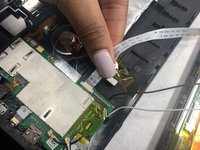
    • Gently remove both ribbon cables from their sockets on the motherboard.

    FixBot'a Sor

    Yorum Ekle

  4. Archos 101 G9 Flash Memory Replacement: adım 4, 1 resimden 1.
    • Remove the white and black coaxial cables with gold tips from the motherboard.

    FixBot'a Sor

    Yorum Ekle

  5. Archos 101 G9 Flash Memory Replacement: adım 5, 1 resimden 1.
    • Remove the display assembly from the back panel.

    FixBot'a Sor

    Yorum Ekle

  6. Archos 101 G9 Flash Memory Replacement, Motherboard: adım 6, 1 resimden 1.
    • Remove the 2 mm screw that holds the motherboard in place using a Phillips #0 screwdriver.

    FixBot'a Sor

    Yorum Ekle

  7. Archos 101 G9 Flash Memory Replacement: adım 7, 1 resimden 1.
    • Carefully remove the ribbon cable from its socket on the motherboard.

    FixBot'a Sor

    Yorum Ekle

  8. Archos 101 G9 Flash Memory Replacement: adım 8, 1 resimden 1.
    • Remove the tape covering all of the solder connections on the motherboard.

    FixBot'a Sor

    Yorum Ekle

  9. Archos 101 G9 Flash Memory Replacement: adım 9, 1 resimden 1.
    • Desolder all six of the connections that were underneath the tape.

    FixBot'a Sor

    Yorum Ekle

  10. Archos 101 G9 Flash Memory Replacement: adım 10, 1 resimden 1.
    • Remove the motherboard from the tablet.

    FixBot'a Sor

    Yorum Ekle

  11. Archos 101 G9 Flash Memory Replacement, Flash Memory: adım 11, 1 resimden 1.
    • Flip the motherboard around to the backside and pry off the silver covering using a nylon spudger.

    FixBot'a Sor

    Yorum Ekle

  12. Archos 101 G9 Flash Memory Replacement: adım 12, 1 resimden 1.
    • Remove the largest black rectangle using the Hakko microsoldering kit.

    FixBot'a Sor

    Yorum Ekle

Sonuç

To reassemble your device, follow these instructions in reverse order.

İptal et: Bu kılavuzu tamamlamadım.

Deneille Davids

Üyelik tarihi: 10/28/21

181 İtibar

2 adet Kılavuz yazıldı

Ekip

UMass Dartmouth, Team 4-1, Gulbrandsen Fall 2021 UMass Dartmouth, Team 4-1, Gulbrandsen Fall 2021 üyesi

UMASSD-GULBRANDSEN-F21S4G1

3 Üyeler

6 adet Kılavuz yazıldı

0Kılavuz Yorumları

Yorum Ekle

İstatistikleri Görüntüle:

Son 24 Saat: 0

Son 7 gün: 1

Son 30 gün: 21

Her zaman: 542