Ana içeriğe geç
Onarım Topluluğuna Katılın - Hesap Oluşturun

Asus Eee PC 1005PEB Battery Replacement

  1. Asus Eee PC 1005PEB Battery Replacement, Battery: adım 1, 1 resimden 1.
    • Start by placing the laptop upside-down on a flat surface.

    • Find the two clips on the back portion of the laptop.

    FixBot'a Sor

    Yorum Ekle

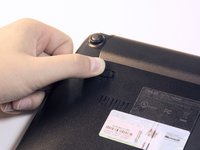
  2. Asus Eee PC 1005PEB Battery Replacement: adım 2, 1 resimden 1.
    • Using your finger, push the clip labeled with a "1" on the laptop from the lock position to unlock position.

    • This clip will hold itself, so after you move it to the unlock position you can remove your finger.

    FixBot'a Sor

    Yorum Ekle

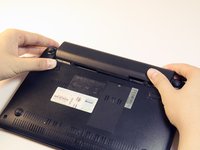
  3. Asus Eee PC 1005PEB Battery Replacement: adım 3, 2 resimden 1. Asus Eee PC 1005PEB Battery Replacement: adım 3, 2 resimden 2.
    • Using your finger, push and hold the pin indicated by a "2" on the laptop from the lock to unlock position.

    • While holding this pin in the unlock position, use your other hand to pull the battery horizontally away from the laptop.

    • When the pins on the battery that reach towards the laptop are away from the laptop, you can release the "2" clip.

    FixBot'a Sor

    Yorum Ekle

  4. Asus Eee PC 1005PEB Battery Replacement: adım 4, 1 resimden 1.
    • Using both hands, pull the battery horizontally away from the laptop.

    FixBot'a Sor

    Yorum Ekle

Sonuç

To reassemble your device, follow these instructions in reverse order.

İptal et: Bu kılavuzu tamamlamadım.

2 farklı kişi bu kılavuzu tamamladı.

Aaron Arenas

Üyelik tarihi: 04/20/14

751 İtibar

5 adet Kılavuz yazıldı

Ekip

Cal Poly, Team 13-32, Maness Spring 2014 Cal Poly, Team 13-32, Maness Spring 2014 üyesi

CPSU-MANESS-S14S13G32

5 Üyeler

5 adet Kılavuz yazıldı

0Kılavuz Yorumları

Yorum Ekle

İstatistikleri Görüntüle:

Son 24 Saat: 1

Son 7 gün: 7

Son 30 gün: 27

Her zaman: 2,023