Ana içeriğe geç
Onarım Topluluğuna Katılın - Hesap Oluşturun

Asus Padfone 2 A68 Sub Cables Replacement

Neye ihtiyacın var

    1. Asus Padfone 2 A68 Sub Cables Replacement, Power Down Device: adım 1, 1 resimden 1.
      • Hold down the power button.

      FixBot'a Sor

      Yorum Ekle

    2. Asus Padfone 2 A68 Sub Cables Replacement, Remove Back Plate: adım 2, 3 resimden 1. Asus Padfone 2 A68 Sub Cables Replacement, Remove Back Plate: adım 2, 3 resimden 2. Asus Padfone 2 A68 Sub Cables Replacement, Remove Back Plate: adım 2, 3 resimden 3.
      • Use plastic opening tools to pry off the cover of the phone.

      FixBot'a Sor

      Yorum Ekle

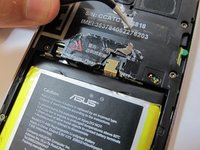
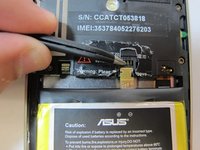
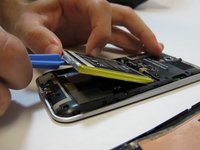
    3. Asus Padfone 2 A68 Sub Cables Replacement, Battery Removal: adım 3, 3 resimden 1. Asus Padfone 2 A68 Sub Cables Replacement, Battery Removal: adım 3, 3 resimden 2. Asus Padfone 2 A68 Sub Cables Replacement, Battery Removal: adım 3, 3 resimden 3.
      Bu adımda kullanılan alet:
      Tweezers
      $4.99
      • Remove the warning sticker that covers the battery plug and connecting cord.

      • Look for the widest gap on either side of the battery. Using the plastic opening tool carefully lift battery out.

      • The battery is held down with adhesive. Be careful not to damage battery or connecting cord.

      • Disconnect battery connecting cord using tweezers.

      FixBot'a Sor

      Yorum Ekle

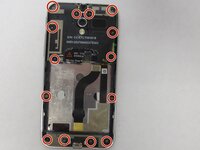
    4. Asus Padfone 2 A68 Sub Cables Replacement, Remove Internal Back Plate: adım 4, 2 resimden 1. Asus Padfone 2 A68 Sub Cables Replacement, Remove Internal Back Plate: adım 4, 2 resimden 2.
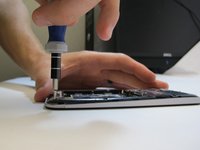
      • Use a T5 Torx screwdriver to remove 14 screws from internal back plate.

      • Use of magnetic pad will help with keeping track of screws.

      • Once screws are out, remove the plate.

      FixBot'a Sor

      Yorum Ekle

    5. Asus Padfone 2 A68 Sub Cables Replacement, Removal of A68 Sub Cables: adım 5, 1 resimden 1.
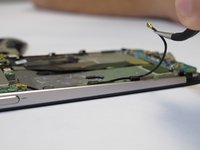
      • Use tweezers to unplug the sub cables from the circuit board and housing.

      FixBot'a Sor

      Yorum Ekle

    6. Asus Padfone 2 A68 Sub Cables Replacement, Replacing the A68 Sub Cables: adım 6, 2 resimden 1. Asus Padfone 2 A68 Sub Cables Replacement, Replacing the A68 Sub Cables: adım 6, 2 resimden 2.
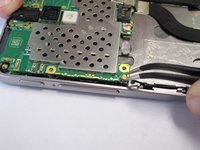
      • Plug in new sub cables to the circuit board and housing.

      FixBot'a Sor

      Yorum Ekle

Sonuç

To reassemble your device, follow these instructions in reverse order.

İptal et: Bu kılavuzu tamamlamadım.

Erica

Üyelik tarihi: 09/25/14

482 İtibar

2 adet Kılavuz yazıldı

Ekip

USF Tampa, Team 5-4, Mcgee Fall 2014 USF Tampa, Team 5-4, Mcgee Fall 2014 üyesi

USFT-MCGEE-F14S5G4

4 Üyeler

47 adet Kılavuz yazıldı

1Rehber Yorum

Boas. Onde posso comprar este cabo?

rsebastiao - Yanıt Paylaş

Yorum Ekle

İstatistikleri Görüntüle:

Son 24 Saat: 1

Son 7 gün: 4

Son 30 gün: 22

Her zaman: 1,582