Ana içeriğe geç
Onarım Topluluğuna Katılın - Hesap Oluşturun

Asus Q501LA-BBI6T03 RAM Replacement

Neye ihtiyacın var

    1. Asus Q501LA-BBI6T03 RAM Replacement, Back Panel: adım 1, 1 resimden 1.
      • Ensure the laptop is powered down before continuing.

      • Use a Phillips #0 screwdriver to remove the ten 3mm Phillips head screws on the base of the laptop.

      FixBot'a Sor

      Yorum Ekle

    2. Asus Q501LA-BBI6T03 RAM Replacement: adım 2, 1 resimden 1.
      • Use the spudger to pry open the rear cover at either hinge.

      FixBot'a Sor

      Yorum Ekle

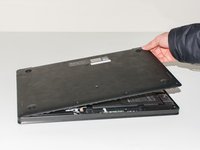
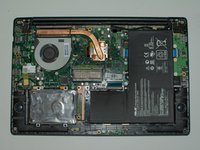
    3. Asus Q501LA-BBI6T03 RAM Replacement: adım 3, 2 resimden 1. Asus Q501LA-BBI6T03 RAM Replacement: adım 3, 2 resimden 2.
      • Grab the cover with your fingers and gently lift it away from the board.

      • Be careful not to break any tabs on the cover when lifting it off.

      FixBot'a Sor

      Yorum Ekle

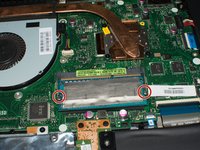
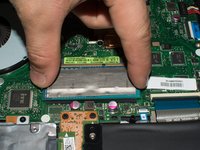
    1. Asus Q501LA-BBI6T03 RAM Replacement, RAM: adım 4, 2 resimden 1. Asus Q501LA-BBI6T03 RAM Replacement, RAM: adım 4, 2 resimden 2.
      • Press down the metal tabs on both sides of the RAM.

      • The tabs are spring loaded and the RAM will pop up immediately.

      FixBot'a Sor

      Yorum Ekle

Sonuç

To reassemble your device, follow these instructions in reverse order.

İptal et: Bu kılavuzu tamamlamadım.

3 farklı kişi bu kılavuzu tamamladı.

Tanner

Üyelik tarihi: 01/25/17

276 İtibar

2 adet Kılavuz yazıldı

Ekip

Cal Poly, Team 8-1, Banghart Winter 2017 Cal Poly, Team 8-1, Banghart Winter 2017 üyesi

CPSU-BANGHART-W17S8G1

3 Üyeler

42 adet Kılavuz yazıldı

0Kılavuz Yorumları

Yorum Ekle

İstatistikleri Görüntüle:

Son 24 Saat: 1

Son 7 gün: 6

Son 30 gün: 33

Her zaman: 898