Ana içeriğe geç
Onarım Topluluğuna Katılın - Hesap Oluşturun

Asus Q525U Battery Replacement

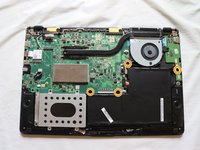
Neye ihtiyacın var

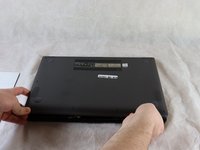
  1. Asus Q525U Battery Replacement, Back Cover: adım 1, 3 resimden 1. Asus Q525U Battery Replacement, Back Cover: adım 1, 3 resimden 2. Asus Q525U Battery Replacement, Back Cover: adım 1, 3 resimden 3.
    • Begin by powering off the device and flipping the device over.

    • Carefully remove the two longer 9.5 mm screws on the corners with a Phillips #1 screwdriver.

    • Remove the eight 7.5 mm Phillips #1 screws on the back of the device.

    FixBot'a Sor
  2. Asus Q525U Battery Replacement: adım 2, 3 resimden 1. Asus Q525U Battery Replacement: adım 2, 3 resimden 2. Asus Q525U Battery Replacement: adım 2, 3 resimden 3.
    • Use an opening pick to separate the back cover from the device.

    • For easiest removal, begin by prying at one of the front corners and sliding the tool under the cover in a counter-clockwise motion (to the left) toward the laptop hinge.

    FixBot'a Sor
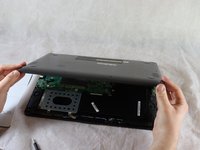
  3. Asus Q525U Battery Replacement: adım 3, 3 resimden 1. Asus Q525U Battery Replacement: adım 3, 3 resimden 2. Asus Q525U Battery Replacement: adım 3, 3 resimden 3.
    • Once the cover has been separated from the device, carefully lift the back cover off the device (begin by lifting from the front of the cover first).

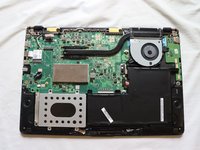
    • The back cover should be easily removable, allowing full access to all of the internal components.

    FixBot'a Sor
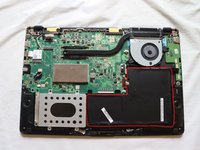
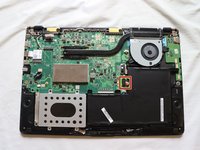
  4. Asus Q525U Battery Replacement, Battery: adım 4, 3 resimden 1. Asus Q525U Battery Replacement, Battery: adım 4, 3 resimden 2. Asus Q525U Battery Replacement, Battery: adım 4, 3 resimden 3.
    • The battery of the device is outlined in red.

    • Using a Phillips #1 screwdriver, remove the four 5 mm screws that are holding the battery in place.

    FixBot'a Sor
  5. Asus Q525U Battery Replacement: adım 5, 2 resimden 1. Asus Q525U Battery Replacement: adım 5, 2 resimden 2.
    Bu adımda kullanılan alet:
    Halberd Spudger
    $2.99
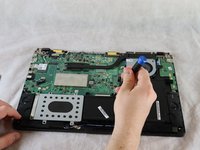
    • Using the Halberd spudger, carefully lift the battery connector up to disconnect it from the motherboard.

    FixBot'a Sor
  6. Asus Q525U Battery Replacement: adım 6, 1 resimden 1.
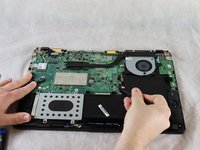
    • Lift the battery out of the frame to remove.

    FixBot'a Sor
Sonuç

To reassemble your device, follow these instructions in reverse order.

Bir başkası bu kılavuzu tamamladı.

Will Targonski

Üyelik tarihi: 02/22/22

153 İtibar

1 Kılavuz yazıldı

Ekip

Clemson, Team 2-5, Hunter Spring 2022 Clemson, Team 2-5, Hunter Spring 2022 üyesi

CLEM-HUNTER-S22S2G5

4 Üyeler

12 adet Kılavuz yazıldı

0Kılavuz Yorumları

Yorum Ekle

İstatistikleri Görüntüle:

Son 24 Saat: 2

Son 7 gün: 14

Son 30 gün: 73

Her zaman: 1,885