Ana içeriğe geç
Onarım Topluluğuna Katılın - Hesap Oluşturun

Asus U56E-BBL6 Keyboard Replacement

Neye ihtiyacın var

    1. Asus U56E-BBL6 Keyboard Replacement, Battery: adım 1, 1 resimden 1.
      • Make sure you unplugged the laptop before you begin the replacement process.

      • Locate the battery locking tabs on the upper right and left corner.

      • Press the tabs in towards each other.

      FixBot'a Sor

      Yorum Ekle

    2. Asus U56E-BBL6 Keyboard Replacement: adım 2, 1 resimden 1.
      • Pull the battery outwards to remove it.

      FixBot'a Sor

      Yorum Ekle

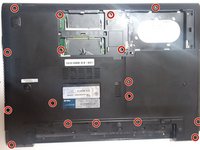
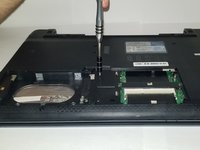
    1. Asus U56E-BBL6 Keyboard Replacement, Back Panel: adım 3, 2 resimden 1. Asus U56E-BBL6 Keyboard Replacement, Back Panel: adım 3, 2 resimden 2.
      • Using a Phillips #00 screwdriver, remove the screws.

      FixBot'a Sor

      Yorum Ekle

    2. Asus U56E-BBL6 Keyboard Replacement: adım 4, 1 resimden 1.
      • Lift backplate and remove from the case.

      FixBot'a Sor

      Yorum Ekle

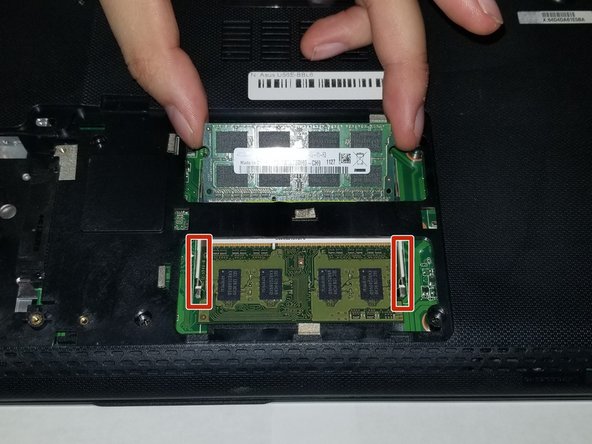
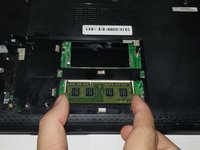
    1. Asus U56E-BBL6 Keyboard Replacement, RAM: adım 5, 1 resimden 1.
      • Once inside the panel, locate your RAM sticks.

      FixBot'a Sor

      Yorum Ekle

    2. Asus U56E-BBL6 Keyboard Replacement: adım 6, 2 resimden 1. Asus U56E-BBL6 Keyboard Replacement: adım 6, 2 resimden 2.
      • This device is embedded with two RAM sticks.

      • Push the metal brackets carefully to release and remove the RAM stick .

      FixBot'a Sor

      Yorum Ekle

    3. Asus U56E-BBL6 Keyboard Replacement: adım 7, 2 resimden 1. Asus U56E-BBL6 Keyboard Replacement: adım 7, 2 resimden 2.
      • Repeat the previous step for removing the other RAM stick.

      FixBot'a Sor

      Yorum Ekle

    1. Asus U56E-BBL6 Keyboard Replacement, Keyboard: adım 8, 1 resimden 1.
      • Using a Phillips #00, remove the four screws.

      FixBot'a Sor

      Yorum Ekle

    2. Asus U56E-BBL6 Keyboard Replacement: adım 9, 2 resimden 1. Asus U56E-BBL6 Keyboard Replacement: adım 9, 2 resimden 2.
      • Using a Phillips #00 screwdriver, remove the screws.

      FixBot'a Sor

      Yorum Ekle

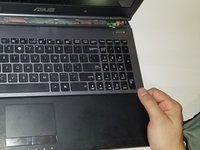
    3. Asus U56E-BBL6 Keyboard Replacement: adım 10, 1 resimden 1.
      • Use a plastic opening tool around the entire edge.

      • Separate the case from the keyboard.

      FixBot'a Sor

      Yorum Ekle

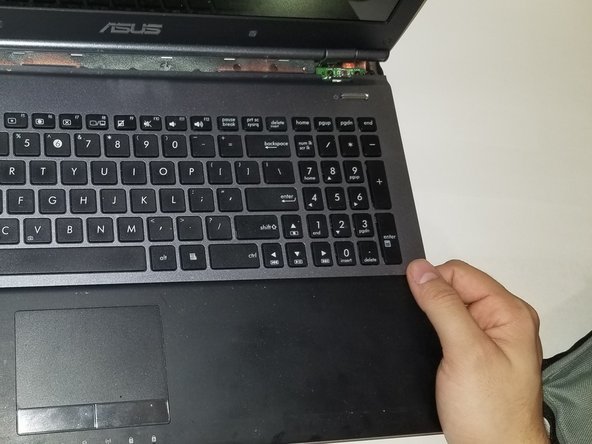
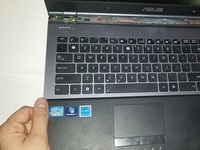
    4. Asus U56E-BBL6 Keyboard Replacement: adım 11, 1 resimden 1.
      • Ensure the laptop is face up for this step.

      • Gently lift the keyboard from the base of the laptop.

      • Be careful of the ribbon cables connecting the keyboard.

      FixBot'a Sor

      Yorum Ekle

    5. Asus U56E-BBL6 Keyboard Replacement: adım 12, 1 resimden 1.
      • Gently tug the ribbon cables free from their slots.

      FixBot'a Sor

      Yorum Ekle

    6. Asus U56E-BBL6 Keyboard Replacement: adım 13, 2 resimden 1. Asus U56E-BBL6 Keyboard Replacement: adım 13, 2 resimden 2.
      • Using both hands, pull the keyboard back and out, fully separating the keyboard from the laptop.

      FixBot'a Sor

      Yorum Ekle

Sonuç

To reassemble your device, follow these instructions in reverse order.

İptal et: Bu kılavuzu tamamlamadım.

Josiah Allard

Üyelik tarihi: 10/26/18

733 İtibar

6 adet Kılavuz yazıldı

Ekip

UMass Dartmouth, Team S2-G8, Peak Fall 2018 UMass Dartmouth, Team S2-G8, Peak Fall 2018 üyesi

UMASSD-PEAK-F18S2G8

3 Üyeler

36 adet Kılavuz yazıldı

2Kılavuz Yorumları

The Keyboard still has to be removed from the Top Case! Your not done yet!

philw395 - Yanıt Paylaş

I removed the Keyboard from the Top Case and replaced the Keyboard. It wasn’t too bad with my Heat Gun and all-in-one painters tool…yes you heard right, my handy dandy painters tool that has served me well for years. Anyway, the only problem area taking the Keyboard out and snapping it back in (if you want to call it that) was by the DVD Player. Good Luck!

philw395 - Yanıt Paylaş

Yorum Ekle

İstatistikleri Görüntüle:

Son 24 Saat: 3

Son 7 gün: 8

Son 30 gün: 33

Her zaman: 1,200