Ana içeriğe geç
Onarım Topluluğuna Katılın - Hesap Oluşturun

Asus W2W-A1 Touchpad Replacement

Neye ihtiyacın var

    1. Asus W2W-A1 Touchpad Replacement, Keyboard: adım 1, 3 resimden 1. Asus W2W-A1 Touchpad Replacement, Keyboard: adım 1, 3 resimden 2. Asus W2W-A1 Touchpad Replacement, Keyboard: adım 1, 3 resimden 3.
      • Remove the battery, then unscrew the 7 3 mm Phillips screws behind the battery. Make sure they go in separate, organized piles.

      • Unscrew the 2 4 mm Phillips head screws by the battery.

      FixBot'a Sor

      Yorum Ekle

    2. Asus W2W-A1 Touchpad Replacement: adım 2, 1 resimden 1.
      • Remove the panel above the keyboard with a plastic spudger.

      FixBot'a Sor

      Yorum Ekle

    3. Asus W2W-A1 Touchpad Replacement: adım 3, 1 resimden 1.
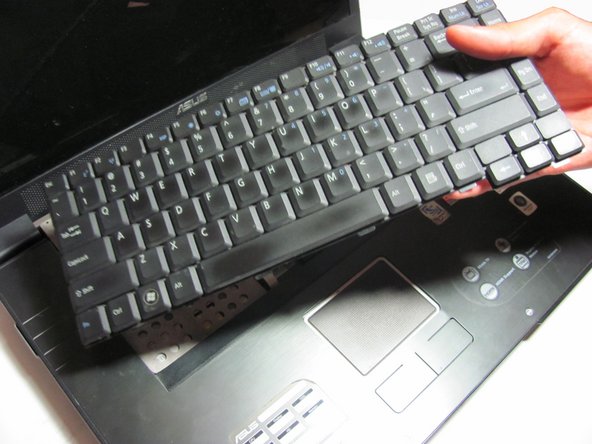
      • Once the panel is removed, use the spudger to pry out the keyboard.

      • Do not fully remove, for the keyboard is still attached to the ribbon cable.

      FixBot'a Sor

      Yorum Ekle

    4. Asus W2W-A1 Touchpad Replacement: adım 4, 2 resimden 1. Asus W2W-A1 Touchpad Replacement: adım 4, 2 resimden 2.
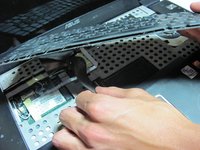
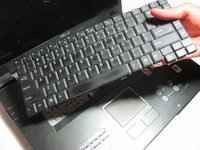
      • Detach the ribbon cable from the keyboard by pulling the end of the ribbon cable that is attached inside of the laptop.

      • Be sure to detach from the root rather than from near the middle. It should slide out with ease.

      • Now you can fully remove the keyboard from the laptop.

      FixBot'a Sor

      Yorum Ekle

    1. Asus W2W-A1 Touchpad Replacement, Front Panel: adım 5, 1 resimden 1.
      • Place your fingers or a spudger between the front panel and the rest of the laptop.

      • Pull upwards gently to detach the side you are grabbing.

      • Repeat on the other side until the panel easily peels off the laptop.

      FixBot'a Sor

      Yorum Ekle

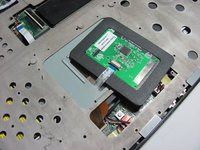
    1. Asus W2W-A1 Touchpad Replacement, Touchpad: adım 6, 2 resimden 1. Asus W2W-A1 Touchpad Replacement, Touchpad: adım 6, 2 resimden 2.
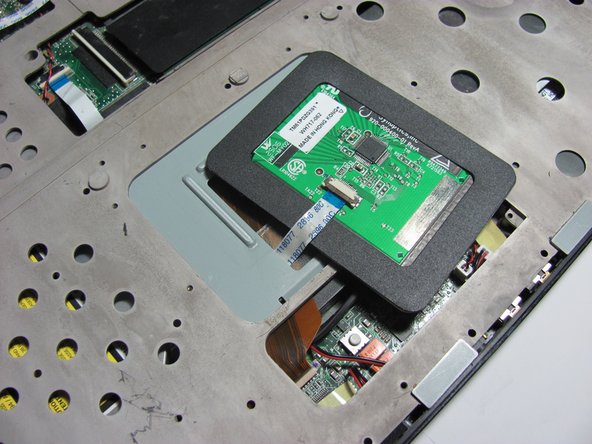
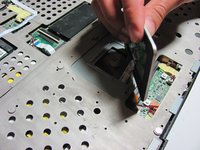
      • The touchpad should be loosely attached to the rest of the laptop by a ribbon cable.

      FixBot'a Sor

      Yorum Ekle

    2. Asus W2W-A1 Touchpad Replacement: adım 7, 1 resimden 1.
      • Gently pull the ribbon cable out of its socket attached to the touchpad.

      • You are now able to remove the touchpad.

      FixBot'a Sor

      Yorum Ekle

Sonuç

To reassemble your device, follow these instructions in reverse order.

İptal et: Bu kılavuzu tamamlamadım.

Nolan Schock

Üyelik tarihi: 04/14/14

501 İtibar

5 adet Kılavuz yazıldı

Ekip

Cal Poly, Team 13-29, Maness Spring 2014 Cal Poly, Team 13-29, Maness Spring 2014 üyesi

CPSU-MANESS-S14S13G29

4 Üyeler

80 adet Kılavuz yazıldı

0Kılavuz Yorumları

Yorum Ekle

İstatistikleri Görüntüle:

Son 24 Saat: 2

Son 7 gün: 4

Son 30 gün: 22

Her zaman: 510