Ana içeriğe geç
Onarım Topluluğuna Katılın - Hesap Oluşturun

Asus X55C CPU Intel Replacement

Neye ihtiyacın var

Videoya Genel Bakış

  1. Asus X55C CPU Intel Replacement, Keyboard: adım 1, 1 resimden 1.
    • Switch off the laptop and remove the battery.

    FixBot'a Sor

    Yorum Ekle

  2. Asus X55C CPU Intel Replacement: adım 2, 3 resimden 1. Asus X55C CPU Intel Replacement: adım 2, 3 resimden 2. Asus X55C CPU Intel Replacement: adım 2, 3 resimden 3.
    • The Keyboard is held by 5x locking clips.

    • Pick up a little the one side of the Keyboard and start opening the clips one by one.

    • Disconnect the Keyboard flex cable from the mother board and remove the KB.

    • Please SUBSCRIBE to my channel ツ

    FixBot'a Sor

    Yorum Ekle

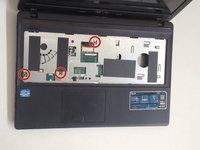
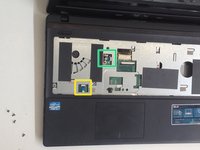
  3. Asus X55C CPU Intel Replacement, Motherboard: adım 3, 2 resimden 1. Asus X55C CPU Intel Replacement, Motherboard: adım 3, 2 resimden 2.
    • Remove 3x Philips screws.

    • Disconnect the two small flex cables:

    • Power On button flex cable

    • Touch pad flex cable

    FixBot'a Sor

    Yorum Ekle

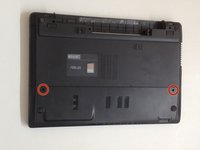
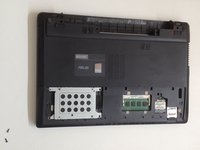
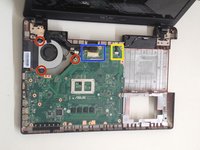
  4. Asus X55C CPU Intel Replacement: adım 4, 3 resimden 1. Asus X55C CPU Intel Replacement: adım 4, 3 resimden 2. Asus X55C CPU Intel Replacement: adım 4, 3 resimden 3.
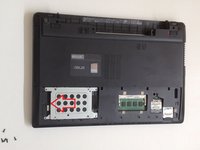
    • Unscrew the two Philips screws and remove the HDD / RAM Cover.

    • Remove three screws securing the hard drive caddy (hard drive assembly).

    • Slide the hard drive assembly to the left to disconnect it from the motherboard.

    FixBot'a Sor
    Yorum Ekle

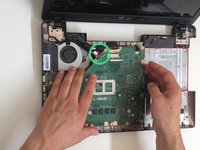
  5. Asus X55C CPU Intel Replacement: adım 5, 2 resimden 1. Asus X55C CPU Intel Replacement: adım 5, 2 resimden 2.
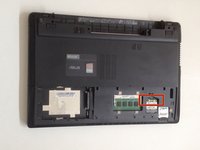
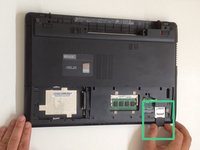
    • Disconnect the two coaxial antenna cables from the Wi-Fi card.

    • Remove any Memory or Dummy card.

    FixBot'a Sor
    Yorum Ekle

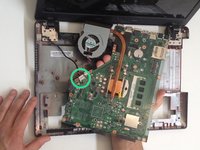
  6. Asus X55C CPU Intel Replacement: adım 6, 3 resimden 1. Asus X55C CPU Intel Replacement: adım 6, 3 resimden 2. Asus X55C CPU Intel Replacement: adım 6, 3 resimden 3.
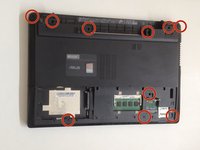
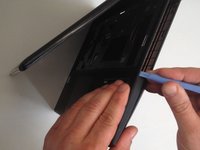
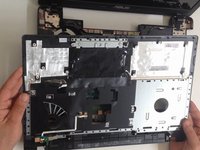
    • The bottom cover is held by 10x Phillips screws. Remove them.

    • With a plastic tool separate the Upper cover and remove it.

    FixBot'a Sor
    Yorum Ekle

  7. Asus X55C CPU Intel Replacement: adım 7, 3 resimden 1. Asus X55C CPU Intel Replacement: adım 7, 3 resimden 2. Asus X55C CPU Intel Replacement: adım 7, 3 resimden 3.
    • Disconnect:

    • The Microphone cable

    • The LCD Display flex cable

    • Remove 3x Pillips screws.

    • Lift the board first from the right edge.

    • There is another one cable, from the DC connector, connected to the underside of main board. We should spun the the board to disconnect the DC connector cable.

    FixBot'a Sor

    Yorum Ekle

  8. Asus X55C CPU Intel Replacement: adım 8, 2 resimden 1. Asus X55C CPU Intel Replacement: adım 8, 2 resimden 2.
    FixBot'a Sor

    Yorum Ekle

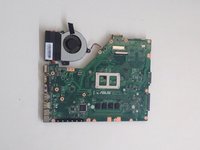
  9. Asus X55C CPU Intel Replacement, CPU Intel: adım 9, 3 resimden 1. Asus X55C CPU Intel Replacement, CPU Intel: adım 9, 3 resimden 2. Asus X55C CPU Intel Replacement, CPU Intel: adım 9, 3 resimden 3.
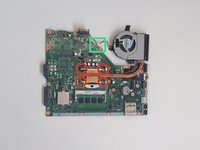
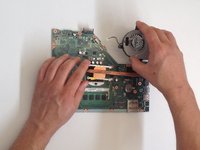
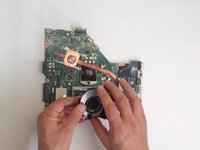
    • Disconnect the Fan cable from the Motherboard.

    • Remove the screws (4x Phillips screws) that hold the cooling system to the Motherboard

    • Remove the Cooling System.

    FixBot'a Sor
    Yorum Ekle

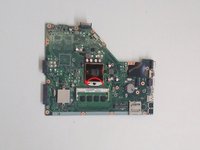
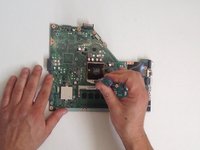
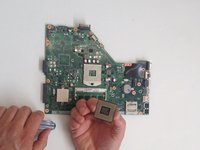
  10. Asus X55C CPU Intel Replacement: adım 10, 3 resimden 1. Asus X55C CPU Intel Replacement: adım 10, 3 resimden 2. Asus X55C CPU Intel Replacement: adım 10, 3 resimden 3.
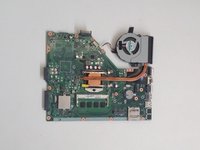
    • Counter clockwise release the screw securing the CPU using a flat head screwdriver.

    • Guideline, lift with equal pressure on two sides of the processor chip to avoid bending any of the pins.

    • Intel Core i3-2370M

    • Before installing the new CPU, clean the Cooling system and put new thermal compound / paste.

    FixBot'a Sor
    Yorum Ekle

Sonuç

To reassemble your device, follow these instructions in reverse order.

İptal et: Bu kılavuzu tamamlamadım.

4 farklı kişi bu kılavuzu tamamladı.

ZFix

Üyelik tarihi: 12/09/13

197.270 İtibar

330 adet Kılavuz yazıldı

Ekip

Master Techs Master Techs üyesi

Community

334 Üyeler

1.694 adet Kılavuz yazıldı

5Kılavuz Yorumları

In step 3 my computer had an extra screw for the DVD drive. So make sure your not trying to pry it open with the screw in like i did.

bill cool - Yanıt Paylaş

Hi there!… I have an old Asus X550CL laptop with an I3 processor. So you know if it’s upgradeable to an I7?

Best Regards!

angelo.cesar79 - Yanıt Paylaş

I’ve the same laptop. Were you able to upgrade it?

Manish - Yanıt Paylaş

Hi, someone let me know if I can upgrade a Asus X55VD's processor from B980 to i7 2670QM.

Or what to take into account? Power usage? Should I only get an i5?

Thanks in advance

Robert Indries - Yanıt Paylaş

Hi there what about the shutdown every 30min exactly

SAINTE-COLOMBE Vonjy - Yanıt Paylaş

Yorum Ekle

İstatistikleri Görüntüle:

Son 24 Saat: 1

Son 7 gün: 8

Son 30 gün: 35

Her zaman: 6,603