Ana içeriğe geç
Onarım Topluluğuna Katılın - Hesap Oluşturun

Asus X751L Wireless Card Replacement

Neye ihtiyacın var

  1. Asus X751L Wireless Card Replacement, Keyboard: adım 1, 1 resimden 1.
    • With the screen closed, place your laptop upside-down with the front facing you.

    • Remove the six 14.6mm Phillips #00 screws.

    • Remove the four 6.6mm Phillips #00 screws.

    FixBot'a Sor

    Yorum Ekle

  2. Asus X751L Wireless Card Replacement: adım 2, 1 resimden 1.
    • Flip the laptop over and open the lid.

    • Pry around the edges of the laptop base using the plastic opening tool.

    • Prying too hard can break the plastic clips.

    FixBot'a Sor

    Yorum Ekle

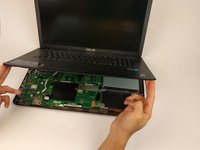
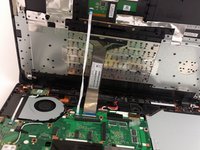
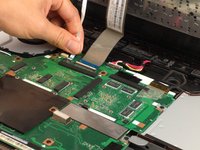
  3. Asus X751L Wireless Card Replacement: adım 3, 3 resimden 1. Asus X751L Wireless Card Replacement: adım 3, 3 resimden 2. Asus X751L Wireless Card Replacement: adım 3, 3 resimden 3.
    • Carefully lift the keyboard up.

    • Be very careful when lifting the keyboard up. Two zero insertion force (ZIF) cables are between the keyboard assembly and the motherboard. Do not lift the assembly too high.

    • Disconnect the two ZIF connectors from the motherboard using your fingernail to lift the cream-colored tab.

    FixBot'a Sor

    Yorum Ekle

  4. Asus X751L Wireless Card Replacement, Wireless Card: adım 4, 1 resimden 1.
    • Remove the single 4.7mm PH00 screw holding the wireless card to the motherboard.

    FixBot'a Sor

    Yorum Ekle

  5. Asus X751L Wireless Card Replacement: adım 5, 1 resimden 1.
    • Using your fingers, lightly lift up on the black and white antenna cords.

    FixBot'a Sor

    Yorum Ekle

  6. Asus X751L Wireless Card Replacement: adım 6, 1 resimden 1.
    • With your fingers lightly pull the wireless card out of the slot.

    • Make sure to keep the card parallel with the motherboard when removing from the slot.

    FixBot'a Sor

    Yorum Ekle

Sonuç

To reassemble your device, follow these instructions in reverse order.

İptal et: Bu kılavuzu tamamlamadım.

3 farklı kişi bu kılavuzu tamamladı.

Matthew Martin

Üyelik tarihi: 02/02/17

217 İtibar

1 Kılavuz yazıldı

Ekip

USF Tampa, Team 17-2, Blackwell Spring 2017 USF Tampa, Team 17-2, Blackwell Spring 2017 üyesi

USFT-BLACKWELL-S17S17G2

4 Üyeler

5 adet Kılavuz yazıldı

1Rehber Yorum

I feel the existing WiFi card is not very good. Is there is better one I can get for the Asus X751L?

July 3, 2023.


cookbake2 - Yanıt Paylaş

Yorum Ekle

İstatistikleri Görüntüle:

Son 24 Saat: 0

Son 7 gün: 5

Son 30 gün: 36

Her zaman: 2,808