Ana içeriğe geç
Onarım Topluluğuna Katılın - Hesap Oluşturun

Asus Zen AiO Pro Z240IC Screen Replacement

Görüntüleme: 7,8 B

İstatistikleri görüntüle:

Son 24 Saat:
3
Son 7 Gün:
26
Son 30 Gün:
136
Her zaman:
7.757
Yorumlar: 8

6 comments on steps, 2 guide comments.

Go to guide comments
Tamamlandı: 2

2 kişi bu kılavuzu "tamamlandı" olarak işaretledi. Sıradaki sen olacak mısın?

Sık Kullanılanlar: 0

Hiç kimse bu kılavuzu favorilere eklemedi (ve abone olmadı). İlk mi olacaksın?

Gerekli Süre: 10 dakika
Zorluk: Kolay
Asus Zen AiO Pro Z240IC Screen Replacement

This guide will show you how to replace the front screen assembly of the Asus Zen AiO Pro Z240IC, which includes the camera and microphone. No technical knowledge is required. All you need is a #1 Phillips screwdriver and a plastic opening tool.

Neye ihtiyacın var

Parçalar

Aletler

    1. Asus Zen AiO Pro Z240IC Screen Replacement, Screen: adım 1, 2 resimden 1. Asus Zen AiO Pro Z240IC Screen Replacement, Screen: adım 1, 2 resimden 2.
      • Use the plastic opening tool to pry off the black plastic strip at the bottom of the screen by wiggling the tool between the strip and the screen.

      • The strip is held in place with adhesive. You may hear a crackling sound as the strip is peeled off.

      • Run the opening tool slowly along the base of the screen, peeling the black strip back, until the opposite end of the screen is reached.

      FixBot'a Sor

      Yorum Ekle

    2. Asus Zen AiO Pro Z240IC Screen Replacement: adım 2, 2 resimden 1. Asus Zen AiO Pro Z240IC Screen Replacement: adım 2, 2 resimden 2.
      • Use a Phillips #1 screwdriver to remove the seven (7) 4.8 mm screws from the base of the screen.

      FixBot'a Sor

      Yorum Ekle

    3. Asus Zen AiO Pro Z240IC Screen Replacement: adım 3, 3 resimden 1. Asus Zen AiO Pro Z240IC Screen Replacement: adım 3, 3 resimden 2. Asus Zen AiO Pro Z240IC Screen Replacement: adım 3, 3 resimden 3.
      • Place the computer on its back, facing up.

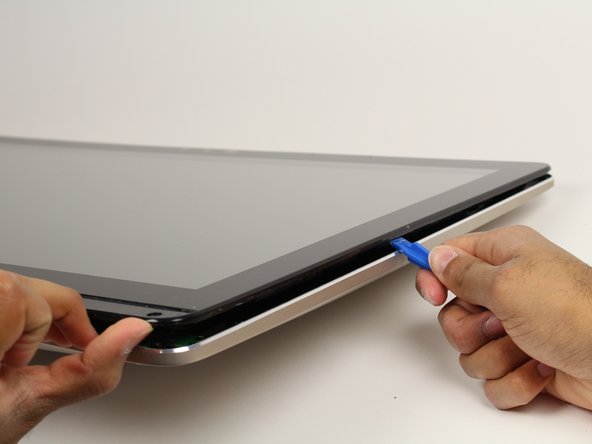
      • Wedge the plastic opening tool in between the screen and the bezel of the aluminum computer casing.

      • Move the tool along the entire edge of the screen with an up-and-down prying motion to loosen the screen from the casing. Do not lift the entire screen away from the computer yet.

      • The screen is held in place by plastic tabs. These will create a popping sound when loosened.

      • The screen assembly will flex as it is pried off. Do not bend the screen too far or the glass screen could shatter.

      FixBot'a Sor

      Yorum Ekle

    4. Asus Zen AiO Pro Z240IC Screen Replacement: adım 4, 1 resimden 1.
      • Lift the screen from the bottom edge by about 6 inches. Prop it open with one hand.

      • Look inside the computer and locate five (5) cables that connect the embedded components of the screen (camera, microphone, etc.) to the rest of the computer.

      FixBot'a Sor

      Yorum Ekle

    5. Asus Zen AiO Pro Z240IC Screen Replacement: adım 5, 3 resimden 1. Asus Zen AiO Pro Z240IC Screen Replacement: adım 5, 3 resimden 2. Asus Zen AiO Pro Z240IC Screen Replacement: adım 5, 3 resimden 3.
      • Remove the two (2) cables that are connected to the computer by white, rectangular terminal blocks by pulling straight out on the plug.

      • The cables and wires in these steps are delicate; do not tug on the individual wires that make up each cable.

      FixBot'a Sor

      Yorum Ekle

    6. Asus Zen AiO Pro Z240IC Screen Replacement: adım 6, 3 resimden 1. Asus Zen AiO Pro Z240IC Screen Replacement: adım 6, 3 resimden 2. Asus Zen AiO Pro Z240IC Screen Replacement: adım 6, 3 resimden 3.
      • Use a finger to lift the plastic locking flaps that hold the remaining three (3) ribbon cables in place.

      • Remove the cables from their terminals by slipping them away from their connectors.

      • The black line on the ribbon cables mark the connecting region. When reinstalling, insert the cable up to this line so the locking flap covers it.

      FixBot'a Sor

      Yorum Ekle

Sonuç

To reassemble your device, follow these instructions in reverse order.

İptal et: Bu kılavuzu tamamlamadım.

2 farklı kişi bu kılavuzu tamamladı.

Jessica Lerena

Üyelik tarihi: 10/02/17

651 İtibar

4 adet Kılavuz yazıldı

Ekip

Cal Poly, Team S4-G1, Livingston Fall 2017 Cal Poly, Team S4-G1, Livingston Fall 2017 üyesi

CPSU-LIVINGSTON-F17S4G1

5 Üyeler

120 adet Kılavuz yazıldı

2Kılavuz Yorumları

Can anyone tell me where I can find this display / lcd for sale?

Thanks

André - Yanıt Paylaş

In step 6 you are removing a ribbon cable with your fingernail. The same cable is damaged for me. Can you share the part number of this cable? I can see this a label is on this cable. I believe this is enabling the digitiser to work. I contacted Asus UK and they have no clue. Thanks

Paul Kormany - Yanıt Paylaş

Yorum Ekle

İstatistikleri Görüntüle:

Son 24 Saat: 3

Son 7 gün: 26

Son 30 gün: 136

Her zaman: 7,757