Ana içeriğe geç
Onarım Topluluğuna Katılın - Hesap Oluşturun

BLU Studio 7.0 II Battery Connection

Salt Önkoşul
Bu sadece bir ön koşul kılavuzudur! Bu kılavuz başka bir prosedürün parçasıdır ve tek başına kullanılması amaçlanmamıştır.

Neye ihtiyacın var

  1. BLU Studio 7.0 II Battery Connection, Battery Connection: adım 1, 2 resimden 1. BLU Studio 7.0 II Battery Connection, Battery Connection: adım 1, 2 resimden 2.
    Bu adımda kullanılan alet:
    Tweezers
    $4.99
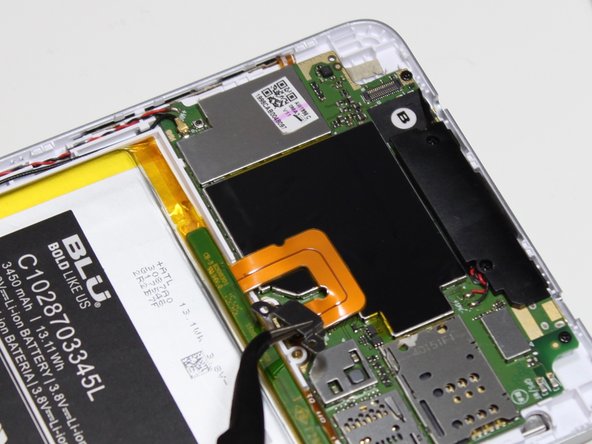
    • Using the PH00 screw driver, remove the two 3mm screws.

    • These screws may be covered by small, round black stickers. Remove the stickers to continue.

    • Remove the metal clip that connects the battery ribbon to the motherboard by lifting up. Precision tweezers work best for this part.

    • Be sure to only grab the metal clip with the tweezers, not the connector underneath.

  2. BLU Studio 7.0 II Battery Connection: adım 2, 1 resimden 1.
    • Disconnect the battery connector using a plastic opening tool or the flat end of a spudger.

Sonuç

To reassemble your device, follow these instructions in reverse order.

Abby

Üyelik tarihi: 05/14/16

852 İtibar

5 adet Kılavuz yazıldı

0Kılavuz Yorumları

Yorum Ekle

İstatistikleri Görüntüle:

Son 24 Saat: 0

Son 7 gün: 2

Son 30 gün: 6

Her zaman: 63