Ana içeriğe geç
Onarım Topluluğuna Katılın - Hesap Oluşturun

Brother PT-D200 Faceplate Replacement

Neye ihtiyacın var

  1. Brother PT-D200 Faceplate Replacement, Battery: adım 1, 1 resimden 1.
    • Flip the device over and press down on the indication arrows located at the top center of the back cover and pull it open.

    FixBot'a Sor

    Yorum Ekle

  2. Brother PT-D200 Faceplate Replacement: adım 2, 1 resimden 1.
    • Remove the six AAA batteries.

    FixBot'a Sor

    Yorum Ekle

  3. Brother PT-D200 Faceplate Replacement, Back of Device: adım 3, 1 resimden 1.
    • Use the Helping Hand 1/4" screwdriver to unscrew the six 3/16" corner screws.

    FixBot'a Sor

    Yorum Ekle

  4. Brother PT-D200 Faceplate Replacement: adım 4, 1 resimden 1.
    • Close the back cover and then flip the device over and separate the top half from the bottom half as shown.

    • Be gentle when lifting the top of the device, there is a ribbon cable attaching the two halves together.

    FixBot'a Sor

    Yorum Ekle

  5. Brother PT-D200 Faceplate Replacement, Circuit Board Cables: adım 5, 1 resimden 1.
    • Gently pull out the ribbon cable from the circuit board.

    • The ribbon cable is very fragile.

    FixBot'a Sor

    Yorum Ekle

  6. Brother PT-D200 Faceplate Replacement: adım 6, 1 resimden 1.
    • Remove two-pin plastic connector from the circuit board.

    • Gently pull the two-pin connector from the circuit board to avoid damaging the board.

    FixBot'a Sor

    Yorum Ekle

  7. Brother PT-D200 Faceplate Replacement, Face Plate: adım 7, 1 resimden 1.
    • On the top portion of the device there are four grey clips locking the faceplate in place. The two top clips are circled in the image. The two others are located in the other corners of the device.

    FixBot'a Sor

    Yorum Ekle

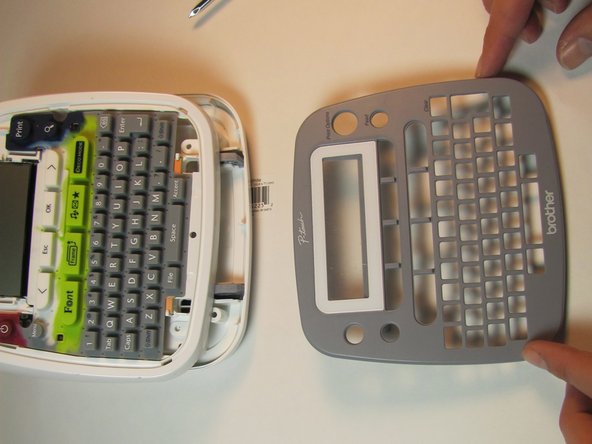
  8. Brother PT-D200 Faceplate Replacement: adım 8, 2 resimden 1. Brother PT-D200 Faceplate Replacement: adım 8, 2 resimden 2.
    • Pull the clips inward two at a time, first the top then the bottom, to snap the face plate off.

    FixBot'a Sor

    Yorum Ekle

Sonuç

To reassemble your device, follow these instructions in reverse order.

İptal et: Bu kılavuzu tamamlamadım.

Bir başkası bu kılavuzu tamamladı.

[deleted]

Üyelik tarihi: 01/24/14

301 İtibar

3 adet Kılavuz yazıldı

0Kılavuz Yorumları

Yorum Ekle

İstatistikleri Görüntüle:

Son 24 Saat: 0

Son 7 gün: 9

Son 30 gün: 31

Her zaman: 1,104