Ana içeriğe geç

CASIO fx-300 MS Battery Replacement

Neye ihtiyacın var

  1. CASIO fx-300 MS Battery Replacement, Battery: adım 1, 3 resimden 1. CASIO fx-300 MS Battery Replacement, Battery: adım 1, 3 resimden 2. CASIO fx-300 MS Battery Replacement, Battery: adım 1, 3 resimden 3.
    • Press SHIFT+AC to turn off the calculator.

    • Press the shift button, and a symbol in the top-left corner should appear. Afterward, push the AC button.

  2. CASIO fx-300 MS Battery Replacement: adım 2, 3 resimden 1. CASIO fx-300 MS Battery Replacement: adım 2, 3 resimden 2. CASIO fx-300 MS Battery Replacement: adım 2, 3 resimden 3.
    • Flip the calculator so the back of the device is facing up.

    • Use a Phillips #0 screwdriver to remove the six 5 mm screws.

  3. CASIO fx-300 MS Battery Replacement: adım 3, 3 resimden 1. CASIO fx-300 MS Battery Replacement: adım 3, 3 resimden 2. CASIO fx-300 MS Battery Replacement: adım 3, 3 resimden 3.
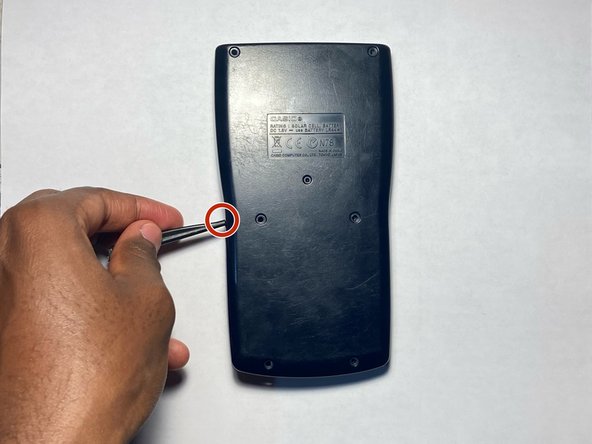
    • Use a spudger to pry the back case from the calculator.

    • Gently work your way around the edge of the calculator to release any clips before separating the two halves.

    • If you feel resistance when removing the back case, check to make sure you didn't miss a screw.

  4. CASIO fx-300 MS Battery Replacement: adım 4, 3 resimden 1. CASIO fx-300 MS Battery Replacement: adım 4, 3 resimden 2. CASIO fx-300 MS Battery Replacement: adım 4, 3 resimden 3.
    • Use a spudger to remove the old battery.

    • Replace it with a new LR44 1.5 volt battery.

  5. CASIO fx-300 MS Battery Replacement: adım 5, 3 resimden 1. CASIO fx-300 MS Battery Replacement: adım 5, 3 resimden 2. CASIO fx-300 MS Battery Replacement: adım 5, 3 resimden 3.
    • Reassemble the calculator and replace the 5 mm Phillips #0 screws.

    • Press the ON button to verify that the replacement was successful.

Sonuç

To reassemble your device, follow these instructions in reverse order.

Bir başkası bu kılavuzu tamamladı.

Raphael Tweneboah

Üyelik tarihi: 09/10/23

145 İtibar

1 Kılavuz yazıldı

Ekip

0Kılavuz Yorumları

Yorum Ekle

İstatistikleri Görüntüle:

Son 24 Saat: 4

Son 7 gün: 15

Son 30 gün: 59

Her zaman: 968