Ana içeriğe geç
Onarım Topluluğuna Katılın - Hesap Oluşturun

Canon EOS 70D Camera Motherboard Replacement

Neye ihtiyacın var

    1. Canon EOS 70D Camera Motherboard Replacement, Battery: adım 1, 1 resimden 1.
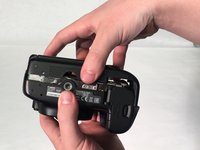
      • Hold the camera with the lens pointing down. Press the highlighted button with your finger to release the cover.

      • Pull cover over to expose the battery.

      FixBot'a Sor

      Yorum Ekle

    2. Canon EOS 70D Camera Motherboard Replacement: adım 2, 2 resimden 1. Canon EOS 70D Camera Motherboard Replacement: adım 2, 2 resimden 2.
      • Press the white button with your finger to release the battery.

      • Once released, the battery will eject out about two inches

      FixBot'a Sor

      Yorum Ekle

    3. Canon EOS 70D Camera Motherboard Replacement: adım 3, 1 resimden 1.
      • Pull battery out of the camera.

      FixBot'a Sor

      Yorum Ekle

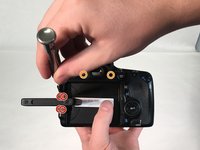
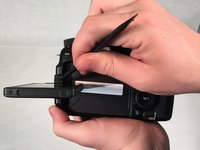
    1. Canon EOS 70D Camera Motherboard Replacement, LCD Touchscreen: adım 4, 2 resimden 1. Canon EOS 70D Camera Motherboard Replacement, LCD Touchscreen: adım 4, 2 resimden 2.
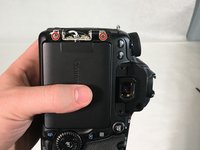
      • Pull Touchscreen out and rotate 90 degrees. Remove the four 3 mm Phillips #000 head screws that are now exposed at the hinge.

      • Remove the two 5 mm Phillips #000 head screws that near the viewfinder.

      • Use a spudger and pry apart the two plastic hinge-covers surrounding the screen hinge.

      • The screen and hinge columns will not be removed at this step.

      • Rotate the screen forward 90 degrees and push it back into its housing against the camera.

      FixBot'a Sor

      Yorum Ekle

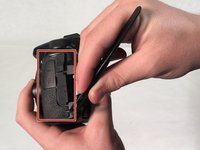
    2. Canon EOS 70D Camera Motherboard Replacement: adım 5, 2 resimden 1. Canon EOS 70D Camera Motherboard Replacement: adım 5, 2 resimden 2.
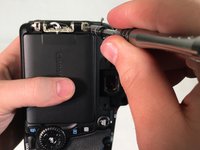
      • Use a spudger to peel rubber matting on left hand side to expose camera backplate mounting screws.

      • Remove three 4 mm Phillip #000 head screws that mount the backplate to the left side of camera.

      FixBot'a Sor

      Yorum Ekle

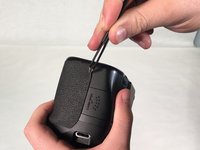
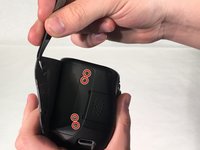
    3. Canon EOS 70D Camera Motherboard Replacement: adım 6, 2 resimden 1. Canon EOS 70D Camera Motherboard Replacement: adım 6, 2 resimden 2.
      Bu adımda kullanılan alet:
      Tweezers
      $4.99
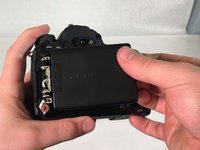
      • Use tweezers to pry rubber matting on right hand side to expose backplate mounting screws.

      • Remove four 4 mm Phillips #000 head screws that mount the backplate to the right side of camera.

      FixBot'a Sor

      Yorum Ekle

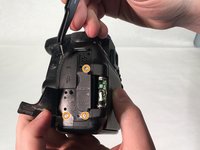
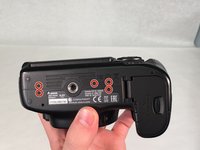
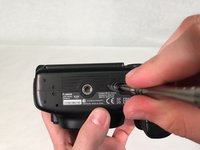
    4. Canon EOS 70D Camera Motherboard Replacement: adım 7, 3 resimden 1. Canon EOS 70D Camera Motherboard Replacement: adım 7, 3 resimden 2. Canon EOS 70D Camera Motherboard Replacement: adım 7, 3 resimden 3.
      • Turn camera upside down. Remove five 5 mm Phillips #000 head screws securing the backplate to the bottom of the camera.

      • Grab the backplate and gently pull away from camera.

      • The backplate will still be attached by the wires running to the LCD touchscreen.

      • The screen will still be attached to the camera and won't be removed until step 10.

      FixBot'a Sor

      Yorum Ekle

    5. Canon EOS 70D Camera Motherboard Replacement: adım 8, 2 resimden 1. Canon EOS 70D Camera Motherboard Replacement: adım 8, 2 resimden 2.
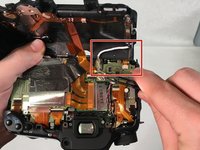
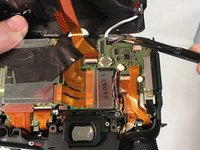
      • Carefully pry open backplate from camera to expose LCD connector (white wire). LCD connector is attached with a metal bar to the motherboard.

      • Use tweezers to gently pry metal bar connector from camera motherboard.

      FixBot'a Sor

      Yorum Ekle

    6. Canon EOS 70D Camera Motherboard Replacement: adım 9, 2 resimden 1. Canon EOS 70D Camera Motherboard Replacement: adım 9, 2 resimden 2.
      • Remove two 4 mm Phillips #000 head screws that mount the LCD touchscreen to the hinge on the camera.

      FixBot'a Sor

      Yorum Ekle

    7. Canon EOS 70D Camera Motherboard Replacement: adım 10, 3 resimden 1. Canon EOS 70D Camera Motherboard Replacement: adım 10, 3 resimden 2. Canon EOS 70D Camera Motherboard Replacement: adım 10, 3 resimden 3.
      • Grip the screen with your hand and gently pull white connecting wire through hole in backplate.

      • Once the connector reaches the hole, twist the connector and pull completely through hole.

      • You must twist the connector in order to fit through hole.

      FixBot'a Sor

      Yorum Ekle

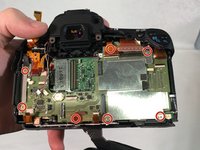
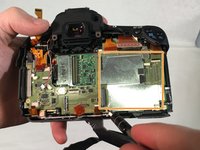
    1. Canon EOS 70D Camera Motherboard Replacement, Camera Motherboard: adım 11, 3 resimden 1. Canon EOS 70D Camera Motherboard Replacement, Camera Motherboard: adım 11, 3 resimden 2. Canon EOS 70D Camera Motherboard Replacement, Camera Motherboard: adım 11, 3 resimden 3.
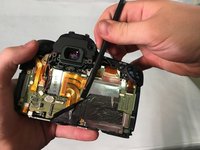
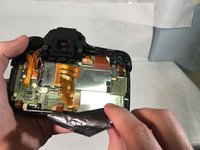
      • Use spudger to lift edge of black heat tape.

      • Slowly peel back black heat tape.

      FixBot'a Sor

      Yorum Ekle

    2. Canon EOS 70D Camera Motherboard Replacement: adım 12, 3 resimden 1. Canon EOS 70D Camera Motherboard Replacement: adım 12, 3 resimden 2. Canon EOS 70D Camera Motherboard Replacement: adım 12, 3 resimden 3.
      Bu adımda kullanılan alet:
      Tweezers
      $4.99
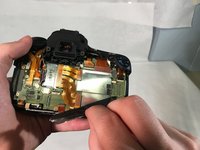
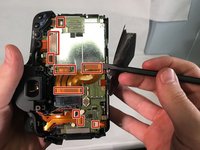
      • Very carefully, use spudger to remove nine orangish ribbon cables.

      • Using tweezers remove the two wire cables shown.

      • Slowly remove ribbon cables because they can tear very easily.

      FixBot'a Sor

      Yorum Ekle

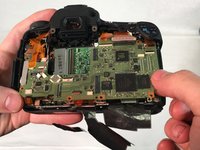
    3. Canon EOS 70D Camera Motherboard Replacement: adım 13, 3 resimden 1. Canon EOS 70D Camera Motherboard Replacement: adım 13, 3 resimden 2. Canon EOS 70D Camera Motherboard Replacement: adım 13, 3 resimden 3.
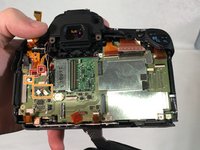
      • Remove seven 5 mm Phillips #000 head screws around motherboard.

      • Once the five screws are removed, remove the metal chip covered by hand.

      • This will leave the mother board exposed, attached by two cable wires underneath.

      FixBot'a Sor

      Yorum Ekle

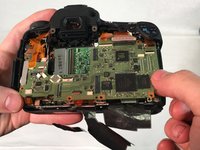
    4. Canon EOS 70D Camera Motherboard Replacement: adım 14, 3 resimden 1. Canon EOS 70D Camera Motherboard Replacement: adım 14, 3 resimden 2. Canon EOS 70D Camera Motherboard Replacement: adım 14, 3 resimden 3.
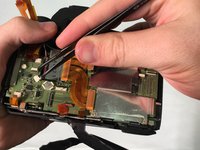
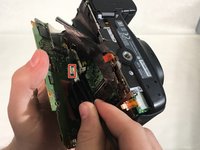
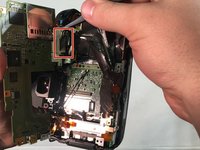
      • Slowly lift motherboard to expose the two cable wires underneath.

      • Using tweezers, unattach the two wire cables holding the motherboard in.

      FixBot'a Sor

      Yorum Ekle

    5. Canon EOS 70D Camera Motherboard Replacement: adım 15, 1 resimden 1.
      • Carefully remove motherboard.

      FixBot'a Sor

      Yorum Ekle

Sonuç

To reassemble your device, follow these instructions in reverse order.

İptal et: Bu kılavuzu tamamlamadım.

17 farklı kişi bu kılavuzu tamamladı.

5Kılavuz Yorumları

Great write up and illustrations. I'm in the process of repairing a 70D and this will be a great help.

Thank you and keep up the good work!

marcuscleveland85 - Yanıt Paylaş
Hi, do you know if after replacing the main board it is necessary to configure the camera with some software ? (I heard of spt software)

Stephen Lay - Yanıt Paylaş
Hi Tyler my Canon Camera eos 70D isn’t working anymore is it possible to replace the motherboard?

Charlie Laguna - Yanıt Paylaş

Je suis à recherche de la carte mère de mon canon 70D. Puis je avoir de l’aide s’il vous plaît. Merci

Mahamadou DEMBELE - Yanıt Paylaş

Je suis à la recherche d'une carte mère Pour canon EOS 70d. Aidez-moi svp

kindambi jython - Yanıt Paylaş

Yorum Ekle

İstatistikleri Görüntüle:

Son 24 Saat: 8

Son 7 gün: 38

Son 30 gün: 202

Her zaman: 21,780