Ana içeriğe geç
Onarım Topluluğuna Katılın - Hesap Oluşturun

Canon EOS A2 Front Cover Replacement

Neye ihtiyacın var

    1. Canon EOS A2 Front Cover Replacement, Battery: adım 1, 1 resimden 1.
      • Locate the battery door/camera grip on the left side of the camera and lift the rotating removal tab.

      FixBot'a Sor

      Yorum Ekle

    2. Canon EOS A2 Front Cover Replacement: adım 2, 1 resimden 1.
      • Twist the tab clockwise to unlock the door, then pull outward from the camera to remove it.

      FixBot'a Sor

      Yorum Ekle

    3. Canon EOS A2 Front Cover Replacement: adım 3, 1 resimden 1.
      • Remove the battery from inside the battery housing and set the cover aside.

      FixBot'a Sor

      Yorum Ekle

    1. Canon EOS A2 Front Cover Replacement, Front Cover: adım 4, 1 resimden 1.
      • Remove the two 6.4mm screws above the lens aperture using a phillips #00 screw driver.

      FixBot'a Sor

      Yorum Ekle

    2. Canon EOS A2 Front Cover Replacement: adım 5, 1 resimden 1.
      • Remove the 6.4mm screw from the inside of the flash bezel.

      • If the flash is locked down, insert the battery, then with the help of a pencil turn the rotary (CW or CCW) switch until the "125" is displayed in the LCD. Press the Flash symbol button. You should hear the latch from the flash, then you can manually lift the flash. If OK, then remove the battery from the camera

      FixBot'a Sor

      Yorum Ekle

    3. Canon EOS A2 Front Cover Replacement: adım 6, 1 resimden 1.
      • Flip the camera upside down and remove the 5.4mm screw below the lens bezel on the front of the camera.

      FixBot'a Sor

      Yorum Ekle

    4. Canon EOS A2 Front Cover Replacement: adım 7, 1 resimden 1.
      • Remove the 5.6mm screws behind the battery cover.

      FixBot'a Sor

      Yorum Ekle

    5. Canon EOS A2 Front Cover Replacement: adım 8, 1 resimden 1.
      • Remove two 6.4mm screws on the latch mechanism on the right side of the camera.

      FixBot'a Sor

      Yorum Ekle

    6. Canon EOS A2 Front Cover Replacement: adım 9, 1 resimden 1.
      • Remove the 6.4mm screw on the top of the inside edge of the battery hole.

      FixBot'a Sor

      Yorum Ekle

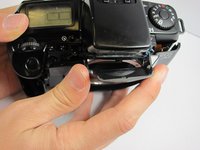
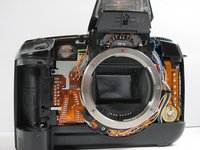
    7. Canon EOS A2 Front Cover Replacement: adım 10, 2 resimden 1. Canon EOS A2 Front Cover Replacement: adım 10, 2 resimden 2.
      • Starting at the flash, carefully pull the front cover away from the camera.

      FixBot'a Sor

      Yorum Ekle

Sonuç

To reassemble your device, follow these instructions in reverse order.

İptal et: Bu kılavuzu tamamlamadım.

Mark

Üyelik tarihi: 04/20/11

197 İtibar

5 adet Kılavuz yazıldı

Ekip

Cal Poly, Team 8-9, Regan Spring 2011 Cal Poly, Team 8-9, Regan Spring 2011 üyesi

CPSU-REGAN-S11S8G9

4 Üyeler

25 adet Kılavuz yazıldı

0Kılavuz Yorumları

Yorum Ekle

İstatistikleri Görüntüle:

Son 24 Saat: 4

Son 7 gün: 14

Son 30 gün: 42

Her zaman: 3,226