Ana içeriğe geç
Onarım Topluluğuna Katılın - Hesap Oluşturun

Canon PowerShot A2300 Flash Assembly Replacement

Neye ihtiyacın var

  1. Canon PowerShot A2300 Flash Assembly Replacement, Front Cover: adım 1, 1 resimden 1.
    • Open the A/V Out Digital port cover on the function button side to reveal a screw.

    FixBot'a Sor

    Yorum Ekle

  2. Canon PowerShot A2300 Flash Assembly Replacement: adım 2, 3 resimden 1. Canon PowerShot A2300 Flash Assembly Replacement: adım 2, 3 resimden 2. Canon PowerShot A2300 Flash Assembly Replacement: adım 2, 3 resimden 3.
    • Remove all 6 screws(2.70 mm), 2 on each side and 2 on the bottom.

    • Screws are small and very easily lost.

    FixBot'a Sor

    Yorum Ekle

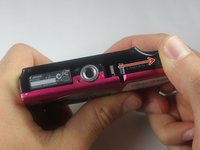
  3. Canon PowerShot A2300 Flash Assembly Replacement: adım 3, 2 resimden 1. Canon PowerShot A2300 Flash Assembly Replacement: adım 3, 2 resimden 2.
    • Open the card/battery latch by sliding the cover away from the camera in the direction indicated by the arrow.

    • Doing this gives a spot to grip on the bottom of the front cover. This will make it easier to handle when removing.

    FixBot'a Sor

    Yorum Ekle

  4. Canon PowerShot A2300 Flash Assembly Replacement: adım 4, 1 resimden 1.
    • Gently lift the bottom of the front cover to roughly a 30 degree angle.

    FixBot'a Sor

    Yorum Ekle

  5. Canon PowerShot A2300 Flash Assembly Replacement: adım 5, 1 resimden 1.
    • Pull the top of the front cover away from the camera by gripping the top of the front cover by the corners where the cover is still attached to the body.

    FixBot'a Sor

    Yorum Ekle

  6. Canon PowerShot A2300 Flash Assembly Replacement, Back Cover: adım 6, 1 resimden 1.
    • Hold the camera in your hands with both thumbs on the screen with the screen faced up.

    • Keep close to the table top in case the camera falls out of your hands.

    FixBot'a Sor

    Yorum Ekle

  7. Canon PowerShot A2300 Flash Assembly Replacement: adım 7, 1 resimden 1.
    • Pull the the bottom left corner of the cover up about an inch to the point shown in the picture.

    • Do not completely remove the back cover by pulling on the side as shown. The cover is still attached on the top of the camera.

    FixBot'a Sor

    Yorum Ekle

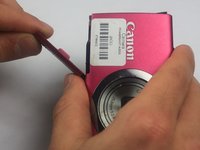
  8. Canon PowerShot A2300 Flash Assembly Replacement: adım 8, 1 resimden 1.
    • Pry the top off by sliding the spudger under the On/Off button.

    FixBot'a Sor

    Yorum Ekle

  9. Canon PowerShot A2300 Flash Assembly Replacement: adım 9, 1 resimden 1.
    • Slide the cover to the right and off the camera.

    • Gently pry using the spudger on the right side if necessary.

    • The A/V OUT DIGITAL cover will sometimes become loose and disconnect from the cover

    FixBot'a Sor

    Yorum Ekle

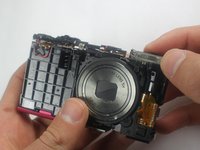
  10. Canon PowerShot A2300 Flash Assembly Replacement, Flash Assembly: adım 10, 1 resimden 1.
    • Raise the screen by wedging the spudger between the bottom of the screen and the mount hole.

    FixBot'a Sor

    Yorum Ekle

  11. Canon PowerShot A2300 Flash Assembly Replacement: adım 11, 1 resimden 1.
    • Remove the metal sheet that is under the screen.

    FixBot'a Sor

    Yorum Ekle

  12. Canon PowerShot A2300 Flash Assembly Replacement: adım 12, 1 resimden 1.
    • Remove the top left screw on the metal sheet that is behind the screen.

    • This screw connects the flash to the metal sheet.

    FixBot'a Sor

    Yorum Ekle

  13. Canon PowerShot A2300 Flash Assembly Replacement: adım 13, 1 resimden 1.
    Bu adımda kullanılan alet:
    Tweezers
    $4.99
    • Use one side of the tweezers to raise the orange retaining flap on the zero insertion force (ZIF) connector to a vertical position.

    FixBot'a Sor

    Yorum Ekle

  14. Canon PowerShot A2300 Flash Assembly Replacement: adım 14, 1 resimden 1.
    • Gently pull the orange ribbon cable out of the ZIF connector using the tweezers.

    FixBot'a Sor

    Yorum Ekle

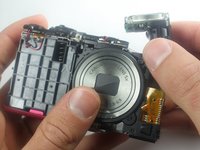
  15. Canon PowerShot A2300 Flash Assembly Replacement: adım 15, 2 resimden 1. Canon PowerShot A2300 Flash Assembly Replacement: adım 15, 2 resimden 2.
    • Remove the flash by gently rotating slightly back and forth and pulling up.

    FixBot'a Sor

    Yorum Ekle

Sonuç

To reassemble your device, follow these instructions in reverse order.

İptal et: Bu kılavuzu tamamlamadım.

3 farklı kişi bu kılavuzu tamamladı.

Nathan McMillan

Üyelik tarihi: 03/23/15

405 İtibar

2 adet Kılavuz yazıldı

Ekip

Baylor, Team 7-14, Williams Spring 2015 Baylor, Team 7-14, Williams Spring 2015 üyesi

BU-WILLIAMS-S15S7G14

4 Üyeler

10 adet Kılavuz yazıldı

0Kılavuz Yorumları

Yorum Ekle

İstatistikleri Görüntüle:

Son 24 Saat: 0

Son 7 gün: 10

Son 30 gün: 78

Her zaman: 2,482