Ana içeriğe geç
Onarım Topluluğuna Katılın - Hesap Oluşturun

Canon PowerShot A3400 IS Flash Assembly Replacement

Neye ihtiyacın var

    1. Canon PowerShot A3400 IS Flash Assembly Replacement, Battery: adım 1, 1 resimden 1.
      • Place thumb on area right next to where it says open and slide to the right to open.

      FixBot'a Sor

      Yorum Ekle

    2. Canon PowerShot A3400 IS Flash Assembly Replacement: adım 2, 1 resimden 1.
      • Remove the battery by pushing the orange object outwards; the battery will spring up and out.

      FixBot'a Sor

      Yorum Ekle

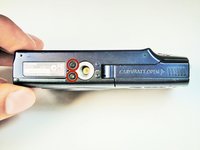
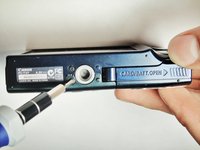
    1. Canon PowerShot A3400 IS Flash Assembly Replacement, Plastic Case: adım 3, 2 resimden 1. Canon PowerShot A3400 IS Flash Assembly Replacement, Plastic Case: adım 3, 2 resimden 2.
      • Remove the two 5.00 mm screws in the bottom of the casing with a Philips #000 screwdriver

      FixBot'a Sor

      Yorum Ekle

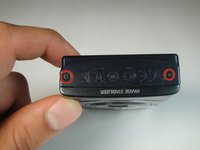
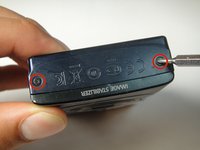
    2. Canon PowerShot A3400 IS Flash Assembly Replacement: adım 4, 2 resimden 1. Canon PowerShot A3400 IS Flash Assembly Replacement: adım 4, 2 resimden 2.
      • Place the camera on to the side that has the image stabilizer label.

      • Remove the 5.00 mm screws that are on this side using the screwdriver.

      FixBot'a Sor

      Yorum Ekle

    3. Canon PowerShot A3400 IS Flash Assembly Replacement: adım 5, 1 resimden 1.
      • Place camera on to the side with the A/V Out Digital Cover facing up.

      • Remove this visible 5.00 mm screw.

      • Pull the A/V Out Digital cover back to uncover the next step.

      FixBot'a Sor

      Yorum Ekle

    4. Canon PowerShot A3400 IS Flash Assembly Replacement: adım 6, 1 resimden 1.
      • Remove the 5.00 mm screw from behind the cover.

      FixBot'a Sor

      Yorum Ekle

    5. Canon PowerShot A3400 IS Flash Assembly Replacement: adım 7, 1 resimden 1.
      • Make sure the battery cover is open.

      FixBot'a Sor

      Yorum Ekle

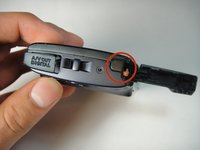
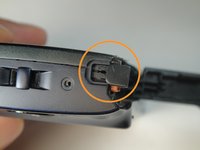
    6. Canon PowerShot A3400 IS Flash Assembly Replacement: adım 8, 2 resimden 1. Canon PowerShot A3400 IS Flash Assembly Replacement: adım 8, 2 resimden 2.
      • Turn the camera onto the side with the A/V out Digital cover.

      • Use your finger to pull this tab to the right.

      FixBot'a Sor

      Yorum Ekle

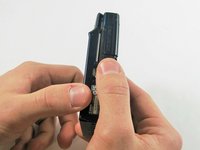
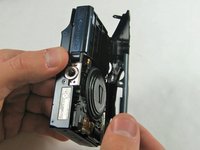
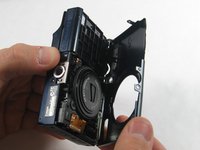
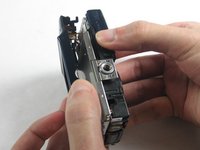
    7. Canon PowerShot A3400 IS Flash Assembly Replacement: adım 9, 3 resimden 1. Canon PowerShot A3400 IS Flash Assembly Replacement: adım 9, 3 resimden 2. Canon PowerShot A3400 IS Flash Assembly Replacement: adım 9, 3 resimden 3.
      • Remove the lens side by using your fingers or a spudger to pry it gently open.

      • Try to pry it loose all around that side so that it is easier to pull off.

      FixBot'a Sor

      Yorum Ekle

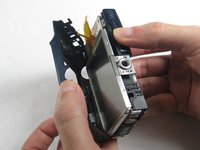
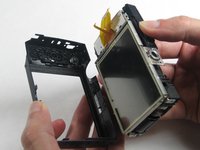
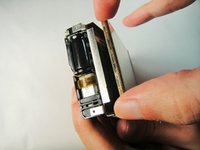
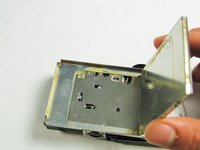
    8. Canon PowerShot A3400 IS Flash Assembly Replacement: adım 10, 3 resimden 1. Canon PowerShot A3400 IS Flash Assembly Replacement: adım 10, 3 resimden 2. Canon PowerShot A3400 IS Flash Assembly Replacement: adım 10, 3 resimden 3.
      • Using your fingers, pull the screen side gently off.

      • Try to loosen it all around that side so that it is easier to try and pull it off.

      FixBot'a Sor

      Yorum Ekle

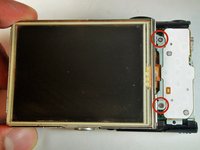
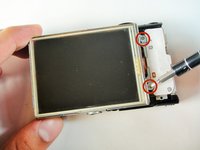
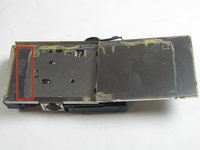
    1. Canon PowerShot A3400 IS Flash Assembly Replacement, Flash: adım 11, 3 resimden 1. Canon PowerShot A3400 IS Flash Assembly Replacement, Flash: adım 11, 3 resimden 2. Canon PowerShot A3400 IS Flash Assembly Replacement, Flash: adım 11, 3 resimden 3.
      • Remove the three 5 mm screws

      FixBot'a Sor

      Yorum Ekle

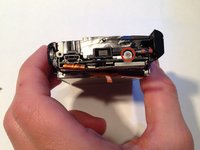
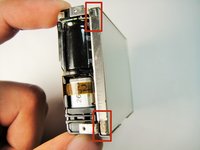
    2. Canon PowerShot A3400 IS Flash Assembly Replacement: adım 12, 3 resimden 1. Canon PowerShot A3400 IS Flash Assembly Replacement: adım 12, 3 resimden 2. Canon PowerShot A3400 IS Flash Assembly Replacement: adım 12, 3 resimden 3.
      • Remove the screen by pulling at the two points as shown.

      FixBot'a Sor

      Yorum Ekle

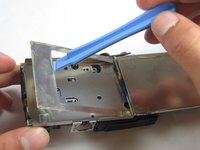
    3. Canon PowerShot A3400 IS Flash Assembly Replacement: adım 13, 2 resimden 1. Canon PowerShot A3400 IS Flash Assembly Replacement: adım 13, 2 resimden 2.
      • Remove the metal plate with the plastic opening tool.

      FixBot'a Sor

      Yorum Ekle

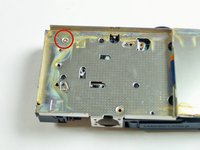
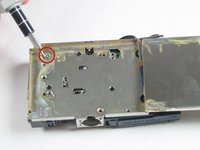
    4. Canon PowerShot A3400 IS Flash Assembly Replacement: adım 14, 2 resimden 1. Canon PowerShot A3400 IS Flash Assembly Replacement: adım 14, 2 resimden 2.
      • Remove the 5 mm screw

      FixBot'a Sor

      Yorum Ekle

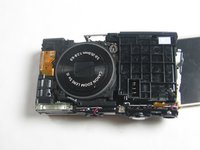
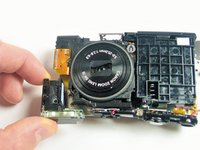
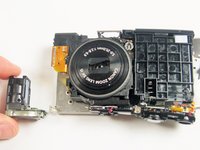
    5. Canon PowerShot A3400 IS Flash Assembly Replacement: adım 15, 3 resimden 1. Canon PowerShot A3400 IS Flash Assembly Replacement: adım 15, 3 resimden 2. Canon PowerShot A3400 IS Flash Assembly Replacement: adım 15, 3 resimden 3.
      • Gently pull the flash assembly away.

      FixBot'a Sor

      Yorum Ekle

Sonuç

To reassemble your device, follow these instructions in reverse order.

İptal et: Bu kılavuzu tamamlamadım.

2 farklı kişi bu kılavuzu tamamladı.

Emily Pretorius

Üyelik tarihi: 01/13/15

349 İtibar

3 adet Kılavuz yazıldı

1Rehber Yorum

easy to take off but waste of putting it back together..

The Heat - Yanıt Paylaş

Yorum Ekle

İstatistikleri Görüntüle:

Son 24 Saat: 1

Son 7 gün: 11

Son 30 gün: 28

Her zaman: 986