Ana içeriğe geç
Onarım Topluluğuna Katılın - Hesap Oluşturun

Canon PowerShot A630 Trigger Button Replacement

Neye ihtiyacın var

  1. Canon PowerShot A630 Trigger Button Replacement, Front Panel: adım 1, 2 resimden 1. Canon PowerShot A630 Trigger Button Replacement, Front Panel: adım 1, 2 resimden 2.
    • Open the battery door by sliding the tab on the battery door while pushing the battery door away from the camera.

    • Remove batteries.

    FixBot'a Sor

    Yorum Ekle

  2. Canon PowerShot A630 Trigger Button Replacement: adım 2, 2 resimden 1. Canon PowerShot A630 Trigger Button Replacement: adım 2, 2 resimden 2.
    • Remove the three indicated .2mm screws using a Phillips #00 screwdriver.

    • Gently pull off side-panel to remove it.

    FixBot'a Sor

    Yorum Ekle

  3. Canon PowerShot A630 Trigger Button Replacement: adım 3, 1 resimden 1.
    • Remove the two indicated .2mm screws using a Phillips #00 screwdriver.

    FixBot'a Sor

    Yorum Ekle

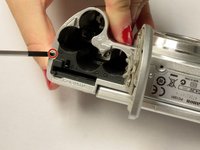
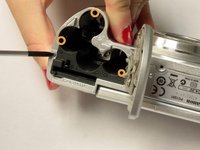
  4. Canon PowerShot A630 Trigger Button Replacement: adım 4, 2 resimden 1. Canon PowerShot A630 Trigger Button Replacement: adım 4, 2 resimden 2.
    • Remove the indicated .2mm screw using a Phillips #00 screwdriver.

    • Remove the three .2mm screws located on the internal side of the top panel within the battery chamber using a Phillips #00 screwdriver.

    FixBot'a Sor

    Yorum Ekle

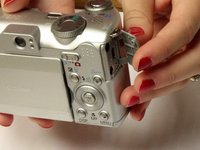
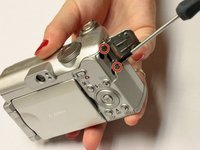
  5. Canon PowerShot A630 Trigger Button Replacement: adım 5, 2 resimden 1. Canon PowerShot A630 Trigger Button Replacement: adım 5, 2 resimden 2.
    • Open 'DIGITAL A/V OUT' door on camera.

    • Remove the two indicated .2mm screws using a Phillips #00 screwdriver.

    FixBot'a Sor

    Yorum Ekle

  6. Canon PowerShot A630 Trigger Button Replacement: adım 6, 1 resimden 1.
    • Grip the sides of the top panel and gently pull to separate the top panel from the camera body.

    • The top panel will not completely detach.

    FixBot'a Sor

    Yorum Ekle

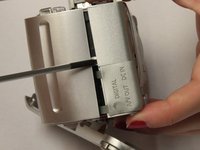
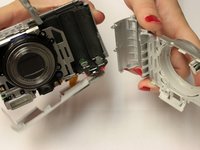
  7. Canon PowerShot A630 Trigger Button Replacement: adım 7, 2 resimden 1. Canon PowerShot A630 Trigger Button Replacement: adım 7, 2 resimden 2.
    • Gently pull the front and back panels apart, and use a Phillips #00 screwdriver to remove the screw connecting the panels.

    • Gripping the top and bottom, gently pull the front panel away from the camera body to remove it.

    FixBot'a Sor

    Yorum Ekle

  8. Canon PowerShot A630 Trigger Button Replacement, Trigger Button: adım 8, 1 resimden 1.
    • Use the spudger to gently pull back the retaining clip and pull the ribbon out

    • The top panel should now be completely detached from the camera

    • Applying to much force to the spudger may damage the retaining clip

    FixBot'a Sor

    Yorum Ekle

  9. Canon PowerShot A630 Trigger Button Replacement: adım 9, 1 resimden 1.
    • Remove the two screws holding down the metal frame using the Phillips #00 screwdriver

    FixBot'a Sor

    Yorum Ekle

  10. Canon PowerShot A630 Trigger Button Replacement: adım 10, 1 resimden 1.
    • Lift up the metal frame to expose the two screws located under the trigger button.

    • Remove the two screws using Phillips #00 screwdriver

    FixBot'a Sor

    Yorum Ekle

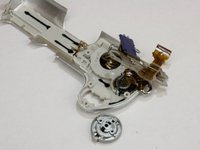
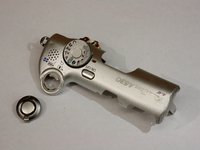
  11. Canon PowerShot A630 Trigger Button Replacement: adım 11, 2 resimden 1. Canon PowerShot A630 Trigger Button Replacement: adım 11, 2 resimden 2.
    • Trigger button should fall out

    FixBot'a Sor

    Yorum Ekle

Sonuç

To reassemble your device, follow these instructions in reverse order.

İptal et: Bu kılavuzu tamamlamadım.

Bir başkası bu kılavuzu tamamladı.

Kelly Duggan

Üyelik tarihi: 10/13/14

460 İtibar

3 adet Kılavuz yazıldı

Ekip

Clemson, Team 2-5, Benson Fall 2014 Clemson, Team 2-5, Benson Fall 2014 üyesi

CLEM-BENSON-F14S2G5

4 Üyeler

18 adet Kılavuz yazıldı

0Kılavuz Yorumları

Yorum Ekle

İstatistikleri Görüntüle:

Son 24 Saat: 1

Son 7 gün: 10

Son 30 gün: 41

Her zaman: 1,018