Ana içeriğe geç
Onarım Topluluğuna Katılın - Hesap Oluşturun

Canon PowerShot S50 Left Motherboard Replacement

Neye ihtiyacın var

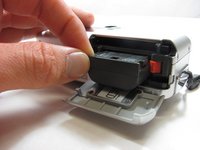
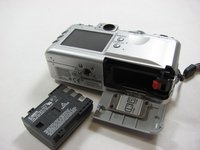
    1. Canon PowerShot S50 Left Motherboard Replacement, Battery: adım 1, 2 resimden 1. Canon PowerShot S50 Left Motherboard Replacement, Battery: adım 1, 2 resimden 2.
      • Place camera LCD side up and press up on the battery door.

      • Let it swing open until you can see the battery inside.

      FixBot'a Sor

      Yorum Ekle

    2. Canon PowerShot S50 Left Motherboard Replacement: adım 2, 1 resimden 1.
      • Press down on the orange plastic.

      • This will gently eject the battery from its compartment.

      FixBot'a Sor

      Yorum Ekle

    3. Canon PowerShot S50 Left Motherboard Replacement: adım 3, 2 resimden 1. Canon PowerShot S50 Left Motherboard Replacement: adım 3, 2 resimden 2.
      • Holding the edges, slide out the battery.

      FixBot'a Sor

      Yorum Ekle

    1. Canon PowerShot S50 Left Motherboard Replacement, Front Panel/Battery Door: adım 4, 1 resimden 1.
      • Look at the camera from the side with the lanyard and 4 screws.

      • Remove the two 3.4 mm screws on the metallic colored part.

      FixBot'a Sor

      Yorum Ekle

    2. Canon PowerShot S50 Left Motherboard Replacement: adım 5, 1 resimden 1.
      • Remove the 3mm screw on the top left.

      • NOTE: When reassembling, it is helpful to put the top screw back in before placing the front cover back on the camera.

      • Now remove the 5.3mm screw on the bottom.

      FixBot'a Sor

      Yorum Ekle

    3. Canon PowerShot S50 Left Motherboard Replacement: adım 6, 1 resimden 1.
      • Place the camera LCD side down.

      • Remove the two 5.3mm screws by the battery door.

      FixBot'a Sor

      Yorum Ekle

    4. Canon PowerShot S50 Left Motherboard Replacement: adım 7, 1 resimden 1.
      • Remove the four 3.4mm screws on the bottom of the camera around the tripod mount.

      • Make sure to keep these screws separate from the previous 5.3 mm screws.

      FixBot'a Sor

      Yorum Ekle

    5. Canon PowerShot S50 Left Motherboard Replacement: adım 8, 1 resimden 1.
      • Stand the camera back up.

      • Remove the two 3.6mm screws on the side with the A/V Out port.

      FixBot'a Sor

      Yorum Ekle

    6. Canon PowerShot S50 Left Motherboard Replacement: adım 9, 1 resimden 1.
      • Lift open the rubber flap covering the A/V Out port.

      • Remove the 3.4mm screw in the center.

      • During reassembly, put the A/V out rubber door on before replacing the front panel of the camera

      FixBot'a Sor

      Yorum Ekle

    7. Canon PowerShot S50 Left Motherboard Replacement: adım 10, 1 resimden 1.
      • Use a spudger and gently open up the front panel of the camera.

      • A thin plastic ribbon will stay connected by a brown piece to front panel of the camera.

      FixBot'a Sor

      Yorum Ekle

    8. Canon PowerShot S50 Left Motherboard Replacement: adım 11, 1 resimden 1.
      • There will be a brown plastic piece keeping the thin plastic ribbon in place.

      • Use the spudger to pull out the brown plastic piece attached to the orange plastic.

      FixBot'a Sor

      Yorum Ekle

    9. Canon PowerShot S50 Left Motherboard Replacement: adım 12, 1 resimden 1.
      Bu adımda kullanılan alet:
      Tweezers
      $4.99
      • Use a pair of tweezers and remove the metal piece inside the camera.

      FixBot'a Sor

      Yorum Ekle

    10. Canon PowerShot S50 Left Motherboard Replacement: adım 13, 1 resimden 1.
      • Remove the battery door

      • NOTE: Putting this back on requires aligning the spring on the back of the door with the hole on the camera

      FixBot'a Sor

      Yorum Ekle

    1. Canon PowerShot S50 Left Motherboard Replacement, Left Motherboard: adım 14, 1 resimden 1.
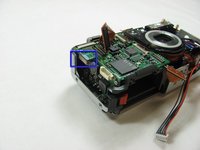
      • Disconnect the black and red cable on the left side of the lens.

      FixBot'a Sor

      Yorum Ekle

    2. Canon PowerShot S50 Left Motherboard Replacement: adım 15, 1 resimden 1.
      • Disconnect the two orange ribbons on the front of the mother board.

      FixBot'a Sor

      Yorum Ekle

    3. Canon PowerShot S50 Left Motherboard Replacement: adım 16, 1 resimden 1.
      • Pull off the orange ribbon on the upper left of the motherboard.

      • This will become available only after removing the ribbon on top.

      • Remove the other two orange ribbons on the middle of the left motherboard.

      FixBot'a Sor

      Yorum Ekle

    4. Canon PowerShot S50 Left Motherboard Replacement: adım 17, 1 resimden 1.
      • Remove the 3.3mm screw halfway up the left side of the motherboard just to the left of the lens.

      • Go under the piece of plastic and remove the 2.6mm screw.

      FixBot'a Sor

      Yorum Ekle

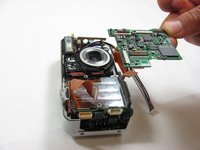
    5. Canon PowerShot S50 Left Motherboard Replacement: adım 18, 2 resimden 1. Canon PowerShot S50 Left Motherboard Replacement: adım 18, 2 resimden 2.
      • Unplug the top part of the left motherboard.

      • Gently lift the left motherboard up to remove

      FixBot'a Sor

      Yorum Ekle

Sonuç

To reassemble your device, follow these instructions in reverse order.

İptal et: Bu kılavuzu tamamlamadım.

Jacob

Üyelik tarihi: 03/29/12

16 İtibar

3 adet Kılavuz yazıldı

Ekip

Cal Poly, Team 7-34, Maness Spring 2012 Cal Poly, Team 7-34, Maness Spring 2012 üyesi

CPSU-MANESS-S12S7G34

5 Üyeler

6 adet Kılavuz yazıldı

0Kılavuz Yorumları

Yorum Ekle

İstatistikleri Görüntüle:

Son 24 Saat: 4

Son 7 gün: 11

Son 30 gün: 34

Her zaman: 1,667