Ana içeriğe geç

Bu kılavuzda güncel değişiklikler var. En son onaylanmamış sürüme geçin.

Canon PowerShot SD500 Digital ELPH Shutter Button Replacement

Neye ihtiyacın var

  1. Canon PowerShot SD500 Digital ELPH Shutter Button Replacement, Battery: adım 1, 1 resimden 1.
    • Slide open the battery cover.

    • Push the small orange tab to the side so the battery can be removed.

  2. Canon PowerShot SD500 Digital ELPH Shutter Button Replacement: adım 2, 2 resimden 1. Canon PowerShot SD500 Digital ELPH Shutter Button Replacement: adım 2, 2 resimden 2.
    • Slide the battery out of the battery compartment.

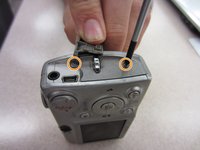
  3. Canon PowerShot SD500 Digital ELPH Shutter Button Replacement, Front and Rear Casing: adım 3, 2 resimden 1. Canon PowerShot SD500 Digital ELPH Shutter Button Replacement, Front and Rear Casing: adım 3, 2 resimden 2.
    • Two Phillips screws need to be removed using a #00 Phillips screwdriver. The upper screw is under the USB port cover, which can simply be pulled away gently from the casing. the lower screw is visible on the panel.

    • The screws are different sizes. The .125 inch screw is located under the USB port cover. The 0.85 inch screw goes in the lower hole on the panel.

    • When looking at the back of the camera, these two screws are on the right panel of the camera.

  4. Canon PowerShot SD500 Digital ELPH Shutter Button Replacement: adım 4, 1 resimden 1.
    • Remove the right side cover from the camera casing.

  5. Canon PowerShot SD500 Digital ELPH Shutter Button Replacement: adım 5, 1 resimden 1.
    • Remove a .07 inch Phillips screw using a #00 Phillips screwdriver.

  6. Canon PowerShot SD500 Digital ELPH Shutter Button Replacement: adım 6, 1 resimden 1.
    • Remove two .085 inch Phillips screws from the left side of the camera using a #00 Philips screwdriver.

  7. Canon PowerShot SD500 Digital ELPH Shutter Button Replacement: adım 7, 1 resimden 1.
    • Remove the left side cover from the camera.

  8. Canon PowerShot SD500 Digital ELPH Shutter Button Replacement: adım 8, 1 resimden 1.
    • Remove three .15 inch Phillips screws from the bottom of the camera using a #00 Phillips screwdriver.

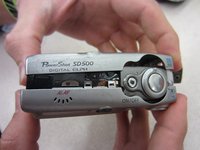
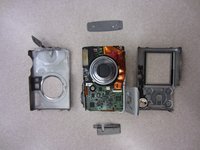
  9. Canon PowerShot SD500 Digital ELPH Shutter Button Replacement: adım 9, 2 resimden 1. Canon PowerShot SD500 Digital ELPH Shutter Button Replacement: adım 9, 2 resimden 2.
    • Once the casing is unscrewed, hold the camera with one side facing down, and lift the opposite face of the casing to open it.

    • Remove the internal camera components and layout out all pieces on a clean surface.

    • The front and back cover may require gentle rocking to remove.

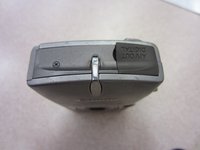
  10. Canon PowerShot SD500 Digital ELPH Shutter Button Replacement, Shutter Button: adım 10, 1 resimden 1.
    • Unscrew one .235 inch long Phillips screw using a #00 Phillips screwdriver from the top of the camera.

  11. Canon PowerShot SD500 Digital ELPH Shutter Button Replacement: adım 11, 1 resimden 1.
    • Gently remove the shutter button unit from the rest of the camera.

Sonuç

To reassemble your device, follow these instructions in reverse order.

Taylor Shields

Üyelik tarihi: 10/13/14

846 İtibar

8 adet Kılavuz yazıldı

Ekip

Clemson, Team 2-1, Benson Fall 2014 Clemson, Team 2-1, Benson Fall 2014 üyesi

CLEM-BENSON-F14S2G1

4 Üyeler

10 adet Kılavuz yazıldı

0Kılavuz Yorumları

Yorum Ekle

İstatistikleri Görüntüle:

Son 24 Saat: 4

Son 7 gün: 10

Son 30 gün: 14

Her zaman: 273