Ana içeriğe geç
Onarım Topluluğuna Katılın - Hesap Oluşturun

Canon PowerShot SX600 HS Display Screen Replacement

Neye ihtiyacın var

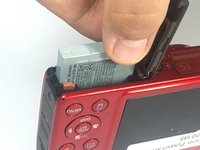
  1. Canon PowerShot SX600 HS Display Screen Replacement, Battery: adım 1, 1 resimden 1.
    • To remove the battery, locate the battery cover on the bottom of the camera.

    • Using your thumb, press down on the cover and slide it outwards.

    FixBot'a Sor

    Yorum Ekle

  2. Canon PowerShot SX600 HS Display Screen Replacement: adım 2, 1 resimden 1.
    • Depress the orange lever holding the battery in place to unlock it.

    FixBot'a Sor

    Yorum Ekle

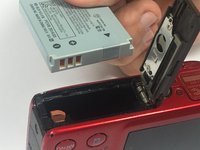
  3. Canon PowerShot SX600 HS Display Screen Replacement: adım 3, 2 resimden 1. Canon PowerShot SX600 HS Display Screen Replacement: adım 3, 2 resimden 2.
    • Use your fingers to remove the battery.

    • Be sure to remember the alignment of the nodes for reassembly.

    FixBot'a Sor

    Yorum Ekle

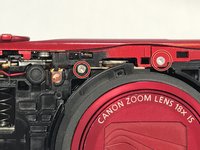
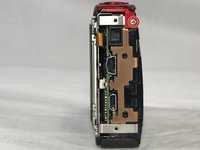
  4. Canon PowerShot SX600 HS Display Screen Replacement, Power and Shutter Buttons: adım 4, 1 resimden 1.
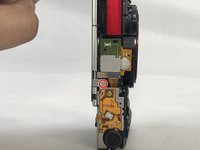
    • Use a #000 Phillips screwdriver to unscrew the four 4mm screws located on the sides of the camera (2 for each side).

    FixBot'a Sor

    Yorum Ekle

  5. Canon PowerShot SX600 HS Display Screen Replacement: adım 5, 1 resimden 1.
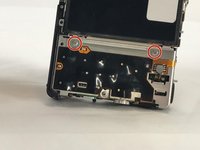
    • Unscrew the four 2mm located on the bottom of the camera using a Phillips #000 screwdriver.

    FixBot'a Sor

    Yorum Ekle

  6. Canon PowerShot SX600 HS Display Screen Replacement: adım 6, 1 resimden 1.
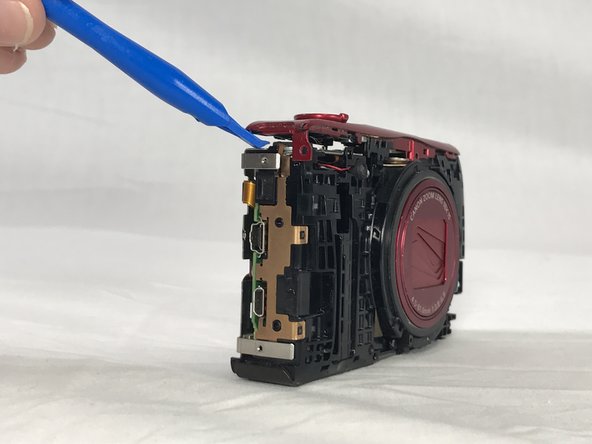
    • Use a plastic opening tool to loosen and remove both the front and back plates of the camera, as well as the two side pieces.

    FixBot'a Sor

    Yorum Ekle

  7. Canon PowerShot SX600 HS Display Screen Replacement: adım 7, 2 resimden 1. Canon PowerShot SX600 HS Display Screen Replacement: adım 7, 2 resimden 2.
    • Unscrew the three 2mm screws attaching the piece to the camera frame with a #000 Phillips screwdriver.

    FixBot'a Sor

    Yorum Ekle

  8. Canon PowerShot SX600 HS Display Screen Replacement: adım 8, 1 resimden 1.
    • Use an opening tool to gently remove the power and shutter button assembly from the frame.

    FixBot'a Sor

    Yorum Ekle

  9. Canon PowerShot SX600 HS Display Screen Replacement, Display Screen: adım 9, 2 resimden 1. Canon PowerShot SX600 HS Display Screen Replacement, Display Screen: adım 9, 2 resimden 2.
    • Unscrew the 2mm screw connections of the main board protector from the camera frame using a #000 Phillips head screwdriver (2 on front, 1 on top)

    FixBot'a Sor

    Yorum Ekle

  10. Canon PowerShot SX600 HS Display Screen Replacement: adım 10, 1 resimden 1.
    • Use a Phillips #000 screwdriver to unscrew the 4mm screw.

    FixBot'a Sor

    Yorum Ekle

  11. Canon PowerShot SX600 HS Display Screen Replacement: adım 11, 1 resimden 1.
    Bu adımda kullanılan alet:
    Tweezers
    $4.99
    • Use a pair of tweezers to remove the no-fuss connector from its holder.

    FixBot'a Sor

    Yorum Ekle

  12. Canon PowerShot SX600 HS Display Screen Replacement: adım 12, 1 resimden 1.
    • Gently lift the protector from the frame.

    FixBot'a Sor

    Yorum Ekle

  13. Canon PowerShot SX600 HS Display Screen Replacement: adım 13, 1 resimden 1.
    • Lift the LCD screen ZIF connector tab and remove the ribbon cable.

    • Detach the no-fuss connector.

    • Lift the screen from its holder.

    FixBot'a Sor

    Yorum Ekle

Sonuç

To reassemble your device, follow these instructions in reverse order.

İptal et: Bu kılavuzu tamamlamadım.

7 farklı kişi bu kılavuzu tamamladı.

Jennyfer Munoz

Üyelik tarihi: 02/15/17

426 İtibar

3 adet Kılavuz yazıldı

Ekip

USF Tampa, Team S6-G4, Lacy Spring 2017 USF Tampa, Team S6-G4, Lacy Spring 2017 üyesi

USFT-LACY-S17S6G4

3 Üyeler

9 adet Kılavuz yazıldı

2Kılavuz Yorumları

Plz I want othe

Gihan - Yanıt Paylaş

I did all this with a new LCD. After reassemble the lens has extended out but camera does not turn on. Should I take it apart again and start from beginning. Is there a connector not in place correctly that will cause this to happen?

Bill Graham - Yanıt Paylaş

Yorum Ekle

İstatistikleri Görüntüle:

Son 24 Saat: 4

Son 7 gün: 21

Son 30 gün: 60

Her zaman: 5,872