Ana içeriğe geç
Onarım Topluluğuna Katılın - Hesap Oluşturun

Circuit Board

Neye ihtiyacın var

  1. Circuit Board, Battery: adım 1, 2 resimden 1. Circuit Board, Battery: adım 1, 2 resimden 2.
    • Locate the horizontal grip located on the back cover of the phone.

    • Slide the back cover down and off of the phone.

    FixBot'a Sor

    Yorum Ekle

  2. Circuit Board: adım 2, 2 resimden 1. Circuit Board: adım 2, 2 resimden 2.
    • Insert a plastic opening tool into the battery release point located above the battery.

    • Pull outwards in order to release the battery.

    FixBot'a Sor

    Yorum Ekle

  3. Circuit Board, Circuit Board Housing: adım 3, 3 resimden 1. Circuit Board, Circuit Board Housing: adım 3, 3 resimden 2. Circuit Board, Circuit Board Housing: adım 3, 3 resimden 3.
    Bu adımda kullanılan alet:
    Tweezers
    $4.99
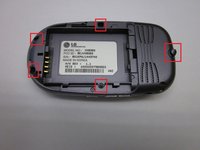
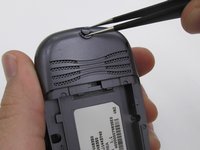
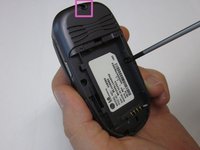
    • Locate the 5 screws holding the body of the phone together.

    • The top screw will have a plastic cover, remove it using tweezers.

    • Using a Philips head screwdriver, twist counterclockwise to remove the screws.

    • Take special care with the screw located at the top of the phone. It is smaller and more likely to be damaged or improperly attached.

    FixBot'a Sor

    Yorum Ekle

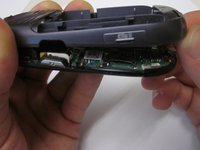
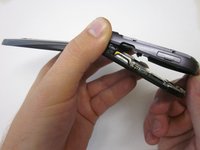
  4. Circuit Board: adım 4, 2 resimden 1. Circuit Board: adım 4, 2 resimden 2.
    • Lift the back cover starting at the bottom of the phone.

    FixBot'a Sor

    Yorum Ekle

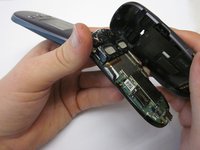
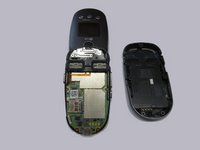
  5. Circuit Board: adım 5, 2 resimden 1. Circuit Board: adım 5, 2 resimden 2.
    • Remove the back cover completely from the phone.

    FixBot'a Sor

    Yorum Ekle

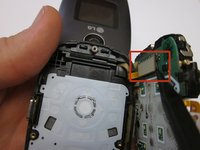
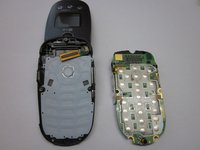
  6. Circuit Board, Circuit Board: adım 6, 1 resimden 1.
    • Locate the clamp at bottom right side of the Circuit Board.

    • Pull the circuit board from the phone being cautious to pull out underneath the clamp.

    FixBot'a Sor

    Yorum Ekle

  7. Circuit Board: adım 7, 2 resimden 1. Circuit Board: adım 7, 2 resimden 2.
    • Locate the ribbon connecting the circuit board to the phone display.

    • Using the spudger, disconnect the ribbon connecting the phone's display and the circuit board.

    • Remove the circuit board

    FixBot'a Sor

    Yorum Ekle

Sonuç

To reassemble your device, follow these instructions in reverse order.

İptal et: Bu kılavuzu tamamlamadım.

Jonathan Flowers

Üyelik tarihi: 10/18/13

628 İtibar

6 adet Kılavuz yazıldı

Ekip

Clemson, Team 14-7, Benson Fall 2013 Clemson, Team 14-7, Benson Fall 2013 üyesi

CLEM-BENSON-F13S14G7

3 Üyeler

16 adet Kılavuz yazıldı

0Kılavuz Yorumları

Yorum Ekle

İstatistikleri Görüntüle:

Son 24 Saat: 2

Son 7 gün: 6

Son 30 gün: 27

Her zaman: 810