Ana içeriğe geç
Onarım Topluluğuna Katılın - Hesap Oluşturun

Connecting TI-Nspire to a Computer

Neye ihtiyacın var

  1. Connecting TI-Nspire to a Computer, Connecting TI-Nspire to a Computer: adım 1, 1 resimden 1.
    FixBot'a Sor

    Yorum Ekle

  2. Connecting TI-Nspire to a Computer: adım 2, 3 resimden 1. Connecting TI-Nspire to a Computer: adım 2, 3 resimden 2. Connecting TI-Nspire to a Computer: adım 2, 3 resimden 3.
    • Make sure you have a TI USB cable to connect your calculator and computer

    • The ends of the cable should look like those in this picture

    FixBot'a Sor

    Yorum Ekle

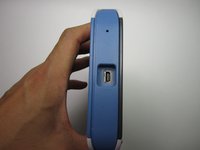
  3. Connecting TI-Nspire to a Computer: adım 3, 2 resimden 1. Connecting TI-Nspire to a Computer: adım 3, 2 resimden 2.
    • Insert the plug into the the slot at the top of the calculator.

    FixBot'a Sor

    Yorum Ekle

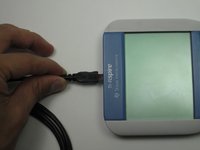
  4. Connecting TI-Nspire to a Computer: adım 4, 1 resimden 1.
    • Connect the calculator to the computer through the USB port

    • Through the TI connect program you are ready to perform actions such as viewing your calculator display on your computer screen

    FixBot'a Sor

    Yorum Ekle

Bitiş Çizgisi

İptal et: Bu kılavuzu tamamlamadım.

19 farklı kişi bu kılavuzu tamamladı.

Ekip

Cal Poly, Team 7-52, Forte Fall 2012 Cal Poly, Team 7-52, Forte Fall 2012 üyesi

CPSU-FORTE-F12S7G52

5 Üyeler

15 adet Kılavuz yazıldı

6Kılavuz Yorumları

This didn't work for me. According to the ti download page for the software the NSPIRE is not listed as a supported device. It appears that the software for the NSPIRE is not free.

no way - Yanıt Paylaş

the software link is wrong

here is the correct one

https://education.ti.com/en/software/det...

Maximman101 - Yanıt Paylaş

the link is denied,

Fashion - Yanıt Paylaş

The link is denied

Fashion - Yanıt Paylaş

The link worked, and I can connect! Thanks!!

Octav Mandru - Yanıt Paylaş

Yorum Ekle

İstatistikleri Görüntüle:

Son 24 Saat: 13

Son 7 gün: 36

Son 30 gün: 122

Her zaman: 99,369