Ana içeriğe geç
Onarım Topluluğuna Katılın - Hesap Oluşturun

DJI Phantom 2 Vision Landing Gear Replacement

Neye ihtiyacın var

  1. DJI Phantom 2 Vision Landing Gear Replacement, Battery: adım 1, 1 resimden 1.
    • The battery is located on the backside of the drone. You will see a large rectangular indent protruding outward.

    • The "battery" shown in the image is for illustrative purposes only. Since the original battery was missing, we constructed this one to demonstrate the repair process. The actual battery will not stick out this much.

  2. DJI Phantom 2 Vision Landing Gear Replacement: adım 2, 2 resimden 1. DJI Phantom 2 Vision Landing Gear Replacement: adım 2, 2 resimden 2.
    • Remove the battery from the compartment by pinching the top and bottom pressure points near the center and pulling the battery towards you.

  3. DJI Phantom 2 Vision Landing Gear Replacement: adım 3, 1 resimden 1.
    • Clean the battery compartment using cotton swabs and isopropyl alcohol or pressurized air to remove any debris or dust inside.

    • Repeat these steps after every battery replacement to prevent damage to the drone’s internal components.

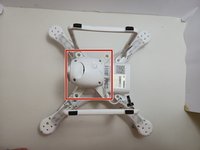
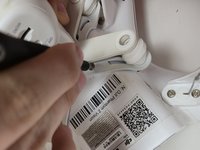
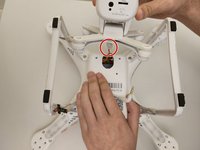
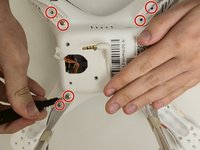
  4. DJI Phantom 2 Vision Landing Gear Replacement, Gimbal Housing: adım 4, 2 resimden 1. DJI Phantom 2 Vision Landing Gear Replacement, Gimbal Housing: adım 4, 2 resimden 2.
    • Remove the propellers before you begin. Refer to the DJI Phantom 2 Vision+ Propellers Removal for detailed instructions, as the process is identical.

    • Flip the drone over so the bottom is facing up.

    • Use a Phillips #00 screwdriver to remove the four 6 mm screws.

    • To access the screws, slowly pull back on the mount in the opposite direction.

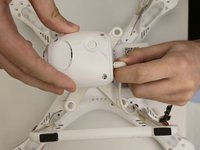
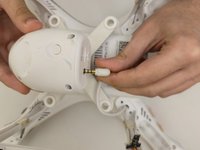
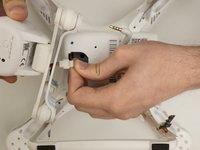
  5. DJI Phantom 2 Vision Landing Gear Replacement: adım 5, 2 resimden 1. DJI Phantom 2 Vision Landing Gear Replacement: adım 5, 2 resimden 2.
    • Unplug the wire connecting the camera to the drone.

  6. DJI Phantom 2 Vision Landing Gear Replacement: adım 6, 2 resimden 1. DJI Phantom 2 Vision Landing Gear Replacement: adım 6, 2 resimden 2.
    • Slowly lift the gimbal housing from the device.

    • Gently disconnect the camera cable from the cable connected to the motherboard.

    • Push on alternating sides of the connector and pull straight away from the socket.

    • If you're having trouble, try rocking the connector side-to-side to loosen it.

    • Do not pull on the wire cables as this may cause damage.

    • The gimbal housing should now be disconnected from the drone.

  7. DJI Phantom 2 Vision Landing Gear Replacement, Landing Gear: adım 7, 1 resimden 1.
    • Locate Landing Gear Assembly.

    • Turn the drone upside down to access the landing gear located on the bottom of the device.

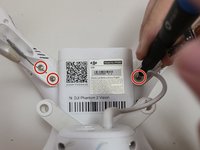
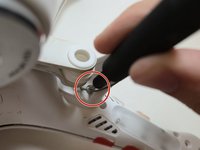
  8. DJI Phantom 2 Vision Landing Gear Replacement: adım 8, 3 resimden 1. DJI Phantom 2 Vision Landing Gear Replacement: adım 8, 3 resimden 2. DJI Phantom 2 Vision Landing Gear Replacement: adım 8, 3 resimden 3.
    • Remove Landing Gear Screws

    • There are two screws located at the base of each landing gear leg.

    • Use a Phillips #1 screwdriver to remove the eight 9 mm screws securing the landing gear to the base of the drone.

  9. DJI Phantom 2 Vision Landing Gear Replacement: adım 9, 1 resimden 1.
    • Remove landing gear assembly.

    • After removing all screws, lift each side of the landing gear assembly away from the drone body to detach it completely.

  10. DJI Phantom 2 Vision Landing Gear Replacement: adım 10, 1 resimden 1.
    • Install replacement Landing Gear

    • Align the replacement landing gear with the mounting holes on the base of the drone.

    • Ensure each landing gear leg is positioned correctly before securing it in place.

  11. DJI Phantom 2 Vision Landing Gear Replacement: adım 11, 1 resimden 1.
    • Secure Replacement Landing Gear

    • Reinsert the eight 9 mm screws into the mounting holes and tighten them using a Phillips #1 screwdriver to secure the replacement landing gear to the drone body.

  12. DJI Phantom 2 Vision Landing Gear Replacement: adım 12, 1 resimden 1.
    • Confirm Installation

    • Turn the drone upright and check that the landing gear is securely attached and level before reinstalling the battery or powering on the device.

Sonuç

To reassemble your device, follow these instructions in reverse order.

Dylan Ponder

Üyelik tarihi: 09/15/24

386 İtibar

4 adet Kılavuz yazıldı

Ekip

0Kılavuz Yorumları

Yorum Ekle

İstatistikleri Görüntüle:

Son 24 Saat: 0

Son 7 gün: 5

Son 30 gün: 12

Her zaman: 136