Giriş
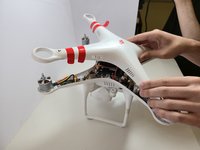
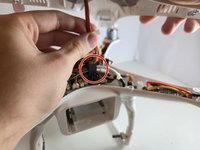
This guide demonstrates how to remove the outer shell of the DJI Phantom 2 Vision.
Before beginning disassembly, clean any residue around the screws to prevent over- or under-tightening.
You may need to remove the outer shell of the DJI Phantom 2 Vision if your drone has sustained damage to the structure or if you need to access the internal components for repair.
Before you begin, ensure your device is powered off and disconnected from the charger.
Note: The drone used in this guide already had its propellers removed. However, you must remove the propellers before taking off the top shell. Refer to the DJI Phantom 2 Vision+ Propellers Removal for detailed instructions, as the process is identical.
Neye ihtiyacın var
-
-
The battery is located on the backside of the drone. You will see a large rectangular indent protruding outward.
-
-
-
-
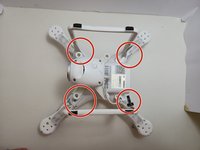
Flip the device so the motors are facing down.
-
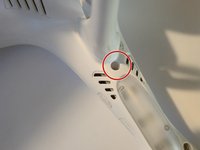
Remove four 6 mm screws next to the landing gear on each arm using a 2 mm Hex key.
-




To reassemble your device, follow these instructions in reverse order.


Ekip

Austin Community College, Team 7-1, Watkins Fall 2024 Austin Community College, Team 7-1, Watkins Fall 2024 üyesi
AUSTINCC-WATKINS-F24S7G1
4 Üyeler
5 adet Kılavuz yazıldı
