Ana içeriğe geç
Onarım Topluluğuna Katılın - Hesap Oluşturun

Dell Inspiron 15 Ram (Memory Module) Replacement

Neye ihtiyacın var

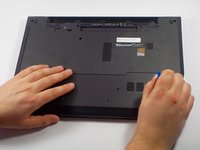
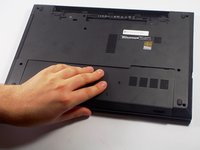
  1. Dell Inspiron 15 Ram (Memory Module) Replacement, Battery: adım 1, 2 resimden 1. Dell Inspiron 15 Ram (Memory Module) Replacement, Battery: adım 1, 2 resimden 2.
    • Make sure your laptop is powered off completely and is not connected to the charger.

    • Close the laptop and place it so that the back of the screen is lying flat on your work surface.

    • Slide both of the battery-release latches towards the outer edges of the laptop to unlock the battery flap.

    FixBot'a Sor

    Yorum Ekle

  2. Dell Inspiron 15 Ram (Memory Module) Replacement: adım 2, 1 resimden 1.
    • Lift the battery at an angle using your fingertips and remove it from the laptop.

    • Press and hold the power button for 5 seconds. This ensures that any remaining power will drain out of the computer.

    FixBot'a Sor

    Yorum Ekle

  3. Dell Inspiron 15 Ram (Memory Module) Replacement, Ram  (Memory Module): adım 3, 3 resimden 1. Dell Inspiron 15 Ram (Memory Module) Replacement, Ram  (Memory Module): adım 3, 3 resimden 2. Dell Inspiron 15 Ram (Memory Module) Replacement, Ram  (Memory Module): adım 3, 3 resimden 3.
    • Remove the bottom cover by removing the 4 mm screw using a PH-0 Phillips screwdriver that secures the base cover to the laptop base.

    • Using the plastic opening tool, pry the base cover from the base.

    • Slide the base cover towards you and remove it from the base. Put it aside.

    FixBot'a Sor

    Yorum Ekle

  4. Dell Inspiron 15 Ram (Memory Module) Replacement: adım 4, 3 resimden 1. Dell Inspiron 15 Ram (Memory Module) Replacement: adım 4, 3 resimden 2. Dell Inspiron 15 Ram (Memory Module) Replacement: adım 4, 3 resimden 3.
    • Using your fingertips, pry the vertical sides of the memory module apart until the piece pops out of place.

    • Slide the memory module out of its slot and lift it out of the laptop base.

    FixBot'a Sor

    Yorum Ekle

Sonuç

To reassemble your device, follow these instructions in reverse order.

İptal et: Bu kılavuzu tamamlamadım.

4 farklı kişi bu kılavuzu tamamladı.

Edward Pacheco

Üyelik tarihi: 03/06/16

852 İtibar

3 adet Kılavuz yazıldı

Ekip

UMass Dartmouth, Team 5-8, Landers Spring 2016 UMass Dartmouth, Team 5-8, Landers Spring 2016 üyesi

UMASSD-LANDERS-S16S5G8

3 Üyeler

6 adet Kılavuz yazıldı

0Kılavuz Yorumları

Yorum Ekle

İstatistikleri Görüntüle:

Son 24 Saat: 1

Son 7 gün: 8

Son 30 gün: 48

Her zaman: 7,373