Giriş
In this guide, you will learn how to replace a Dell Inspiron 15-3542 LCD.
The screen on a laptop serves as an output device for the operating system. One of the ways that a screen is damaged is when you see multiple color lines on the screen. The most common cause of screen damage occurs from dropping the laptop. Applying too much pressure on the screen will also cause the screen to break. Therefore, always make sure your laptop screen is handled with care.
Neye ihtiyacın var
-
-
Power off the laptop.
-
Flip the laptop over so the bottom is facing up.
-
Slide the right button to the unlock symbol.
-
Slide the left button to the other unlock symbol.
-
While holding the left button, use your right finger to raise the battery up from the laptop.
-
-


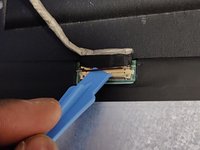

To reassemble your device, follow these instructions in reverse order.
İptal et: Bu kılavuzu tamamlamadım.
2 farklı kişi bu kılavuzu tamamladı.



Ekip

York University, Team S3-G48, Melo-Thaiss Fall 2020 York University, Team S3-G48, Melo-Thaiss Fall 2020 üyesi
YORK-MELO-THAISS-F20S3G48
1 Üye
1 Kılavuz yazıldı
