Ana içeriğe geç
Onarım Topluluğuna Katılın - Hesap Oluşturun

Dell Inspiron 15-7567 Wireless Card Replacement

Neye ihtiyacın var

    1. Dell Inspiron 15-7567 Wireless Card  Replacement, Battery: adım 1, 1 resimden 1.
      • Turn off laptop before beginning.

      • Place the laptop upside down on a flat, stable surface.

      FixBot'a Sor

      Yorum Ekle

    2. Dell Inspiron 15-7567 Wireless Card  Replacement: adım 2, 2 resimden 1. Dell Inspiron 15-7567 Wireless Card  Replacement: adım 2, 2 resimden 2.
      • Remove the 3mm screw in the location shown, using a Phillips #1 screwdriver.

      FixBot'a Sor

      Yorum Ekle

    3. Dell Inspiron 15-7567 Wireless Card  Replacement: adım 3, 1 resimden 1.
      • Remove the panel from the sides and pull it out at an angle towards you.

      FixBot'a Sor

      Yorum Ekle

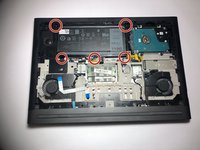
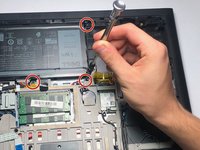
    4. Dell Inspiron 15-7567 Wireless Card  Replacement: adım 4, 2 resimden 1. Dell Inspiron 15-7567 Wireless Card  Replacement: adım 4, 2 resimden 2.
      • Remove the five 3mm screws on the battery with a Torx (T8) screwdriver in the locations shown.

      FixBot'a Sor

      Yorum Ekle

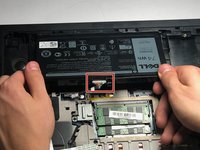
    5. Dell Inspiron 15-7567 Wireless Card  Replacement: adım 5, 2 resimden 1. Dell Inspiron 15-7567 Wireless Card  Replacement: adım 5, 2 resimden 2.
      Bu adımda kullanılan alet:
      Tweezers
      $4.99
      • Disconnect the power cord from the battery by using a pair of tweezers, your fingers, or the opening tools from the iFixit pro tech tool kit.

      • Pinch the clips on the left and right side while pulling on the cord at the same time.

      FixBot'a Sor

      Yorum Ekle

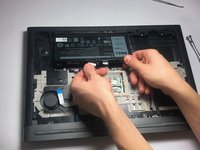
    6. Dell Inspiron 15-7567 Wireless Card  Replacement: adım 6, 1 resimden 1.
      • Pull the battery towards you.

      • Make sure to pull at an upward angle.

      FixBot'a Sor

      Yorum Ekle

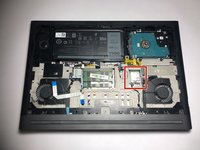
    1. Dell Inspiron 15-7567 Wireless Card  Replacement, Wireless Card: adım 7, 2 resimden 1. Dell Inspiron 15-7567 Wireless Card  Replacement, Wireless Card: adım 7, 2 resimden 2.
      • Remove the 3mm screw using the Phillips #0 screwdriver in the location shown.

      • Remove the grey panel as well.

      FixBot'a Sor

      Yorum Ekle

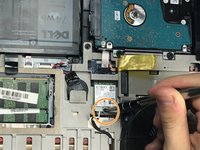
    2. Dell Inspiron 15-7567 Wireless Card  Replacement: adım 8, 1 resimden 1.
      • Detach the black and white wires connected to the card by gently lifting up on the wires.

      FixBot'a Sor

      Yorum Ekle

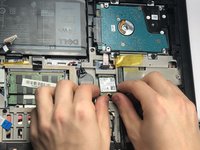
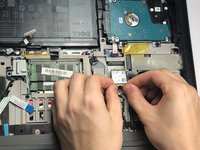
    3. Dell Inspiron 15-7567 Wireless Card  Replacement: adım 9, 2 resimden 1. Dell Inspiron 15-7567 Wireless Card  Replacement: adım 9, 2 resimden 2.
      • Gently pull the wireless card out at an angle towards you.

      FixBot'a Sor

      Yorum Ekle

Sonuç

To reassemble your device, follow these instructions in reverse order.

İptal et: Bu kılavuzu tamamlamadım.

0Kılavuz Yorumları

Yorum Ekle

İstatistikleri Görüntüle:

Son 24 Saat: 2

Son 7 gün: 7

Son 30 gün: 19

Her zaman: 1,092