Giriş
The Dell Inspiron 3520 has a lithium-ion battery that is easily accessible from the underside of the notebook. As a reminder, when disposing of the old battery, place it in an e-waste container.
Neye ihtiyacın var
-
-
-
Turn off notebook
-
Set the notebook upside down with the battery facing away from you.
-
Locate the unlock and release sliding tabs on the bottom right and left hand corners of the battery respectively.
 FixBot'a Sor
-
-
-
-
Slide the right tab to the right to unlock the battery.
-
Slide and hold the the left tab to the left to release the battery from the unit.
-
Finally, remove the battery by sliding it away from the unit and yourself.
-
-


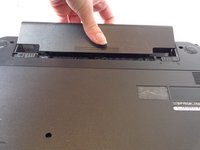
To reassemble your device, follow these instructions in reverse order.
İptal et: Bu kılavuzu tamamlamadım.
Bir başkası bu kılavuzu tamamladı.

Ekip

USF Tampa, Team 16-2, Watkins Winter 2015 USF Tampa, Team 16-2, Watkins Winter 2015 üyesi
USFT-WATKINS-W15S16G2
3 Üyeler
25 adet Kılavuz yazıldı
