Bu çeviri bir makine tarafından oluşturulmuştur ve henüz bir kişi tarafından incelenmemiştir. Bu dili konuşuyor musunuz? İnceleme için.
Giriş
Ekran modülü, Dell Inspiron 8600'ün temel bir parçasıdır. Arızalanması veya ekranın kırılması durumunda, inceleme ve/veya değişim amacıyla taban kısmından ayrılması gerekebilir.
Dell Inspiron 8600 cihazınızın ekran modülünü çıkarmak için bu kılavuzu takip edin.
Neye ihtiyacın var
-
-
-
Bataryayı dizüstü bilgisayarın sol alt tarafından gösterildiği gibi çıkarın.
 FixBot'a Sor
-
-
-
-
-
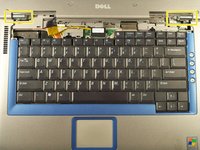
Plastik kanırtma aparatını üst mavi panelin en sol tarafındaki çentiğe yerleştirin ve menteşe kapağını ayırın.
-
Diğer tarafı da ayırmanız gerekebilir. Bunu, plastik kanırtma aparatını menteşe ile üst kılıf arasına yerleştirerek yapabilirsiniz.
-
-
-
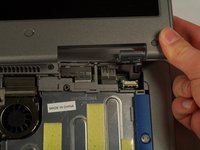
Dizüstü bilgisayarın sağ tarafındaki küçük siyah tırnağı çekin.
-
Menteşe kapağını artık çıkardınız.
-
-
-
-
-
-
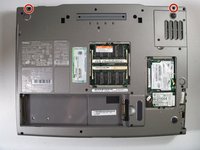
Dizüstü bilgisayarı ters çevirin ve belirtilen vidaları çıkarın.
-
Dizüstü bilgisayarı tekrar düz konuma çevirin.
-
Ekran modülünün bilgisayarın tabanına sabitlendiği iki noktayı bulun.
-
-
-
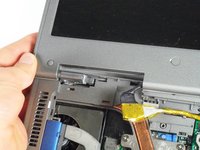
Siyah tırnağı nazikçe yukarı kaldırarak ekran kartını ekran modülünden ayırın.
-
-





Cihazınızı tekrar toplamak için bu talimatları ters sırada uygulayın.
İptal et: Bu kılavuzu tamamlamadım.
2 farklı kişi bu kılavuzu tamamladı.

Ekip

Cal Poly, Team 18-22, Garner Spring 2011 Cal Poly, Team 18-22, Garner Spring 2011 üyesi
CPSU-GARNER-S11S18G22
4 Üyeler
180 adet Kılavuz yazıldı
