Ana içeriğe geç
Onarım Topluluğuna Katılın - Hesap Oluşturun

Dell Inspiron 9100 Mini-PCI (WiFi) Card Replacement

Neye ihtiyacın var

    1. Dell Inspiron 9100 Mini-PCI (WiFi) Card Replacement, Battery: adım 1, 3 resimden 1. Dell Inspiron 9100 Mini-PCI (WiFi) Card Replacement, Battery: adım 1, 3 resimden 2. Dell Inspiron 9100 Mini-PCI (WiFi) Card Replacement, Battery: adım 1, 3 resimden 3.
      • Unplug the laptop from the power adapter and turn the power off.

      • Failure to unplug laptop before proceeding could result in risk of electric shock!

      FixBot'a Sor

      Yorum Ekle

    2. Dell Inspiron 9100 Mini-PCI (WiFi) Card Replacement: adım 2, 3 resimden 1. Dell Inspiron 9100 Mini-PCI (WiFi) Card Replacement: adım 2, 3 resimden 2. Dell Inspiron 9100 Mini-PCI (WiFi) Card Replacement: adım 2, 3 resimden 3.
      • Slide the battery-lock tab and hold.

      • Flip the battery away from the chassis to remove it.

      FixBot'a Sor

      Yorum Ekle

    1. Dell Inspiron 9100 Mini-PCI (WiFi) Card Replacement, Mini-PCI (WiFi) Card: adım 3, 2 resimden 1. Dell Inspiron 9100 Mini-PCI (WiFi) Card Replacement, Mini-PCI (WiFi) Card: adım 3, 2 resimden 2.
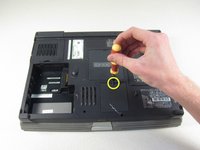
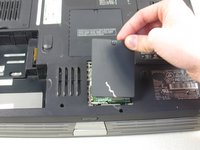
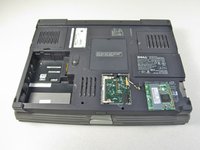
      • Undo the screw on the Mini-PCI card cover labeled "C"

      • This screw will remain within the panel

      • Remove the panel from the chassis.

      FixBot'a Sor

      Yorum Ekle

    2. Dell Inspiron 9100 Mini-PCI (WiFi) Card Replacement: adım 4, 1 resimden 1.
      • Disconnect the antenna cables from the Mini-PCI card.

      FixBot'a Sor

      Yorum Ekle

    3. Dell Inspiron 9100 Mini-PCI (WiFi) Card Replacement: adım 5, 3 resimden 1. Dell Inspiron 9100 Mini-PCI (WiFi) Card Replacement: adım 5, 3 resimden 2. Dell Inspiron 9100 Mini-PCI (WiFi) Card Replacement: adım 5, 3 resimden 3.
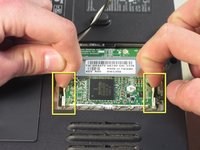
      • Use your fingertips to carefully spread apart the white plastic tabs.

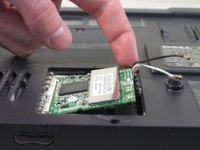
      • Flip the Mini-PCI card up at a 45 degree angle.

      • Remove the card from the computer by sliding out diagonally

      • Ground yourself while dealing with the card. Static shock can cause damage to the card. Store the card in anti-static bag when not in use.

      FixBot'a Sor

      Yorum Ekle

Sonuç

To reassemble your device, follow these instructions in reverse order.

İptal et: Bu kılavuzu tamamlamadım.

Bir başkası bu kılavuzu tamamladı.

charlierefvem

Üyelik tarihi: 01/11/11

854 İtibar

7 adet Kılavuz yazıldı

Ekip

Cal Poly, Team 13-2, Forte Winter 2011 Cal Poly, Team 13-2, Forte Winter 2011 üyesi

CPSU-FORTE-W11S13G2

5 Üyeler

45 adet Kılavuz yazıldı

0Kılavuz Yorumları

Yorum Ekle

İstatistikleri Görüntüle:

Son 24 Saat: 0

Son 7 gün: 4

Son 30 gün: 37

Her zaman: 4,705