Ana içeriğe geç
Onarım Topluluğuna Katılın - Hesap Oluşturun

Dell Latitude D620 CD Drive Replacement

Neye ihtiyacın var

  1. Dell Latitude D620 CD Drive Replacement, Keyboard: adım 1, 1 resimden 1.
    • Power down the laptop and remove the battery.

    • Open the laptop cover all of the way.

    FixBot'a Sor
  2. Dell Latitude D620 CD Drive Replacement: adım 2, 3 resimden 1. Dell Latitude D620 CD Drive Replacement: adım 2, 3 resimden 2. Dell Latitude D620 CD Drive Replacement: adım 2, 3 resimden 3.
    • Locate the notch under the cover at the top of the keyboard

    • Using the spudger as a lever, lift the plastic covering

    • Carefully remove the rest of the covering from right to left

    FixBot'a Sor
  3. Dell Latitude D620 CD Drive Replacement: adım 3, 1 resimden 1.
    • Unscrew the top portion of the keyboard using a #00 screwdriver

    FixBot'a Sor
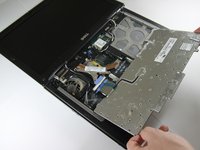
  4. Dell Latitude D620 CD Drive Replacement: adım 4, 1 resimden 1.
    • Hold keyboard from the top and gently pull towards the LCD screen to remove the keyboard from the case

    • Don't pull on the keyboard too forcefully because it is attached to the motherboard with a short, thin ribbon cable

    FixBot'a Sor
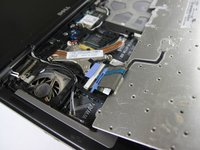
  5. Dell Latitude D620 CD Drive Replacement: adım 5, 2 resimden 1. Dell Latitude D620 CD Drive Replacement: adım 5, 2 resimden 2.
    • Once keyboard is out of the case, lay it face-down on the track pad

    FixBot'a Sor
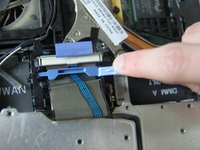
  6. Dell Latitude D620 CD Drive Replacement: adım 6, 2 resimden 1. Dell Latitude D620 CD Drive Replacement: adım 6, 2 resimden 2.
    • Using a small spudger, pull back on the black bar to release the blue lever

    FixBot'a Sor
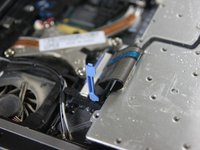
  7. Dell Latitude D620 CD Drive Replacement: adım 7, 1 resimden 1.
    • Pull up on the metal bar connected to the socket to detach the ribbon cable

    FixBot'a Sor
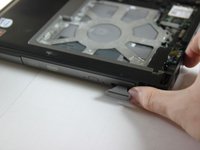
  8. Dell Latitude D620 CD Drive Replacement, CD Drive: adım 8, 2 resimden 1. Dell Latitude D620 CD Drive Replacement, CD Drive: adım 8, 2 resimden 2.
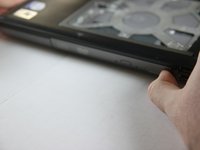
    • Press in the tab on the bottom right side of the CD drive

    • The tab comes out on its own; there is no need to pull it out manually.

    FixBot'a Sor
  9. Dell Latitude D620 CD Drive Replacement: adım 9, 1 resimden 1.
    • Gently pull the tab to remove the disk tray.

    FixBot'a Sor
Sonuç

To reassemble your device, follow these instructions in reverse order.

10 farklı kişi bu kılavuzu tamamladı.

Ivan

Üyelik tarihi: 04/15/10

194 İtibar

1 Kılavuz yazıldı

Ekip

Cal Poly, Team 24-35, Regan Spring 2010 Cal Poly, Team 24-35, Regan Spring 2010 üyesi

CPSU-REGAN-S10S24G35

4 Üyeler

4 adet Kılavuz yazıldı

0Kılavuz Yorumları

Yorum Ekle

İstatistikleri Görüntüle:

Son 24 Saat: 2

Son 7 gün: 19

Son 30 gün: 120

Her zaman: 8,891