Ana içeriğe geç
Onarım Topluluğuna Katılın - Hesap Oluşturun

Dell Optiplex 745 Small Form Factor RAM Replacement

  1. Dell Optiplex 745 Small Form Factor RAM Replacement, Opening the case: adım 1, 2 resimden 1. Dell Optiplex 745 Small Form Factor RAM Replacement, Opening the case: adım 1, 2 resimden 2.
    • Pull the tab and the lid will pop up.

    FixBot'a Sor

    Yorum Ekle

  2. Dell Optiplex 745 Small Form Factor RAM Replacement: adım 2, 2 resimden 1. Dell Optiplex 745 Small Form Factor RAM Replacement: adım 2, 2 resimden 2.
    • Grab the lid and pull it up and off.

    FixBot'a Sor

    Yorum Ekle

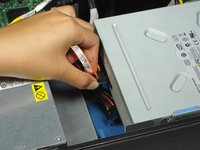
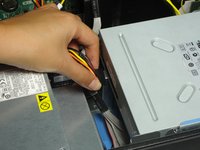
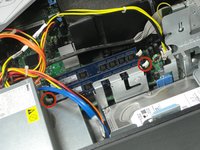
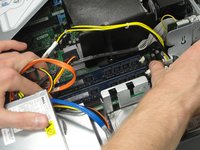
  3. Dell Optiplex 745 Small Form Factor RAM Replacement, Disconnecting the cables: adım 3, 2 resimden 1. Dell Optiplex 745 Small Form Factor RAM Replacement, Disconnecting the cables: adım 3, 2 resimden 2.
    • Pull out both sets of cables from the side of the optical drive.

    • Both cables are plugged into the drive right next to each other.

    FixBot'a Sor

    Yorum Ekle

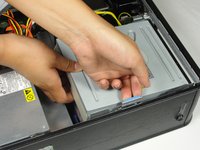
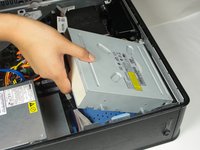
  4. Dell Optiplex 745 Small Form Factor RAM Replacement, Removing the optical drive: adım 4, 2 resimden 1. Dell Optiplex 745 Small Form Factor RAM Replacement, Removing the optical drive: adım 4, 2 resimden 2.
    • Pull the tab up holding the optical drive in place.

    • Slide the optical drive out.

    FixBot'a Sor

    Yorum Ekle

  5. Dell Optiplex 745 Small Form Factor RAM Replacement, Unlocking the RAM stick from the motherboard: adım 5, 2 resimden 1. Dell Optiplex 745 Small Form Factor RAM Replacement, Unlocking the RAM stick from the motherboard: adım 5, 2 resimden 2.
    • Press down on the white tabs on both sides of the RAM stick until the RAM stick pops up.

    FixBot'a Sor

    Yorum Ekle

  6. Dell Optiplex 745 Small Form Factor RAM Replacement, Lifting the RAM stick out of the case: adım 6, 1 resimden 1.
    • Gently lift the RAM stick up and out of the case.

    • When inserting a RAM stick, press firmly down into the slot until the white tabs lock into both sides of the stick.

    FixBot'a Sor

    Yorum Ekle

Sonuç

To reassemble your device, follow these instructions in reverse order.

İptal et: Bu kılavuzu tamamlamadım.

7 farklı kişi bu kılavuzu tamamladı.

Brandon Cooper

Üyelik tarihi: 09/28/14

486 İtibar

1 Kılavuz yazıldı

Ekip

Cal Poly, Team 13-10, Forte Fall 2014 Cal Poly, Team 13-10, Forte Fall 2014 üyesi

CPSU-FORTE-F14S13G10

6 Üyeler

12 adet Kılavuz yazıldı

1Rehber Yorum

Dell master. I'm going to be the best repair pro on this side of the south side.

fixitbrosmsus - Yanıt Paylaş

Yorum Ekle

İstatistikleri Görüntüle:

Son 24 Saat: 3

Son 7 gün: 15

Son 30 gün: 34

Her zaman: 2,160