Ana içeriğe geç
Onarım Topluluğuna Katılın - Hesap Oluşturun

Dell Optiplex SX280 Panel Cover Replacement

Görüntüleme: 4,5 B

İstatistikleri görüntüle:

Son 24 Saat:
0
Son 7 Gün:
13
Son 30 Gün:
81
Her zaman:
4.468
Yorumlar: 0

Hiç kimse bu kılavuza yorum bırakmadı. Birinci olacak mısın?

Go to guide comments
Tamamlandı: 6

6 kişi bu kılavuzu "tamamlandı" olarak işaretledi. Sıradaki sen olacak mısın?

Sık Kullanılanlar: 1

1 kişi bu kılavuzu favorilerine ekledi (ve abone oldu). Sıradaki sen olacak mısın?

Gerekli Süre: 2 dakika
Zorluk: Kolay
Dell Optiplex SX280 Panel Cover Replacement

Remove the Panel Cover to access the components of the device.

    1. Dell Optiplex SX280 Panel Cover Replacement, Panel Cover: adım 1, 1 resimden 1.
      • Make sure the computer is turned off, by selecting the start menu and choosing “Shut Down”.

      • Ensure all cables, speakers and other devices are unplugged and turned off before opening the computer case.

      FixBot'a Sor

      Yorum Ekle

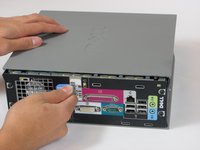
    2. Dell Optiplex SX280 Panel Cover Replacement: adım 2, 2 resimden 1. Dell Optiplex SX280 Panel Cover Replacement: adım 2, 2 resimden 2.
      • Lay the computer on its side; you will see a blue knob.

      • Turn this knob 90 deg clockwise.

      FixBot'a Sor

      Yorum Ekle

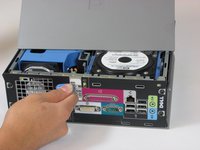
    3. Dell Optiplex SX280 Panel Cover Replacement: adım 3, 2 resimden 1. Dell Optiplex SX280 Panel Cover Replacement: adım 3, 2 resimden 2.
      • Slide the panel case forward about 1/2 inch while knob is turned.

      • Lift panel case off computer.

      FixBot'a Sor

      Yorum Ekle

Sonuç

To reassemble your device, follow these instructions in reverse order.

İptal et: Bu kılavuzu tamamlamadım.

6 farklı kişi bu kılavuzu tamamladı.

Wyatt

Üyelik tarihi: 10/06/10

784 İtibar

6 adet Kılavuz yazıldı

Ekip

Cal Poly, Team 22-4, Maness Fall 2010 Cal Poly, Team 22-4, Maness Fall 2010 üyesi

CPSU-MANESS-F10S22G4

4 Üyeler

156 adet Kılavuz yazıldı

0Kılavuz Yorumları

Yorum Ekle

İstatistikleri Görüntüle:

Son 24 Saat: 0

Son 7 gün: 13

Son 30 gün: 81

Her zaman: 4,468