
Dell Optiplex SX280 Upper Fan Replacement

Tom ve
En son 28 Oca 2014 tarihinde güncellendi
Görüntüleme: 6 B
İstatistikleri görüntüle:
- Son 24 Saat:
- 3
- Son 7 Gün:
- 26
- Son 30 Gün:
- 94
- Her zaman:
- 5.950
Yorumlar: 0
Hiç kimse bu kılavuza yorum bırakmadı. Birinci olacak mısın?
Go to guide commentsTamamlandı: 7 8
7 kişi bu kılavuzu "tamamlandı" olarak işaretledi. Sıradaki sen olacak mısın?
8 kişi bu kılavuzu "tamamlandı" olarak işaretledi. Siz de dahil - harika iş!
Sık Kullanılanlar: 3 4
3 kişi bu kılavuzu favorilerine ekledi (ve abone oldu). Sıradaki sen olacak mısın?
Siz de dahil olmak üzere 4 kişi bu kılavuzu favorilerine ekledi (ve abone oldu)!
Öne Çıkan Kılavuzlar
Bu kılavuz, iFixit kadrosu tarafından acayip havalı bulundu.
Giriş
1. adıma git ↓Replace the Upper Fan in the computer tower to prevent overheating and computer damage.
Neye ihtiyacın var
Aletler
-
Spudger4.9

-
-
-
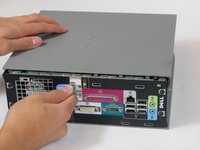
Lay the computer on its side; you will see a blue knob.
-
Turn this knob 90 deg clockwise.
-
-
-
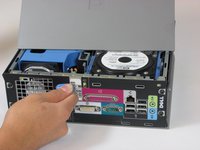
Slide the panel case forward about 1/2 inch while knob is turned.
-
Lift panel case off computer.
-
-
-
-
-
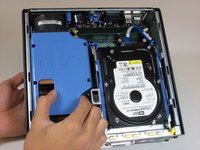
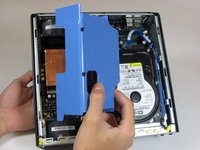
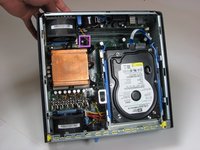
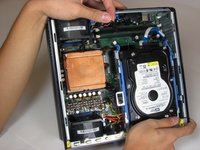
Remove the large blue cover from the computer. There are no screws or tabs holding it in place.
-
-
-
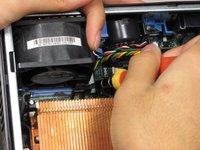
Remove the power supply that connects the upper fan to the motherboard. The power supply has black, red, green and yellow wires.
-
-
-
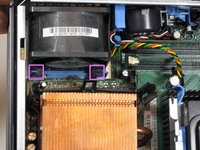
Remove the rubber grommets from the base of the fan. A screwdriver or spudger may be useful.
-
-

 FixBot'a Sor









To reassemble your device, follow these instructions in reverse order.
İptal et: Bu kılavuzu tamamlamadım.
7 farklı kişi bu kılavuzu tamamladı.

Ekip

Cal Poly, Team 22-4, Maness Fall 2010 Cal Poly, Team 22-4, Maness Fall 2010 üyesi
CPSU-MANESS-F10S22G4
4 Üyeler
156 adet Kılavuz yazıldı
